EasyManua.ls Logo

IRiver T6 - Page 14

IRiver T6
41 pages
Print Icon
To Next Page IconTo Next Page
To Previous Page IconTo Previous Page
Loading...
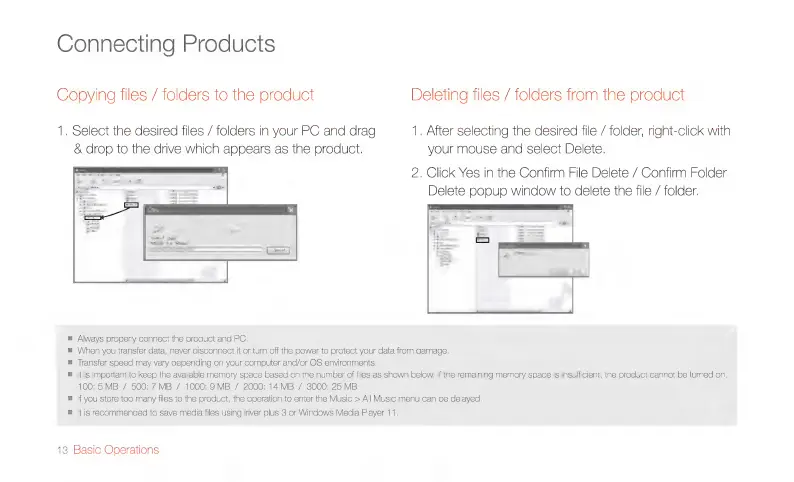
Connecting
Products
Copying
files
/
folders
to
the
product
Deleting
files
/
folders
from
the
product
1.
Select
the
desired
files
/
folders
in
your
PC
and
drag
1.
After
selecting
the
desired
file
/
folder,
right-click
with
&
drop
to
the
drive
which
appears
as
the
product.
your
mouse
and
select
Delete.
2.
Click
Yes
in
the
Confirm
File
Delete
/
Confirm
Folder
Delete
popup
window
to
delete
the
file
/
folder.
m
Always
properly
connect
the
product
and
PC.
m
When
you
transfer
data,
never
disconnect
it
or
tum
off
the
power
to
protect
your
data from
damage.
m
Transfer
speed
may
vary
depending
on
your
computer
and/or
OS
environments.
m
|t
is
important
to
keep
the
available
memory
space
based
on
the
number
of
files
as
shown
below.
If
the
remaining
memory
space
is
insufficient,
the
product
cannot
be
tumed
on.
100:
5
MB
/
500:
7
MB
/
1000:
9
MB
/
2000:
14
MB
/
3000:
25
MB
m
|f
you
store
too
many
files
to
the
product,
the
operation
to
enter
the
Music
>
All
Music
menu
can
be
delayed.
m
|t
is
recommended
to
save
media
files
using
iriver
plus
3
or
Windows
Media
Player
11.
13
Basic
Operations

Related product manuals