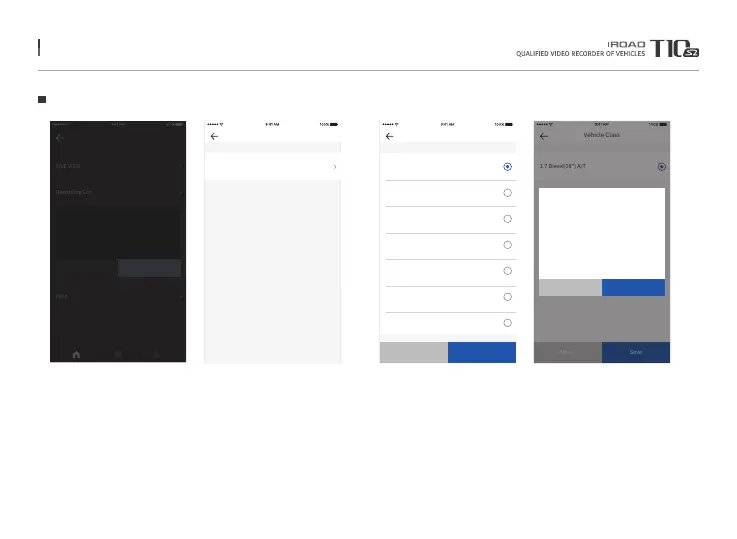
68. OBDII SCANNER APPLICATION
OBD Setting
LIVE VIEW
Recording List
Dash Cam Settings
Firmware Update
OBD
Help
Cancel
No registered OBD information
Do you want to proceed OBD setting?
NO INFO
OK
When running the OBD tap first,
please input vehicle inforamtion settings
STEP 1
Please enter Vehicle Manufacturer, Vehicle Models, Years, Fuel Type,
Displacement, Official Fuel Efficiency, Maximum Capacity, Vehicle Lengths,
Vehicle Class in order to save.
(Please enter the information of actual vehicle correctly)
- After saved settings, please identify information to be saved.
STEP 2
SETTING
Set My Car
(Left 7 times of resets.)
Please set your vehicle info to use OBD.
Please make sure correct information inputted due to limitaion
of resets. (Total 7 times, 7 times left)
※Please enter the same vehicle information as the information on your vehicle
registration card. If you have entered wrong information, you will not be able
to verify the exact vehicle status and information.
※The OBD does not work when it is set to different vehicles more than 7 times
due to vehicle replacement or other reasons. There is no limit to the same vehicle.
Manufacturer
KIA
HYUNDAI
BMW
AUDI
BENZ
TOYOTA
NISSAN
Prev Next
Vehicle Class
1.7 Diesel(18”) A/T
Prev Save
1.Manufacturer : KIA
2.Vehicle Model : K5
3.Model Year : 2016
4.Engine Type : Diesel
5.Engine Displacement : 1685cc
6.Fuel Consumption : 15.6km/l
7.Seating Capacity : 5seat
8.Vehicle Length : 4855mm
9.Vehicle Class : 17” Diesel(18”)A/T
SETTING
Reset REGISTER
※ For more information, please refer to the supported vehicles and support items
registered on the IROAD homepage.



 To Next Page