Auto
Search
Tuning
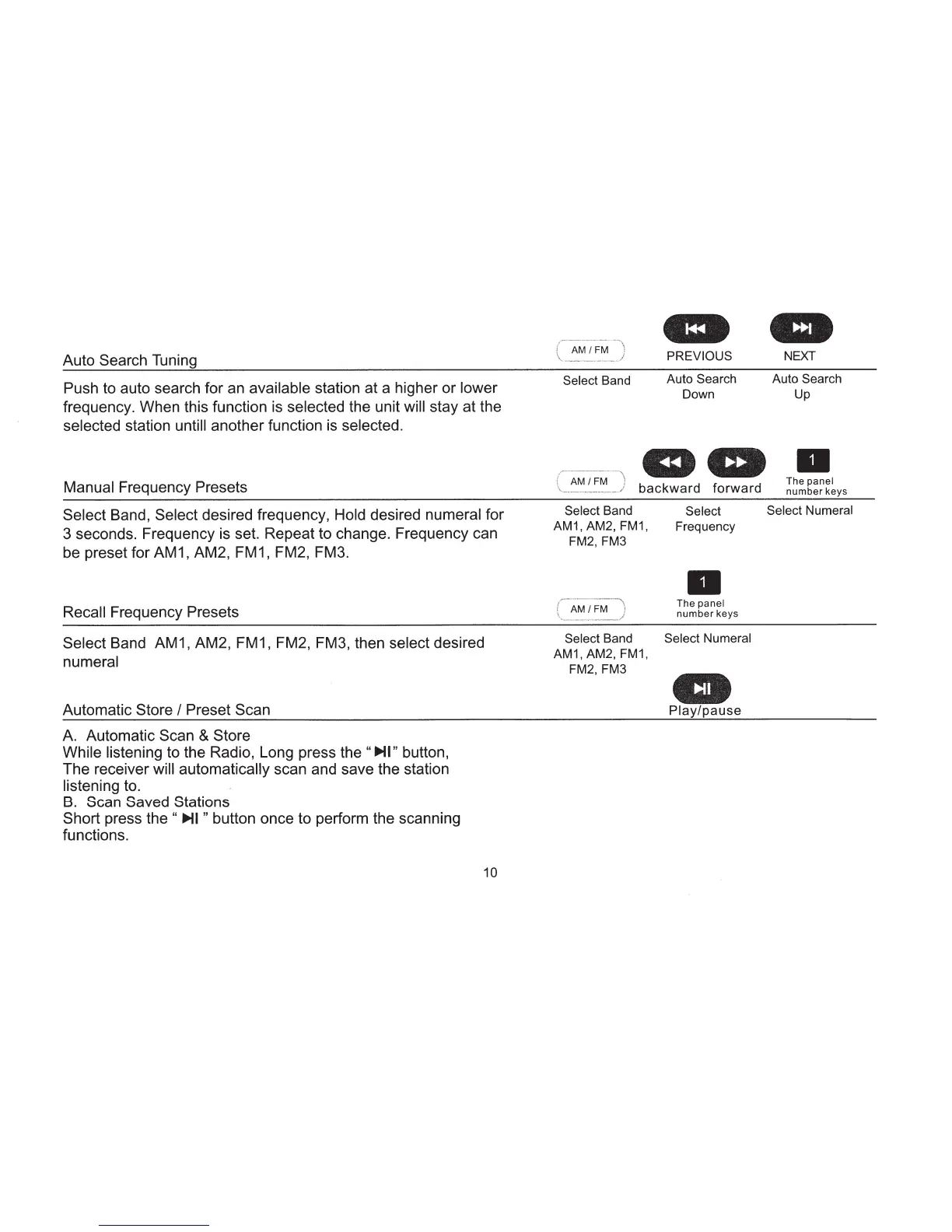
Push to auto search
for
an
available
station
at
a higher
or
lower
frequency. When this function is
selected
the unit
will
stay
at
the
selected station
untill
another
function is
selected.
Manual
Frequency
Presets
Select
Band, Select desired
frequency, Hold
desired
numeral
for
3 seconds. Frequency is set.
Repeat
to change. Frequency can
be preset
for
AM1, AM2, FM1, FM2, FM3.
Recall
Frequency
Presets
Select
Band AM1, AM2, FM1, FM2, FM3, then
select
desired
numeral
Automatic
Store
I
Preset
Scan
A. Automatic
Scan &
Store
While
listening
to the Radio, Long press the
"IJJilil"
button,
The
receiver
will automatically
scan and save the station
listening
to.
B.
Scan Saved
Stations
Short
press the
"
IJJilil
" button
once
to perform the scanning
functions.
10
--
AM
/FM
PREVIOUS
Select
Band
Auto Search
Down
AM/FM
--
backward
forward
Select
Band
AM1, AM2, FM1,
FM2, FM3
AM/FM
Select
Band
AM1, AM2, FM1,
FM2, FM3
Select
Frequency
•
The
panel
number
keys
Select Numeral
Cl
Play/pause
-
NEXT
Auto Search
Up
•
The
panel
number
keys
Select Numeral


 To Next Page