RADIO OPERATION
Auto Best Station Memory
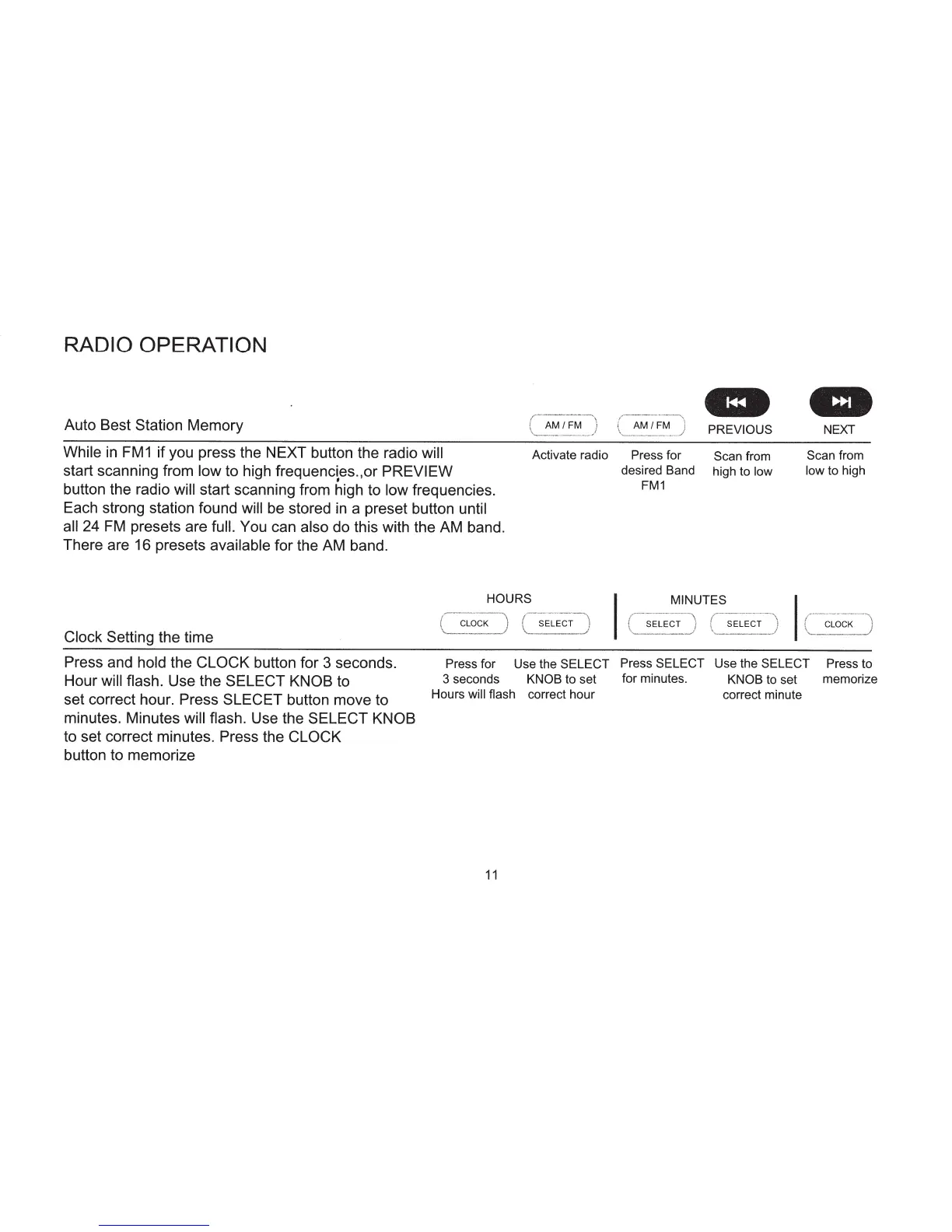
While
in
FM1
if you press the NEXT button the radio
will
start scanning from low
to high frequencies.,or
PREVIEW
•
button the radio
will
start scanning from high to
low
frequencies.
Each strong station found
will
be stored
in
a preset button
until
all
24
FM
presets are full. You can
also
do this with the AM band.
There are 16 presets
available
for the AM band.
HOURS
Clock
Setting the time
AM/FM
Activate radio
SELECT
at
-
AM/FM
PREVIOUS
NEXT
Press for
Scan
from
Scan
from
desired Band
high to
low
low
to high
FM1
MINUTES
~-
-
"~-~---··--
·
·····-·--
,
{
SELECT
J
\......__
._.
__
.
../
SELECT
CLOCK
Press and hold
the CLOCK
button for 3 seconds.
Hour will flash. Use the
SELECT KNOB
to
Press for Use the
SELECT Press
SELECT
Use the
SELECT
Press to
set correct hour. Press
SLECET
button move to
minutes. Minutes
will flash.
Use the SELECT KNOB
to set correct minutes. Press the CLOCK
button to memorize
3 seconds KNOB to set for minutes. KNOB
to
set memorize
Hours will flash
correct hour correct minute
11


 To Next Page