• 6
XR72CX
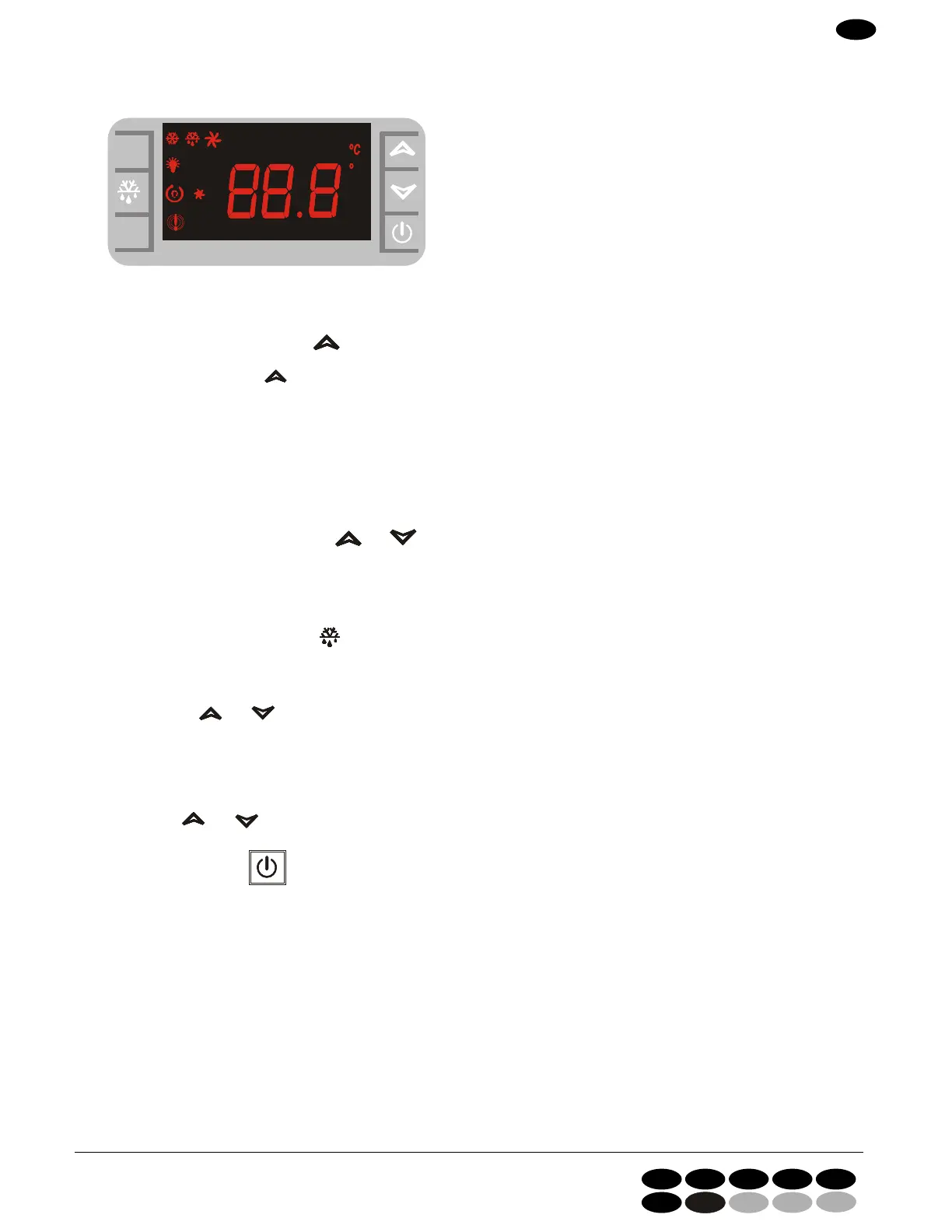
1.0 PANNELLO DI CONTROLLO
CONTROL PANEL - TABLEAU DE COMMANDE
SCHALTTAFEL - PANEL DE CONTROL - BEDIENINGSPANEEL
dd
ixixix
eee
llllll
ddd
dd
dd
dd
ixixix
ixixix
ixixix
ixixix
eee
ee
ee
ee
llllll
llllll
llllll
llllll
lll
lll
lll
lll
SETSETSET
FFF
000
F 1XF F
1X1X
.
TO SEE THE MAXIMUM TEMPERATURE
1. Push and release the button.
2. Message displayed: “HI” + max. temperature reached.
3. By pushing the button
or by waiting for 5 seconds the normal temperature will be displayed again.
TO SEE THE SET POINT
1. Push and release the button SET : set point will be immediately displayed;
2. To go back to the temperature, wait for 5 seconds or push SET again.
TO CHANGE THE SET POINT
1. Keep button SET pushed for about 2 seconds.
2. Set point will be displayed, and the LED °C will start flashing;
3. To change the value, push buttons and
4. To record the new set point, push button SET or wait 15 seconds to leave programming.
TO START A MANUAL DEFROST CYCLE.
To start a defrost cycle push button for at least 2 seconds.
TO LOCK THE KEYBOARD
1. Keep buttons and pushed for a few seconds, until the flashing word “POF” is displayed.
2. At this point, the keyboard is locked: you can only display the set point, the max. and min. temperature,
3. If a button is kept pushed for more than 3 seconds , the word “POF” will appear.
TO UNLOCK THE KEYBOARD.
Keep buttons and pushed for a few seconds, until the flashing word “POn” is displayed.
ON/OFF FUNCTION
Push ON/OFF button for 2seconds: the device will display “OFF”.
In this configuration, all loads and controls are disabled.
To go back to ON, push again the button for 2 seconds.
GB
I GB F D E
NL
DK
4280 56751_1ac
KONTROLPANEL


 To Next Page