EN
72
SUPERCAPRI
428000925100
12.1 USER INTERFACE
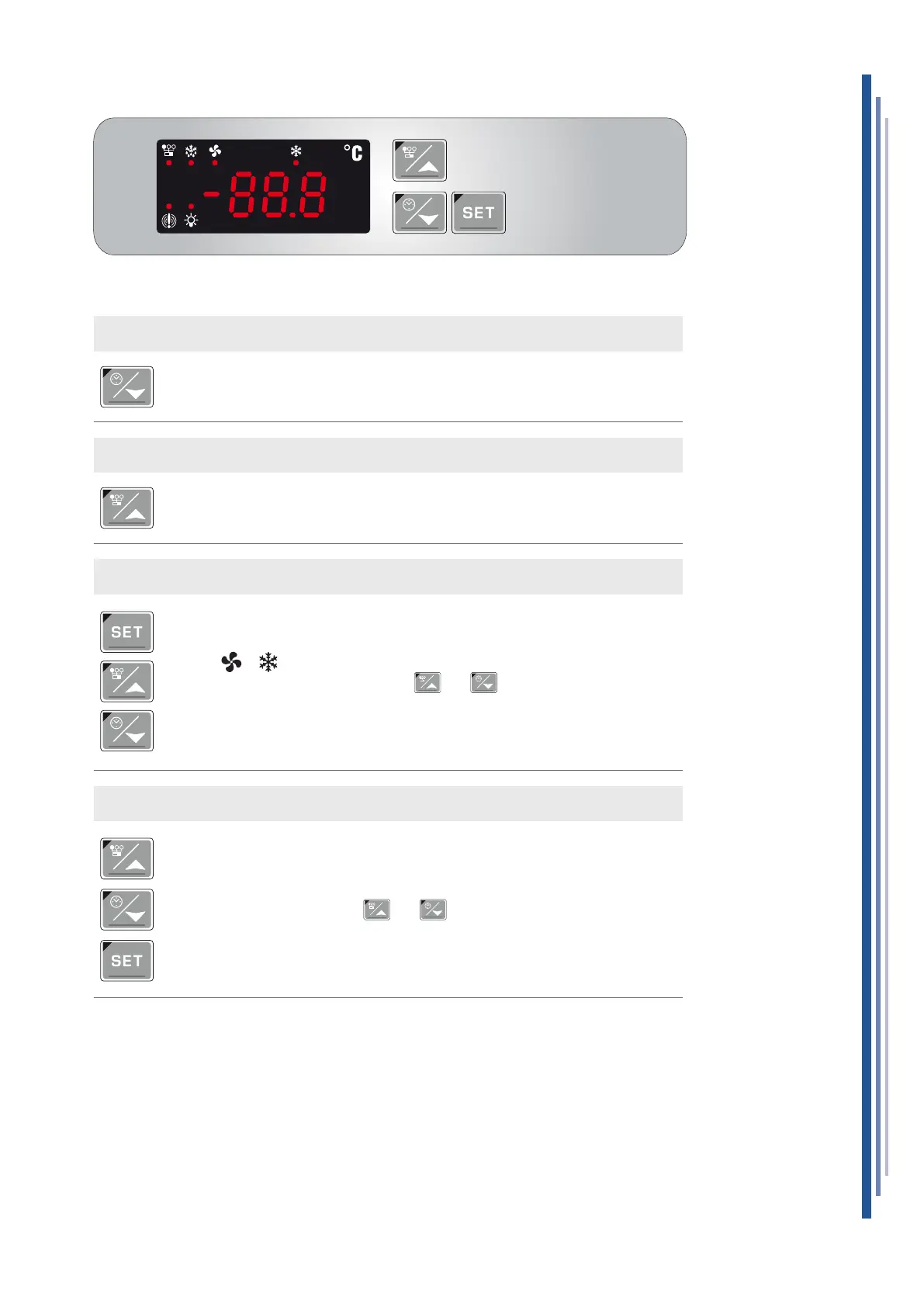
DISPLAY MINIMUM TEMPERATURE
• Press and release the button.
• The message "Lo" will be displayed, followed by the minimum temperature reached.
• Press the button or wait 5 seconds to display the normal temperature.
DISPLAY MAXIMUM TEMPERATURE
• Press and release the button.
• The message "Hi" will be displayed, followed by the maximum temperature reached.
• Press the button or wait 5 seconds to display the normal temperature.
VIEWING AND EDITING SET POINT
• Press and release the button SET: the set point will be immediately displayed.
• The Leds and start to ash.
• To modify the value use the buttons and .
• To save the new set point, press the SET key or wait 15 seconds to exit the
programming function.
CANCELLATION STORED TEMPERATURES
• To cancel the stored temperatures, to display the maximum or minimum temperature
use the buttons and .
• Press the SET button until the "rST" message ashes 3 times.


 To Next Page