9 of 30
3.1 Blast chilling/blast-freezing and conservation
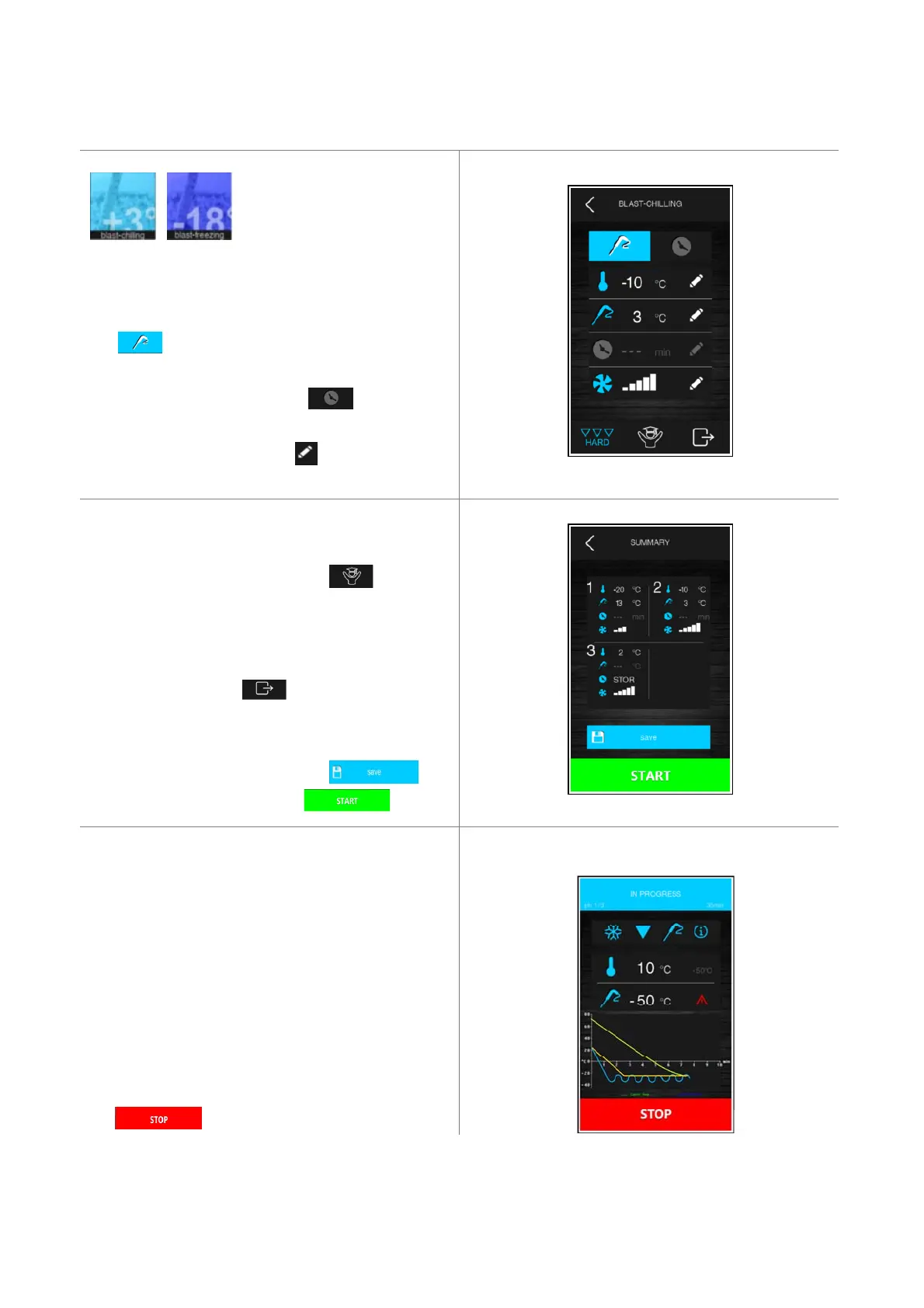
Pressing one of these areas redirect you to blast chilling
or blast-freezing cycle setup.
TEMPERATURE CONTROL If enabled, the needle probe
key lights up blue by default. With needle probe
error the cycle always run with time control.
TIME CONTROL press timer area time controlled
area will light up blue.
CHANGE SETTINGS pressing area allows you to
change each value shown on the display.
HARD and SOFT phases can be included or removed by
touching the low left icon.
EXPERT to change extra data, press area:
- Hard or Soft parameters
- Holding (Conservation) Setpoint
- Fan Speed if using a fan driver
SETTING READY push area to proceed.
SUMMARY Before starting the cycle setting list is
reported as shown aside. Check the configuration.
SAVE CUSTOM SETINGS Press area .
START CYCLE press lower green area.
RUNNING CYCLE The unit starts checking the insert
probe if enabled. If the test fails the cycle automatically
switches to time control, and an alarm appears.
The display will show the main set points and a
temperature trend in graph.
INFORMATION press (i) if you want to know the probe
run time values, the relay status and the alarms.
STOP The cycle can be stopped at any time by pressing
the key.


 To Next Page