Need help?
Do you have a question about the iSinwheel S9 and is the answer not in the manual?
Covers power button, light, mode, cruise control, and lock indicator functions.
Instructions for cleaning the scooter and storing it properly to prevent damage.
Guidelines for maintaining the battery's health and lifespan, including charging practices.
Recommendations for storing the scooter in different environments and proper disposal methods.
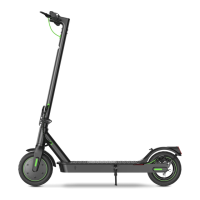
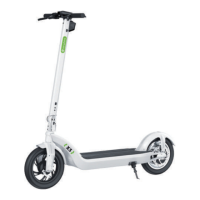
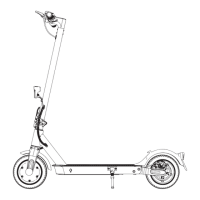
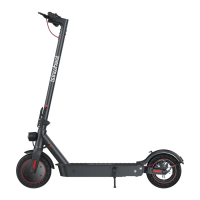
The isinwheel S9 Electric Scooter is a personal mobility device designed for leisure and commuting. It features a foldable design for portability and storage, and is equipped with a disc brake system for reliable stopping power. The scooter is designed for users aged 14 and above.
The isinwheel S9 Electric Scooter provides an efficient and enjoyable way to travel. It operates by an electric motor, allowing users to propel themselves without physical exertion once the initial coasting speed is reached. The scooter is controlled via a handlebar, which includes a display for essential information, a headlight for visibility, and a brake lever. The accelerator initiates movement, and the kinetic energy recovery system (KERS) assists in braking. For enhanced functionality and control, the scooter can be connected to the "MiniRobot" app, which allows for features like turning on zero start and locking/unlocking the scooter.
To begin riding the S9, users should first turn on the power and check the electricity indicator on the display. The scooter requires an initial coasting speed of at least 3 mph before the accelerator can be engaged. Riders should place both feet on the deck and press the accelerator to initiate movement. For safety, it is recommended to wear helmets and knee pads, especially when learning to ride.
The scooter offers multiple power modes, which can be switched by double-clicking the mode button on the control panel. A cruise control feature allows the scooter to maintain a consistent speed after 5 seconds, indicated by a beep. The front light can be turned on or off with a single click of the light button.
Folding and carrying the S9 is straightforward. Ensure the scooter is turned off. To fold, unlock the folding mechanism and bend the handlebar stem to hook the buckle on the rear fender. To unfold, press the bell trigger to release it from the buckle, erect the handlebar, and lock the folding structure.
When riding in public areas, it is crucial to respect pedestrians' right of way. Riders should avoid startling pedestrians, especially children, and use the bell to alert them when approaching from behind. When passing pedestrians, slow down and pass on their left (in countries where vehicles drive on the right). When crossing pedestrian areas, maintain a low speed or dismount the scooter.
The "MiniRobot" app, available on the App Store (iPhone) and Google Play (Android), provides additional information and functions, including the option to enable zero start, which allows the scooter to accelerate from a standstill without needing to coast first. The app also enables locking and unlocking the scooter.
Regular maintenance is essential to ensure the longevity and safe operation of the isinwheel S9 Electric Scooter.
For cleaning the scooter's body, a damp cloth is sufficient for most stains. For stubborn marks, a small amount of toothpaste and a toothbrush can be used, followed by wiping with a damp cloth. It is important to avoid using alcohol, gasoline, kerosene, or other corrosive chemical solvents, as these can cause damage. High-pressure water sprays should not be used for cleaning. During cleaning, ensure the scooter is turned off, the charging cable is unplugged, and the rubber flap covering the charging port is closed to prevent water leakage and potential electric shock. When not in use, store the scooter indoors in a cool, dry place, ideally between 14°F and 104°F. Avoid prolonged outdoor storage, as excessive sunlight, overheating, or overcooling can shorten the battery pack's lifespan. The device is not intended for use at elevations greater than 2000m.
Only original battery packs should be used, as other models or brands may pose safety risks. Avoid touching the battery contacts, and do not dismantle or puncture the casing. Keep contacts away from metal objects to prevent short circuits, which can damage the battery or cause injuries. Use the original power adapter to prevent potential damage or fire. Proper disposal of used batteries is crucial to protect the environment; always follow local regulations. To prolong battery lifespan, fully charge the battery after every use. In daily use, try to avoid completely exhausting the battery before recharging. If the battery is low, charge it as soon as possible. It is recommended to charge the scooter every other month to preserve the battery's health.
The disc brake sensitivity can be adjusted using an Allen wrench. To loosen the screw on the rocker, adjust the disc brake rocker. If the brake is too sensitive, rotate the rocker down slightly and then retighten the screw. If the brake does not stop effectively, rotate the rocker up slightly and retighten. It is normal for the disc brake to squeak until it is broken in; this does not affect its function. To remove disc brake noise, ensure the scooter is turned off. For easier access, place the scooter on a desk. Loosen the two screws on the pump (not the rocker screw). Adjust the disc brake pump's position so that the brake disc is centered between the two brake pads, ensuring they do not touch each other. Once the desired position is achieved, retighten the screws to the pump.
For missing accessories or broken parts upon arrival, take a photo and email it to support@isinwheel.com for assistance. For tire replacement, contact support or search for "How to replace the pneumatic tire" on YouTube. If the rear disc brake is not working well, contact support for adjustment instructions or search for "How to adjust rear brake of scooter" on YouTube. Unusual noise from the rear wheel often indicates a tilted disc brake causing friction; refer to the Disc Brake Adjustment page or contact support if the problem persists. The manual also provides a list of error codes (E04, E10-E16) and advises contacting isinwheel Support Team if any of these appear on the screen.
For any issues related to riding, maintenance, safety, or errors/faults, users can contact isinwheel customer service via email at support@isinwheel.com or visit their website at www.isinwheel.com.
 General
| Motor Power | 350W |
|---|---|
| Max Speed | 25 km/h |
| Battery Capacity | 7.5 Ah |
| Weight | 12.5 kg |
| Charging Time | 4-5 hours |
| Range | 25-30 km |
| Max Load | 120 kg |
| Brake System | Electronic brake + Disc brake |
| Tire Size | 8.5 inch |

 To Next Page