WARNINGS
• Attention: the camera supports only 2.4 GHz Wi-Fi connection. It does NOT support 5GHz band
• The camera is not waterproof, so it is not suitable for outdoor installations. It is an electronic
device. It is recommended to protect the camera and the power cable (the power plug does not have
an IP protection rating, so it must be 100% protected to avoid short circuits).
• The warranty will not cover damage due to water infiltration inside.
• In the event that the camera is in areas subject to significant changes in light / brightness, it will be
necessary to wait a few seconds for the image to return perfectly, the time necessary for the
automatic recovery of the light sensitivity. If the camera is oriented from a dark area towards highly
luminous areas, the shooting of those areas may appear very blurry and white, but also with a green
color tone. It is not a defect but a peculiarity of the built-in IR LEDs that will tend to activate as the
twilight sensor inside the camera will start working. It will therefore be necessary to orient the
camera in another way. Also bear in mind that the camera in the dark will shoot in black/white.
• If you have not used the system for a long time, disconnect the camera power supply.
• Do not cut the power supply cord of the unit to adapt it to another power source.
• Check that the power supply and the cable coming out of it are not damaged; otherwise,
disconnect the power supply and contact your dealer for replacement with an equivalent model.
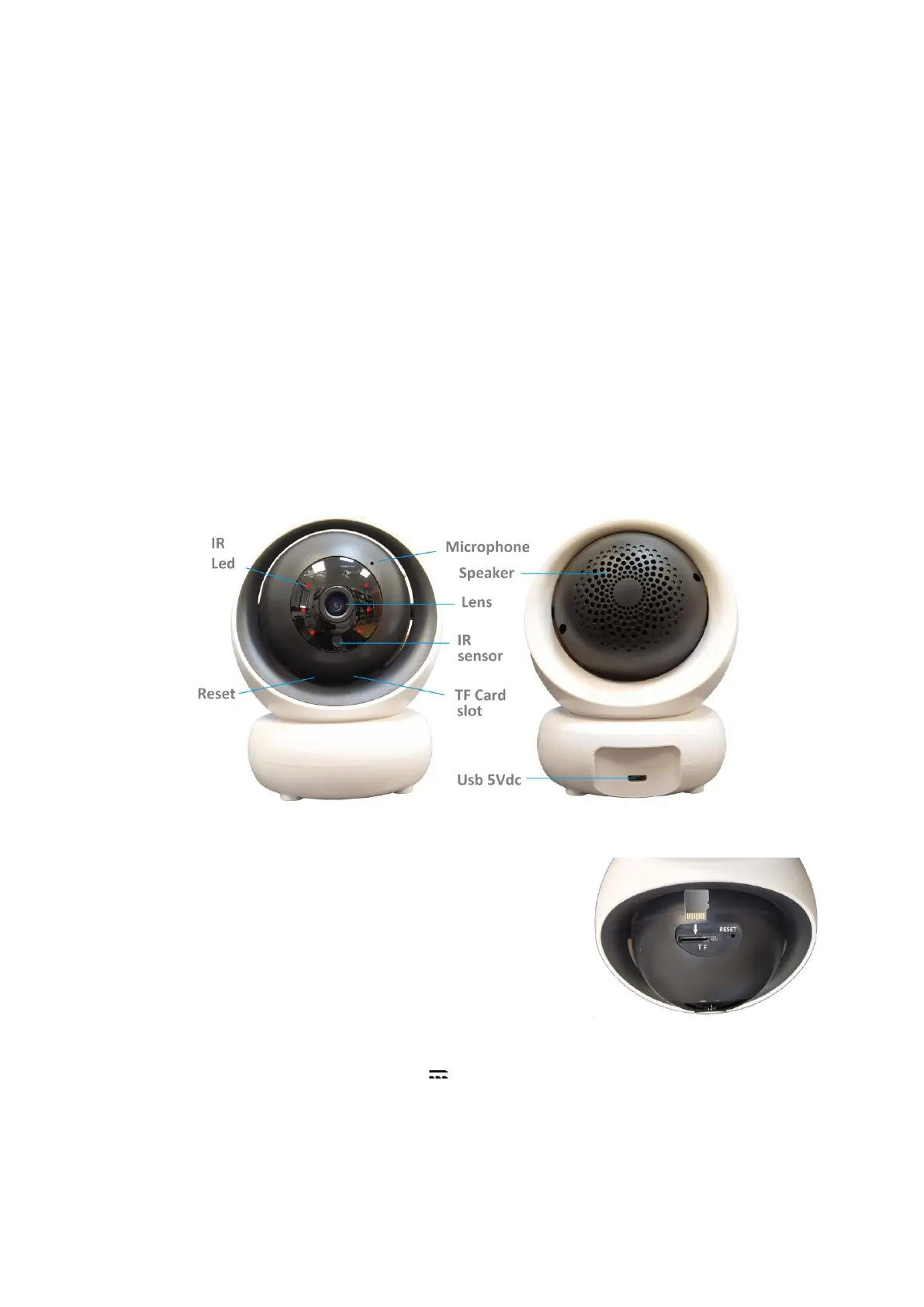
DESCRIPTION
MICRO SD CARD
To make the recordings, please put the micro SD card (max.
128GB) into the camera when it is in off. After adding the camera
to the mobile app, please access to the settings to format the SD
and set the recording mode (24h or in case of motion alarm).
FIRST INSTALLATION
Power the camera using the adapter with 5V 1,5A output present in the package.
The chamber checks the limit switches, performing a complete rotation of 355 ° on the horizontal
plane and one of 90° on the vertical plane.
When finished, it will assume the starting position (Home).
Proceed with connecting the camera to the wifi router.


 To Next Page