2
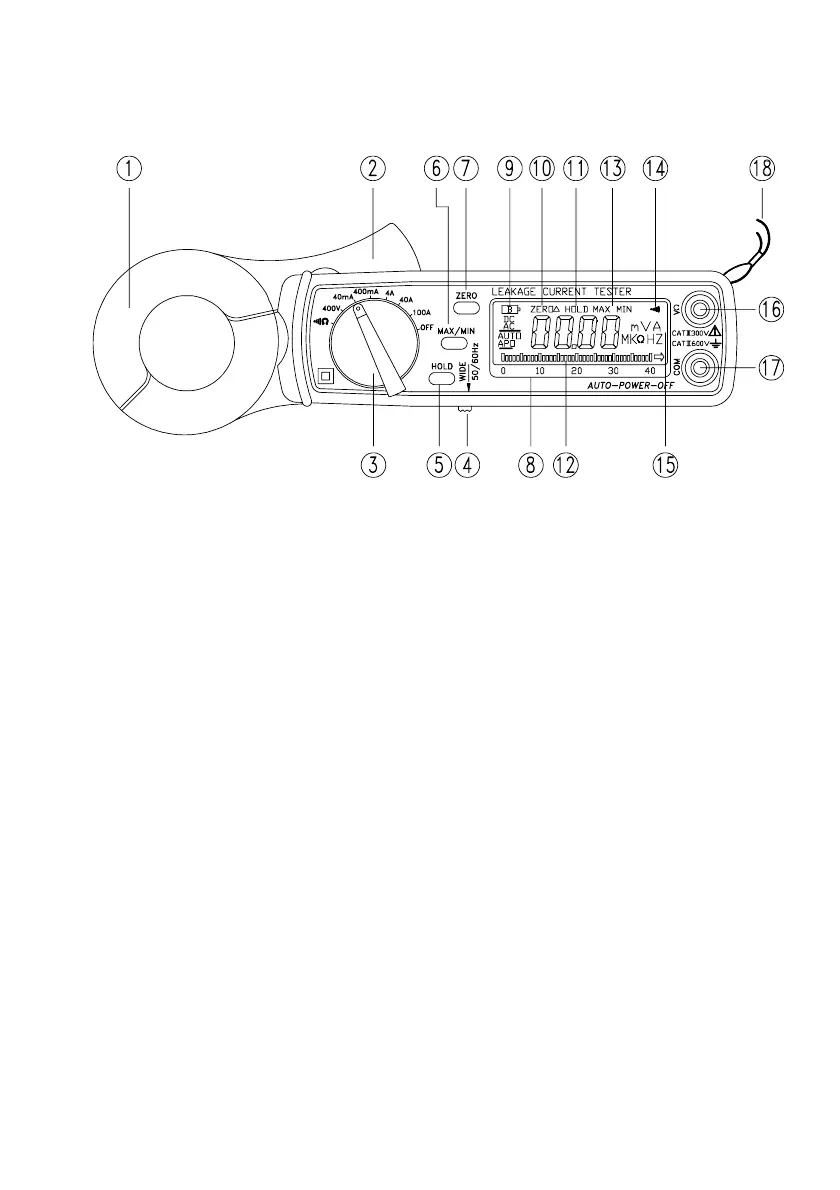
2. Panel Description
1.Transformer Jaw
This is used to pick up current signal. To measure DC/AC current,
conductor must be enclosed by the jaw.
2.Transformer Trigger
This is used to open the jaw.
3.Function Selector Switch
This is used to select the function user desired, such as ACV, ACA, Ohm
and Continuity.
4.Frequency Selection Switch
At 50/60Hz position, only the low frequency signal is measured. At Wide
position, signal from 40 - 1KHz is measured.
5.Data Hold Button
Once this button is pushed, reading shall be held on the LCD. Press again
to release it. This button is not available in continuity function.
6.Max/Min Hold Button
This button is used to enable the maximum or minimum value to be
displayed and updated during measurement. Press once, minimum
value shall be displayed and updated. Press again, maximum value
shall be displayed and updated. The Zero/Relative function will be
disabled if Max/Min function is enabled. This button is not available in
continuity function.
7.Zero/Relative Button
Once this button is pressed, the current reading shall be set to zero and
be used as a zero reference value for all other subsequent measurement.
This function will be disabled when MAX/MIN function is enabled. This
button is not available in continuity function.


 To Next Page