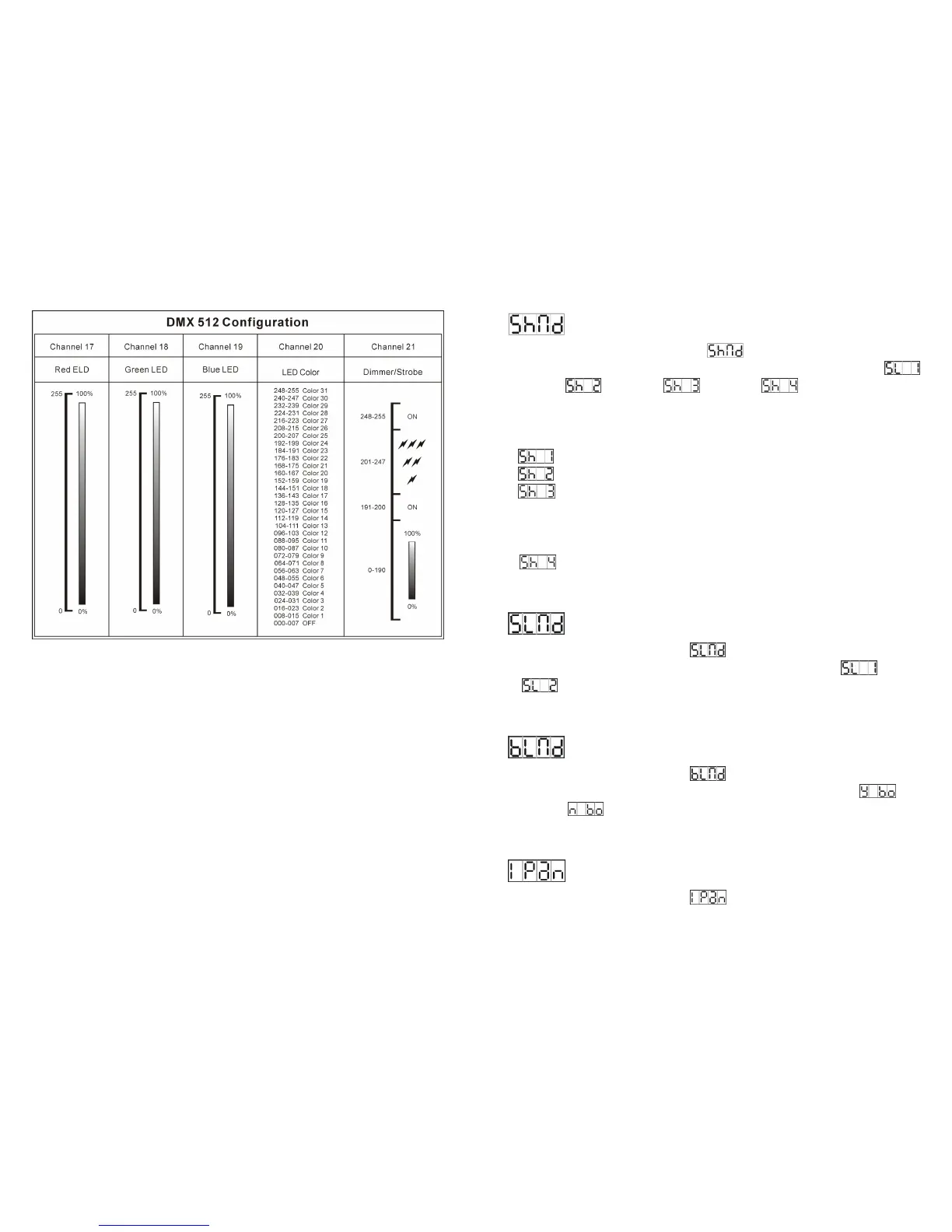
17-
i.) For DMX reset, put DMX value of CH-8 & CH-16 to 255, the unit will reset after about five
seconds.
For lamp on, put DMX value of CH-8 to 247 & CH-16 to 255.
For lamp off, put DMX value of CH-8 to 239 & CH-16 to 255.
ii.) For color sound activated, put DMX value of CH-6 to 248-255.
For gobo sound activated, put DMX value of CH-9 to 248-255.
10-
Show Mode
Press the MENU button up to when the is showing on the display. Pressing
ENTER button and the display will blink. Use DOWN and UP button to select the
(show 1) or (show 2) or (show 3) or (show 4) mode. Once the
mode has been selected, press the ENTER button to setup. Idling 8 seconds automatically
exit menu mode. Back to the functions without any change press MENU button.
Show 1 mode - Fixture is placed on the floor. Tilt movement angle 210°.
Show 2 mode - Fixture is fixed under ceiling. Tilt movement angle 90°.
Show 3 mode - Fixture is placed on the speaker, The spot is always projecting
to the audience’s direction; i.e in front of the stage. Pan movement angle ( left to
right to left ): 160°. Tilt movement angle: 90° ( 60° above horizon; 30° below
horizon).
Show 4 mode - Fixture is fixed under ceiling. The spot is mainly projecting in
front of the stage. Pan movement angle (left to right to left) :160°. Tilt
movement angle: 90° ( vertically, front 75°; back 15° ) .
Slave Mode
Press the MENU button up to when the is shown on the display. Pressing ENTER
button and the display will blink. Use DOWN and UP button to select the
(normal)
or
(2 light show) mode. Once the mode has been selected, press the ENTER
button to setup. Idling 8 seconds automatically exit menu mode. Back to the functions
without any change press MENU button.
Blackout Mode
Press the MENU button up to when the is shown on the display. Pressing ENTER
button and the display will blink. Use DOWN and UP button to select the
(yes
blackout) or (no blackout) mode. Once the mode has been selected, press the
ENTER button to setup. Idling 8 seconds automatically exit menu mode. Back to the
functions without any change press MENU button.
Pan Inversion
Press the MENU button up to when the is shown on the display. Pressing ENTER


 To Next Page