11-
button and the display will blink. Use DOWN and UP button to select the
(normal)
or
(pan inversion) mode. Once the mode has been selected, press the ENTER
button to setup. Idling 8 seconds automatically exit menu mode. Back to the functions
without any change press MENU button.
Tilt Inversion
Press the MENU button up to when the is shown on the display. Pressing ENTER
button and the display will blink. Use DOWN and UP button to select the
(normal)
or
(tilt inversion) mode. Once the mode has been selected, press the ENTER
button to setup. Idling 8 seconds automatically exit menu mode. Back to the functions
without any change press MENU button.
Led Display
Press the MENU button up to when the is showing on the display. Pressing
ENTER button and the display will blink. Use DOWN and UP button to select the
(Led on) or
(Led off) mode. Once the mode has been selected, press the ENTER
button to setup. Idling 8 seconds automatically exit menu mode. Back to the functions
without any change press MENU button.
White Balance
Press the MENU button up to when the is showing on the display. Pressing
ENTER button and
will blink on the display, use DOWN and UP button to adjust
the value from 125 to 255, press ENTER button to store and
will blink on the
display, use DOWN and UP button to adjust the value from 125 to 255, press ENTER button
to store and
will blink on the display, use DOWN and UP button to adjust the value,
press ENTER button to store. Idling 8 seconds automatically exit menu mode. Back to the
functions without any change press MENU button.
Display Inversion
It is good for you to install the unit on the floor or under ceiling. Press the MENU button up to
when the
is blinking on the display. Use the ENTER button to change to the mode
(display inversion), It will automatically store after 8 seconds. Or press the ENTER
button again return to the mode (display normal). To go back to the functions press
the MENU button.
16-
Once the address has been selected, press and keep ENTER button pressed up to when
the display stops blinking or storing automatically 8 seconds later. To go back to the
functions without any change press the MENU button again.
Please refer to the following diagram to address your DMX512 channel for the first 4 units.
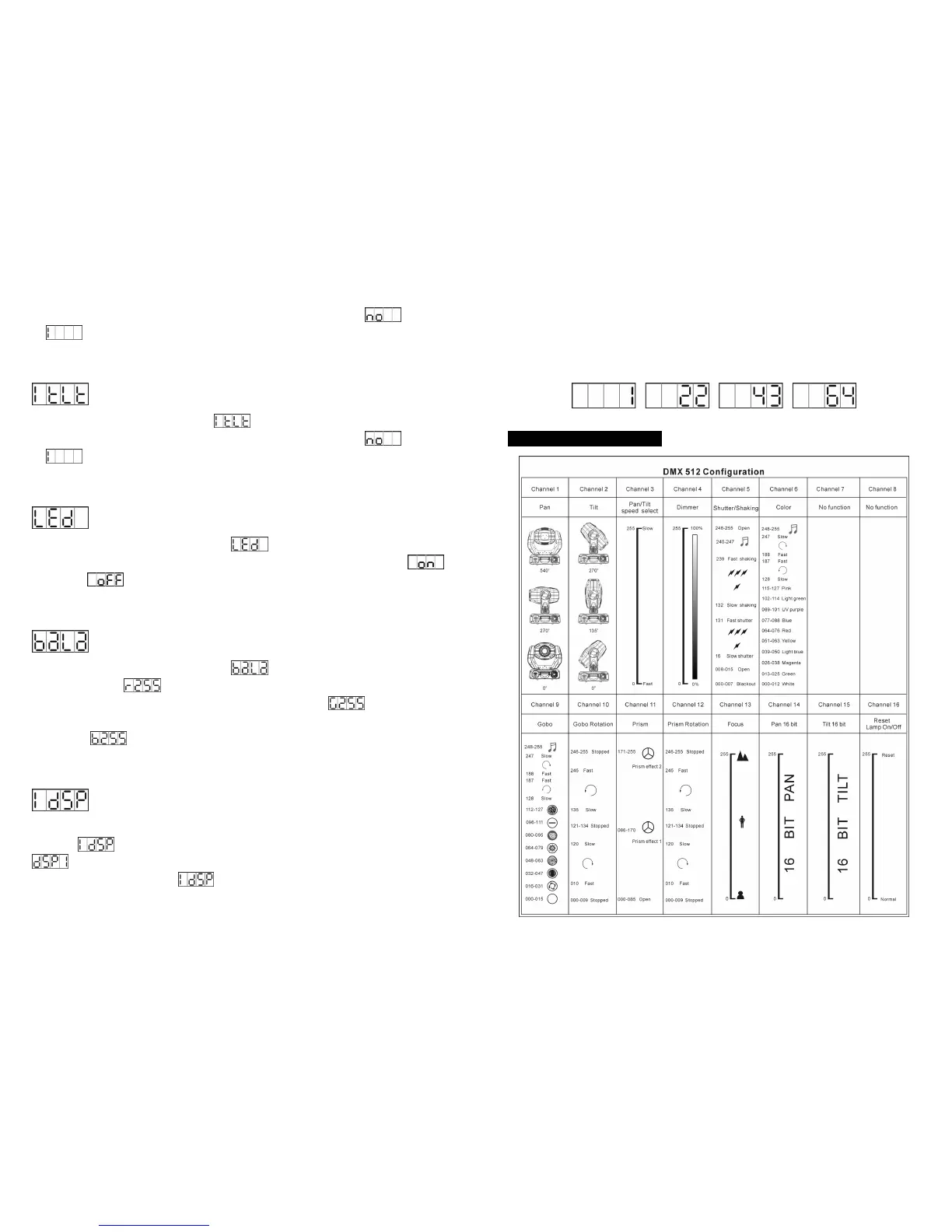
5.4. DMX 512 Configuration


 To Next Page