18-
iii.) For DMX Reset, put DMX value of CH-8 & CH-16 to 255.
19-
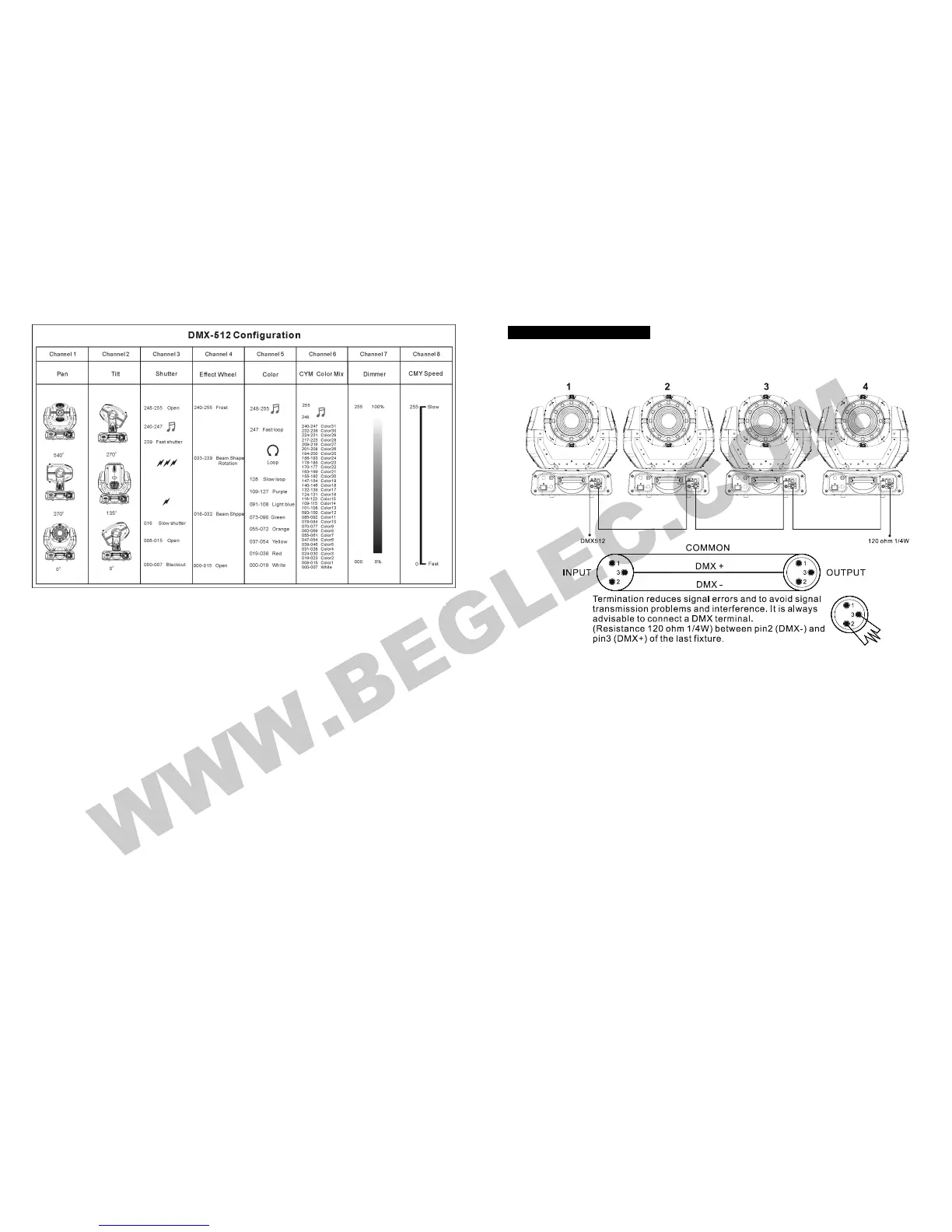
5.5. DMX512 Connection
The DMX512 is widely used in intelligent lighting control, with a maximum of 512
channels.
1. If you use a controller with 5 pins DMX connector, you need to use a 5 to 3 pin adapter.
2. At last unit, the DMX cable has to be terminated with a terminator. Solder a 120-ohm
1/4W resistor between pin 2(DMX-) and pin 3(DMX+) into a 3-pin XLR-plug and plug it
in the DMX-output of the last unit.
3. Connect the unit together in a “daisy chain” by XLR plug from the output of the unit to
the input of the next unit. The cable cannot be branched or split to a “Y” cable. DMX512
is a very high-speed signal. Inadequate or damaged cables, soldered joints or corroded
connectors can easily distort the signal and shut down the system.
4. The DMX output and input connectors are pass-through to maintain the DMX circuit,
when power is disconnected to the unit.
5. Each lighting unit needs to have an address set to receive the data sent by the
controller. The address number is between 0-511 (usually 0 & 1 are equal to 1).
6. The end of the DMX512 system should be terminated to reduce signal errors.
7. 3 pin XLR connectors are more popular than 5 pins XLR.
3 pin XLR: Pin 1: GND, Pin 2: Negative signal (-), Pin 3: Positive signal (+)



 To Next Page