8
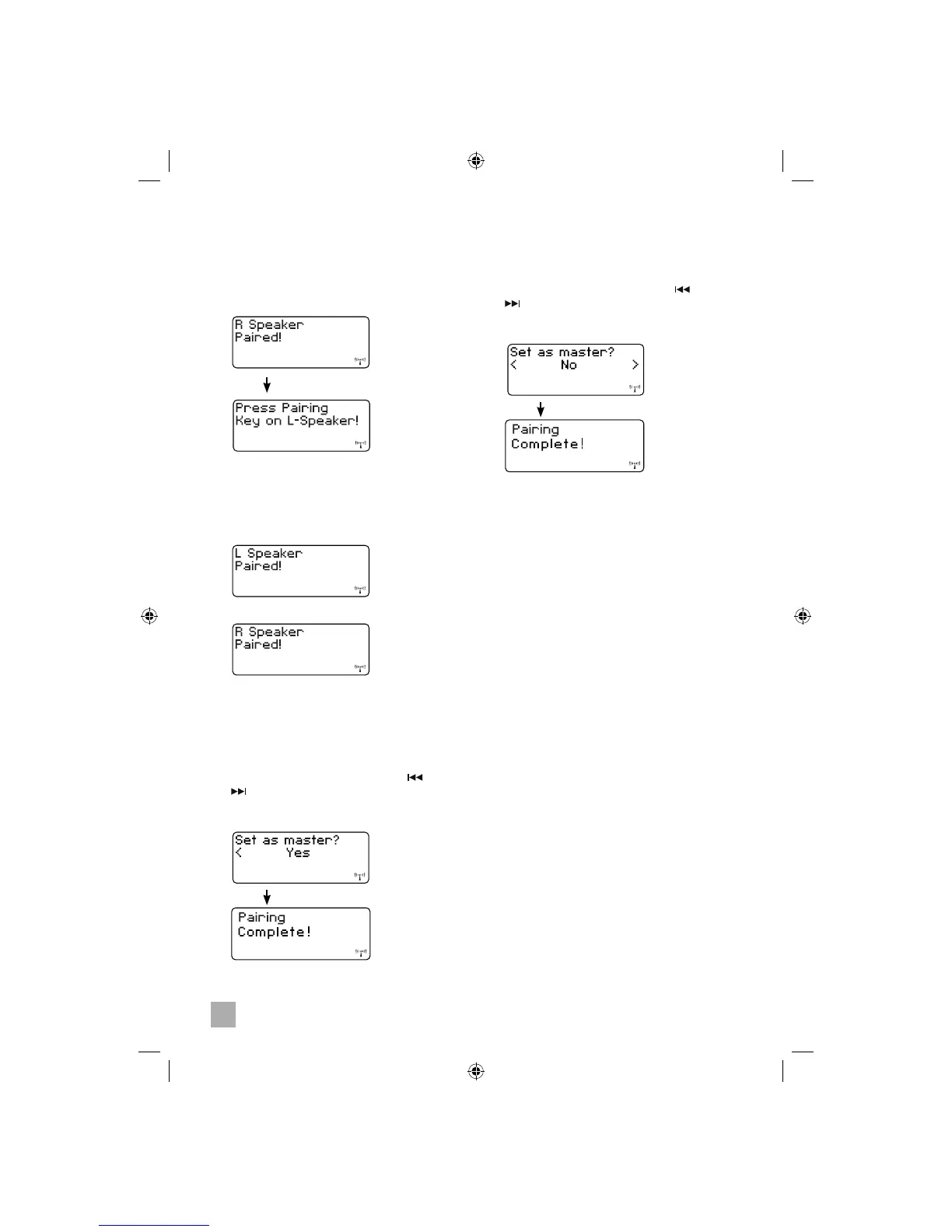
• To set as Slave Group press the or
button for to select “No” and press the
ENTER button to confi rm. Display shows
“Pairing Complete!”
3. Press the PAIRING button on the speaker
remaining to be paired as guided by the
display. The second speaker pairing is
complete and confi rmation is shown on the
display.
or
4. At this stage you may choose to set this
pair of speakers as Master Group speakers
or Slave Group speakers. The system can
accommodate any combination of Master
and Slave Group speakers.
• To set as Master Group press the or
button for to select “Yes” and press the
ENTER button to confi rm. Display shows
“Pairing Complete!”.
5. For pairing additional speakers, repeat Steps
1 to 4 again.
Master Group Speakers
• Use this option when you want centralized
control of the whole system.
• All Master Group speakers receive the same
audio from the wireless main unit.
• Master Group speakers are controlled
directly by the wireless main unit.
• Main unit volume is applied to all Master
Group speakers.
• Adjusting the volume on any speaker in the
Master Group will affect the volume equally
on all others in the Master group.
• Powering ON or OFF the main unit will power
ON or OFF all speakers in the Master Group.
• Powering ON or OFF any speaker works in
two ways:
- Short press – only the left and right
speaker in the pair are powered ON or
OFF. Wireless main unit and from every
other pair in the Master Group are
unaffected.
- Long press – speaker pair, main unit
and every other pair in Master Group
power ON or OFF together.
Slave Group Speakers
• Use this option when you want individual
control of speaker pairs, usually on a room-
by-room basis. For example, speakers
placed in a bedroom could use this setting so
that volume and power changes on the main
unit do not unintentionally wake someone.
• All Slave Group speakers receive the same
audio from the wireless main unit.
• Slave Group speakers are controlled
independently from the main unit and from
each other.
Speaker Set-Up
• If the right speaker the PAIRING button is
pressed:


 To Next Page