11
Programmed Playback
Up to 32 tracks can be programmed to play in the desired order.
Notes:
- Shuffle playback does not work during programmed playback.
- Programmed playback works with finalized disc only.
1. Press “CD/USB” button repeatedly to select CD mode, then load a CD.
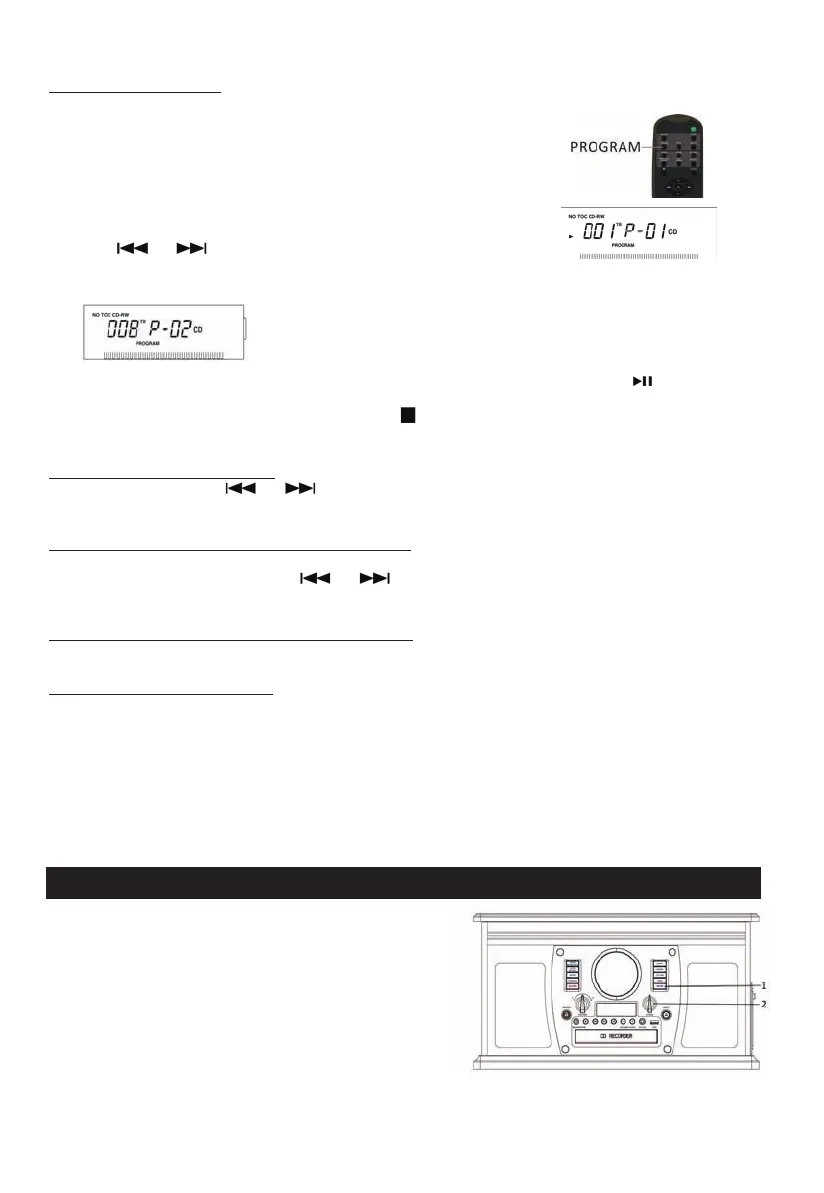
2. While the CD is stopped, press the PROGRAM button.
3. “PROGRAM” indicator blinks, and “P-01” appears on the display.
4. Press (
or )
to select a track number.
5. Press the PROGRAM button again to set the current track.
6. “P-02” is displayed. Repeat steps 4 thru 5 to program the additional tracks.
7. When the selection of track numbers has been finished, press the PLAY button (
) to start
program playback.
8. To cancel the program mode, press the STOP (
) button twice.
To check the programmed order
In the stop mode, press ( or ) repeatedly to show the track numbers that have
been programmed.
To add a track to the end of the programmed order:
In the stop mode, press the PROGRAM button.
Select a track number by pressing (
or ), then press the PROGRAM button.
The current track will be added to the end of the program.
To delete the last track from the programmed order:
In the stop mode, press the CLEAR button to delete the last track from the program.
To clear the programmed order:
Press STOP when the CD is already stopped, or press OPEN/CLOSE, POWER, AM/FM,
PHONO, CD/USB, or AUX/Bluetooth.
Listening to the Radio
1. Press the “AM/FM” button(1).
Press again to switch between AM and FM
2. Tune to the desired station
using the Radio Tuner Knob(2).
Note: In FM Mode, The “TUNED/ST” indicator
lights up red when tuning in the stereo reception station.
In AM mode, The “TUNED/ST” indicator lights up red
when a station is correctly tuned in.


 To Next Page