19
To clear the programmed order:
Press STOP button twice when the USB is already stopped, or press OPEN/CLOSE, POWER,
AM/FM, PHONO, CD/USB, or AUX/BLUETOOTH.
BEFORE RECORDING
Audio from the PHONO, TAPE, CD or AUX/BLUETOOTH sources can be recorded on the USB
memory.
Note: AUX/BT/PHONO/TAPE record to USB, the format is MP3.
Prepare the audio source for recording
1. Select the desired audio recording source by pressing the corresponding selector button.
(“PHONO,” “TAPE,” “CD/USB” or “AUX/Bluetooth”)
2. Prepare the appropriate audio source for normal play (external audio device / vinyl record /
cassette tape).
3. Insert a USB memory stick into USB slot .
Select Auto Track Increment Selection Mode
Tracks can be set to assign automatically when the input sound level drops below a certain limit
(-20db/-30db/-40db ) for more than 2 seconds.
Press the AUTO/MANUAL button repeatedly ( or MANUAL/AUTO INCREMENT on the remote) to
cycle between the following modes:
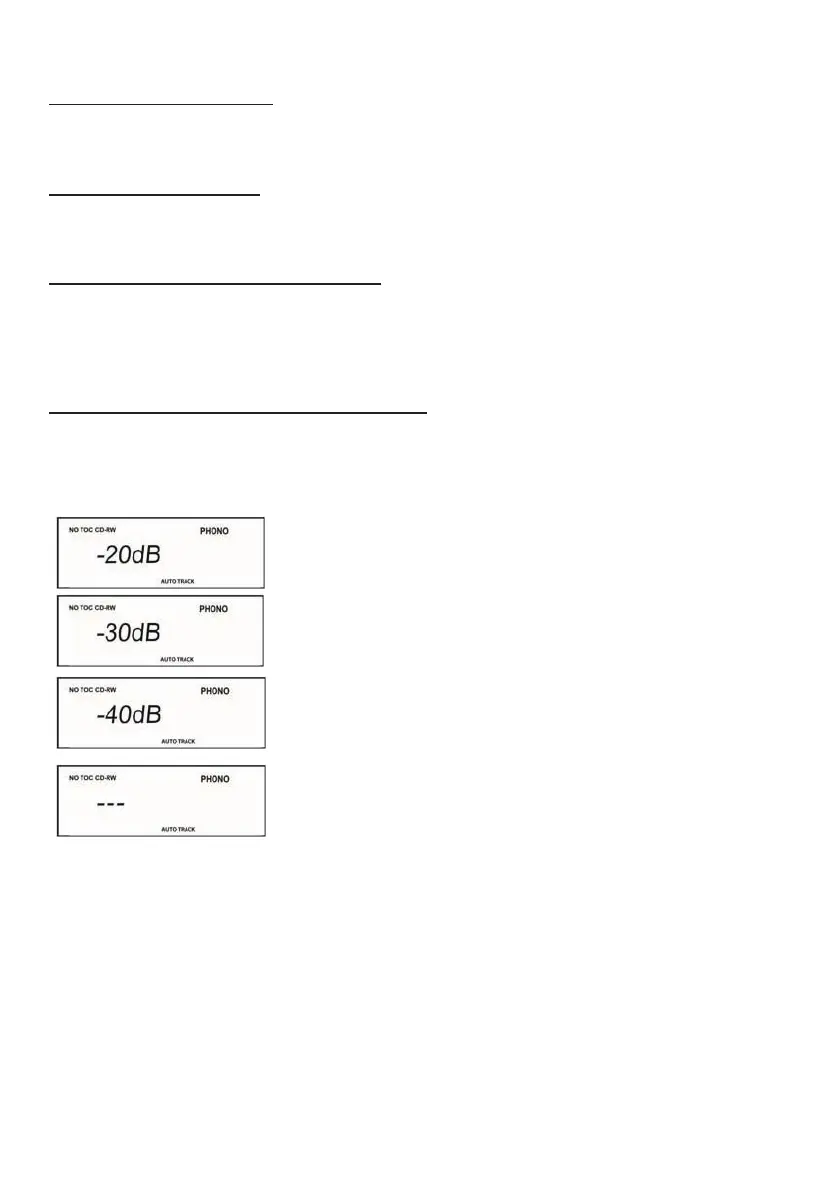
“AUTO TRACK -20db”
A new track will be assigned automatically when the sound level
drops below -20db
“AUTO TRACK -30db”
A new track will be assigned automatically when the sound level
drops below -30db
“AUTO TRACK -40db”
A new track will be assigned automatically when the sound level
drops below -40db
Manual Track Selection
Tracks will not be assigned automatically. A new track will be
assigned whenever “TRACK INCREMENT” is pressed during
recording.
AUTO TRACKING function is to cut the separation for each music/song you are recording to CD by
recognizing the silence that is in between the songs on your records or cassette tapes. The decibels
(-20dB, -30dB, -40dB) allow you to choose the level of minimal sound that may still exist
between
t
he songs to be recognized as the separation before the next song to cut a track. If your source of the
recording quality is not of best quality it is recommended to use the “MANUAL TRACKING” function
for best result in recording.


 To Next Page