7
User guide
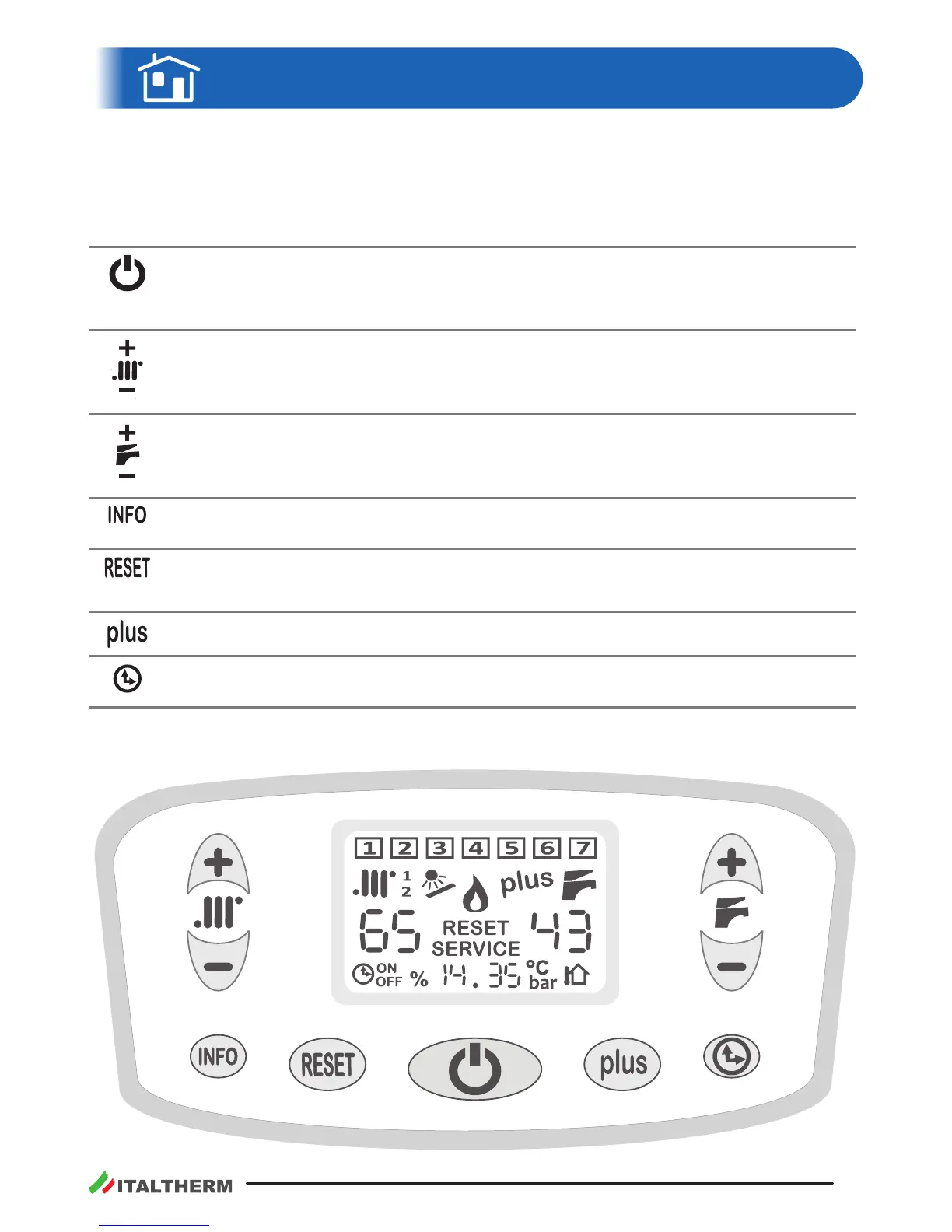
Keyboard buons
Note: the here below keyboard features are referred to the standard way of working. When accesso-
ries are installed, a few special sengs are in progress or, in case of being in the technician Menu,
buons may perform dierently.
Stand –by/Way of funconing
At every press, the boiler switches its mode from OFF to summer or winter or heang-only
mode.
CH seng
To set the CH system temperature. If the Outdoor Sensor Kit was installed, see also "Out-
door Sensor Kit" on page 49.
DHW seng
To set the DHW temperature. See also "Commands related to Domesc Hot Water" on
page 10.
It displays all the addional boiler informaon. For deeper details go to "INFO menu" on
page 13.
Press to reset the boiler in case of breakdown.
See "Alarms - boiler block" on page 36.
It manually sets the acvaon and inacvaon of the DHW storage forced heang.
It sets the hourly seng of the DHW storage program. It's used also during the program-
ming of the DHW storage program itself and for the seng of the clock.
00146 00




 To Next Page