The ITC T-6221 is a CD/MP3 player designed for public address systems, offering a reliable and user-friendly solution for audio playback in various settings such as mosques, schools, hotels, factories, stadiums, and air stations. This device is built with a standard chassis design, featuring 1U aluminum alloy panels that are both aesthetically pleasing and durable.
Function Description:
The T-6221 functions primarily as a CD/MP3 player, capable of playing audio from CDs, VCDs, MP3s, and DVDs. It provides stereo audio signal output through its left and right channels (L/R output). The unit is equipped with a microcomputer control system and touch keys for easy operation. It features a high-brightness VFD dynamic fluorescent display, which offers clear visibility of the device's status and playback information. The player incorporates imported digital movement, a system with ESS decoding, and super error correction, ensuring stable and high-quality audio playback even from less-than-perfect discs. Automatic playback controls further enhance its ease of use.
Important Technical Specifications:
- Model: T-6221
- Frequency Response: 20Hz-20KHz (-1.5dB), indicating a broad range for accurate sound reproduction.
- Power Requirements: ~220-240V 50/60Hz, suitable for standard electrical grids in many regions.
- Power Consumption: 30W, suggesting relatively efficient operation.
- Dimensions (mm): 484 (width) x 220 (depth) x 44 (height), making it a compact 1U rack-mountable unit.
- Weight: 3.6Kg, which is a manageable weight for installation and handling.
- Audio Output: Stereo L/R output.
Usage Features:
The T-6221 offers a comprehensive set of features for intuitive operation, both from its front panel and via a remote controller.
Front Panel Controls:
- GIVE ON: Power switch.
- USB interface: For playing MP3 files from USB devices.
- SD booth: For playing MP3 files from SD cards.
- CD SCREEN: Displays the working state of the CD player.
- OPEN/CLOSE: Opens or closes the CD tray.
- Operating mode selection button: Allows selection of different operating modes.
- PLAY / PAUSE: Starts or pauses playback.
- STOP / RETURN: Stops playback or returns to the previous menu.
- PREVIOUS: Skips to the previous track or performs a band search backward.
- NEXT: Skips to the next track or performs a band search forward.
- POWER SWITCH: On top of the opening Power. Press the end to power shut down.
- POWER indicator: Illuminates when the unit is powered on.
- AC POWER INPUT: Standard power input connector.
- AUDIO OUTPUT: RCA connectors for stereo audio output to an amplifier or mixer.
- MONITOR VOLUME: Adjusts the volume for monitoring purposes.
Remote Controller Features:
The remote controller provides convenient access to various functions:
- In / out positions: Likely controls for disc tray open/close.
- Play / Pause / confirm button: For playback control and menu confirmation.
- Stop / back button: Stops playback or navigates back in menus.
- Last: Skips to the last track.
- Next: Skips to the next track.
- CD player operating mode selection button: Allows switching between different playback modes (e.g., CD, USB, SD).
- SD/USB/SD audio input mode selection button: Specifically for selecting USB or SD card input.
- (0~9) number control: For direct track selection by entering the track number.
CD Operation:
- Power Supply: Press the "power" switch to turn on the unit.
- Button Function: Utilize the various buttons for control.
- Dish Placements Tray Up: Place the CD in the tray.
- Press key "open/close" tray close start read: Close the tray to begin reading the disc.
- Play diskette:
- Placement CD diskette read back enter firstly catalog choice menus and play firstly song use pervious and next key can elect demand song: This describes the process of navigating and selecting songs from a CD.
- Play course press key stop, menu backtrack catalog choice menus Useing previous and next key choose demand song press key play come into homologous catalog choice menus, a new press key play, carry out like 1 of play function: This details the playback, stop, and navigation functions for selecting and playing songs.
Applications:
The T-6221 is designed to integrate seamlessly into a public address system. Its rear panel connections, specifically the audio output, are intended to connect to a mixer pre-amplifier, which then feeds into the main amplifier and speaker system. This allows the T-6221 to serve as the primary audio source for background music, announcements, or other audio content within the public address infrastructure.
Maintenance Features and Safety Precautions:
The manual emphasizes several safety precautions and maintenance guidelines to ensure the longevity and safe operation of the T-6221.
Safety Precautions:
- Read Instructions: Always read the instructions carefully before use.
- Keep Manual: Keep the manual handy for future reference.
- Warning/Caution Labels: Pay attention to warning and caution labels on the unit and in the manual, which indicate potential hazards like death, serious personal injury, or property damage.
- Installation Environment:
- Avoid installing the unit in rain or wet environments to prevent fire or electric shock.
- Do not expose the unit to direct sunlight, heat sources, or in locations generating sooty smoke or steam.
- Ensure proper ventilation; do not block ventilation slots.
- Avoid placing heavy objects on top of the unit.
- Do not place cups, bowls, or other containers of liquid or metallic objects on top of the unit.
- Do not insert non-drop metallic objects or flammable materials into the ventilation slots.
- Power Supply:
- Always use the specified voltage.
- Do not cut, kink, or damage the power supply cord.
- Do not plug or unplug the power supply plug with wet hands.
- When moving the unit, be sure to remove its power supply cord from the wall outlet.
- Unplug the power supply cord during prolonged periods of non-use or during thunderstorms.
- If the power supply cord is damaged, immediately discontinue use and contact ITC dealer.
- If the unit falls, or the unit case breaks, disconnect power immediately.
- If you detect smoke or a strange smell coming from the unit, immediately disconnect power.
- Contact an ITC dealer for cleaning; dust accumulation can cause fire or electric shock.
- Servicing:
- Do not attempt to repair the unit yourself; refer all servicing to your nearest ITC dealer.
- Do not remove the unit's terminal cover or open the unit's case, as there are high voltage components inside.
- Grounding: Ensure the unit is properly grounded to prevent electric shock.
Dimensional Diagram and Installation:
The dimensional diagram provides precise measurements (484mm W x 220mm D x 44mm H) for proper installation in a rack or other enclosure. It also specifies a minimum clearance of 10cm (100mm) on all sides (top, bottom, and sides) from other objects to ensure adequate airflow and prevent the unit's internal temperature from rising excessively. This is crucial for maintaining optimal performance and preventing overheating.
In summary, the ITC T-6221 is a robust and user-friendly CD/MP3 player designed for professional public address applications. Its combination of durable construction, versatile playback options, intuitive controls, and adherence to safety standards makes it a reliable choice for delivering high-quality audio in various environments.

 Need help?
 General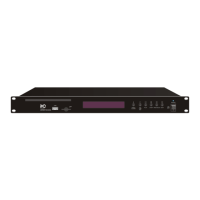

 To Next Page