CD/
USB/
SD
7
5.REMOTE CONTROLLER
2
3
4
5
6
8
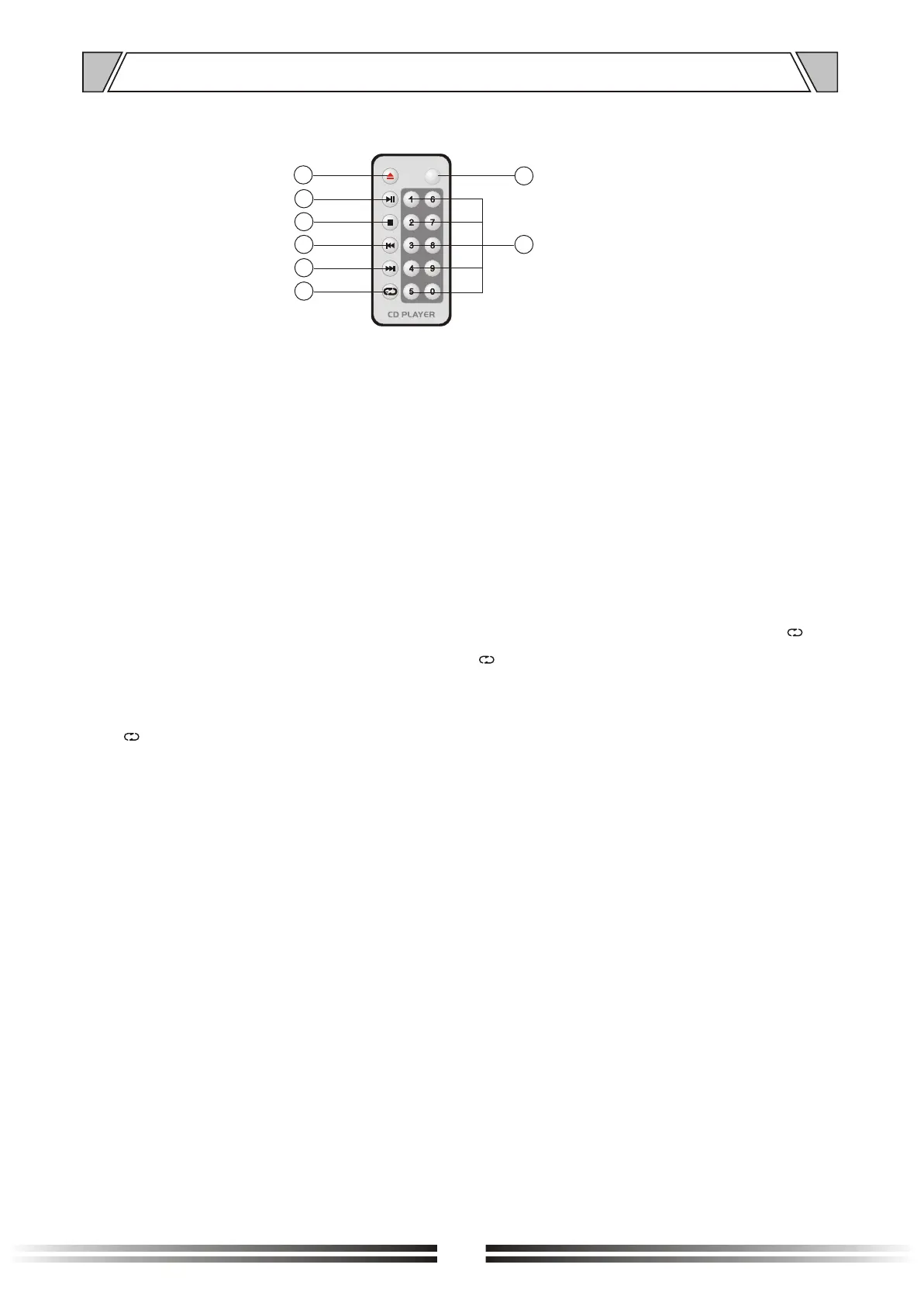
1.
Play / Pause / confirm button
3. Stop / back button
4. Last
In / out positions
2.
5. Next
6. CD player operating mode selection button
7. SD/USB/SD audio input mode selection button
8. (0~9) number control
7
1
Notice:
1. Select the track number of more than two digits, only on the remote control keyboard enter the
required Numbers in a row;
2.CD playback mode selection button when using operation, when the screen shows to ALL play
for circulation mode, When the display shows for , Play to single cycle mode, No more than two
arbitrary display, no circulation mode, play the last song immediately stop playback, the display
shows broadcast ALL return for circulation mode;
3. Button when using switch in different patterns, the key time of no more than a second, a single
click, when key time more than a second time, is continuous press below two swappable play mode.


 To Next Page