6
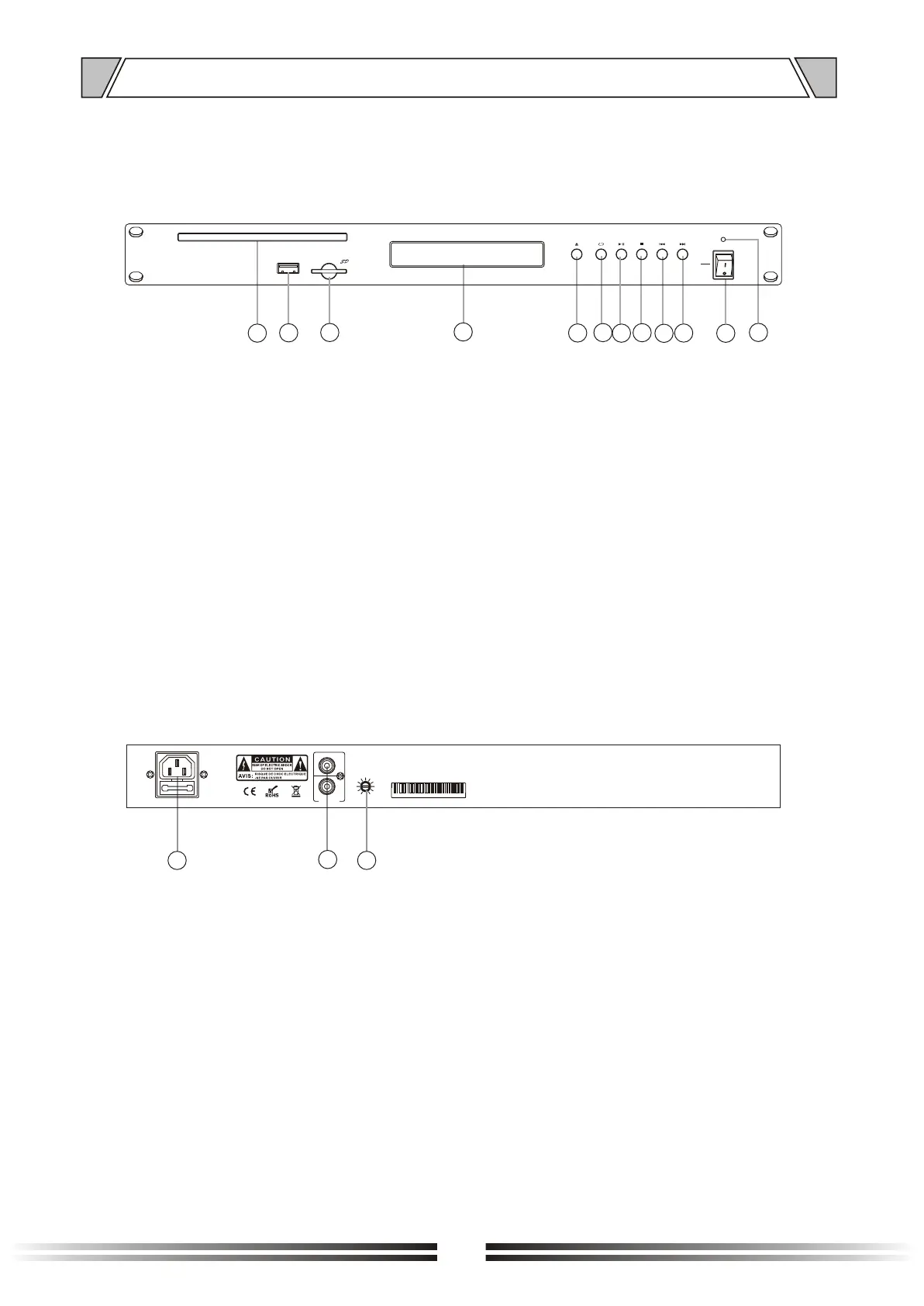
1. GIVE ON
2. USB interface
3. SD booth
5. OPEN/CLOSE
6. O
7. PLAY / PAUSE
8. STOP / RETURN
STOP / RETURN band search button (CD)
4. CD SCREEN
Display the working state of CD
perating mode selection button
10.NEXT
Next band search button (CD)
11.POWER SWITCH
On top of the opening Power
Press the end, power shut down
12.POWER
Power indicator
9. PREVIOUS
Previous band search button (CD)
4.1 FRONT PANEL
4. NOMENCLATURE AND FUNCTIONS
4
5
6
9
1
8
10
ON
OFF
POWER
OPEN/
CLOSE
CD/
USB
/SD
PLAY STOP NEXTPREVIOUS
USB
2
3
7
11
12
15. MONITOR VOLUME
13. AC POWER INPUT
14. AUDIO OUTPUT
4.2 REAR PANEL
13
14
~230V 50Hz
30W
T1AL 250V
AUDIO
OUTPUT
R
L
MON VOL
MIN MAX
15


 To Next Page