5.OPERATING INSTRUCTIONS
8
1. When the T-6245 rear panel REC MESSAGE switch to 1,2,3, 1,2,3, respectively, representing the
selected memory, press the T-6245 panel REC button, the indicator (ACTIVE) light from the panel
MIC port input signal to start recording; press the T-6245 panel STOP button to stop recording.
(Each memory can record one minute, store 3 pre-recorded alarm signal can be good when used in
alarm). According to the contents of the recording switch to the REC MESSAGE 1,2,3 position, you
can audition to play the content, press the play button panel, press the stop end.
2. Choose to play one or two storage reservoir playback; were short port PLAY MESSAGE of COM
-NO1/COM-NO2,, indicator (ACTIVE) light, start playing the sound, then you can choose to play one
time, and repeat play disconnect the port to stop playback.
3. Press the T-6245 panel STOP button to stop recording / stop playing the recording; choose T-6245
rear panel MESSAGE 1 TIME / CONTINUOUS represent a record player / continuous play audio;
switch REC MESSAGE to the OFF state, representatives can not be recorded.
4. Under NORMAL (normal operation) state, the T-6245 board IN COM ZONE port input signal, select
the T-6245 panel ZONE1-6 buttons, the T-6245 board ZONE1-6 OUT correspond with output, input
and output 1:1.
5. Three levels of priority function:
built-in recording information (1 and 2) Priority: TUNER, CD, MP3;
Built-in chime priority: Record Information (1 and 2): TUNER, CD, Mp3;
All audio remote call microphone priority: This function is used to "MIX MUSIC / PAGE" output port.
6. Failure to exclude guidance:
""
""
""
""
""
""
""
""
""
Reason
Phenomenon
All wires connected
but no voice output
Plugged in, but the alarm signal
overload or short circuit
voltage is not stable, high or low
No sound output under normal
conditions
The machine is under high
temperature conditions to protect
wire connection error
no power or wrong plug connection
fuse burned
no input signal
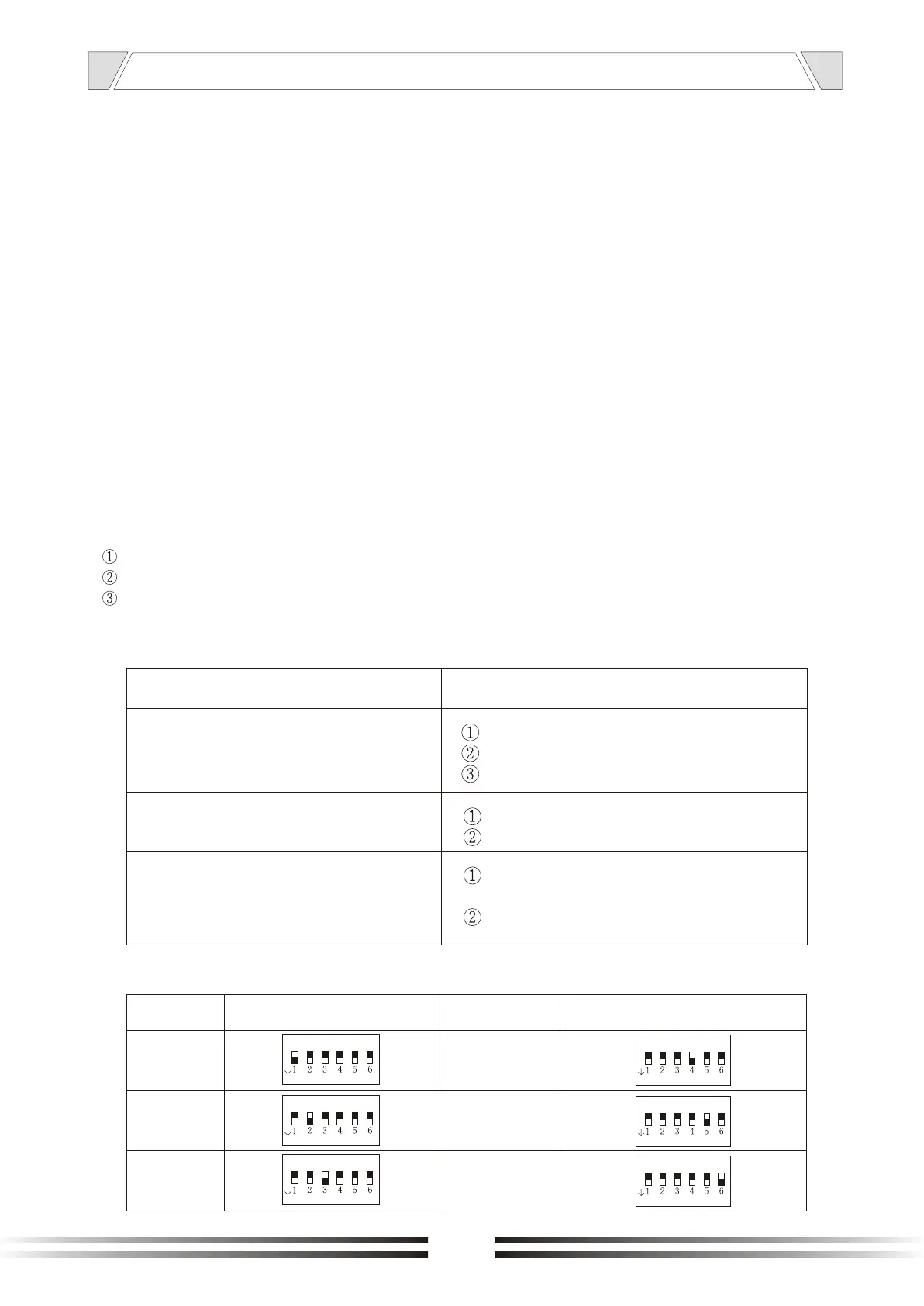
7. ID consol address set
ADDRESS
DEFINITION
1
2
3
ON
ON
ON
4
5
6
ADDRESS
ON
ON
ON
DEFINITION


 To Next Page