5.9 Alarm voice replacement
1. Remove the TF card from the host and use a specialized card reader.
2. Plug in the computer, open the U disk, there are several folders.
3. Folder definition:
(1) ALERT: warning voice folder
(2) EVAC0: evacuation voice folder
(3) PROMT: prompt voice folder
(4) Other folders: ...
4. Put the voice file that needs to be replaced into the corresponding folder, delete the original
voice file.
Note: The replaced voice file must be in .MP3 format, with a code rate ≤192kbps, named after
English characters.
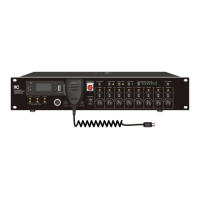
5.10 Built-in MP3 player operation method
Press the MODE button to select the USB mode, copy the MP3 file in the U disk (below 32G),
and it supports MP3 / WAV / WMA / AEC / FLAC format.
Insert a TF card (below 32G) to copy the MP3 file, and it supports MP3 / WAV / WMA / AEC /
FM (Radio reception) function
Press the MODE button to select the FM mode, and then long press the PLAY / PAUSE button to
automatically receive the radio station. The radio stations received (depending on the sound
received) depends on the venue.
In USB or TF card mode, play a song at will, press the mode button to switch between REPeat
One / REPeat ALL / Random / REpeat Floder.


 To Next Page