
 Need help?
Do you have a question about the iTechworld iTECHDCDC20 and is the answer not in the manual?
Explains how to operate the charger using DC power input and its charging behavior.
Details the function, setup, and requirements for solar charging with the device.
Describes the meaning of the indicator lights on the charger's front panel.
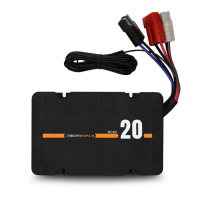
The iTECHDCDC20 is a sophisticated multi-stage dual input charger designed for in-vehicle use, specifically for charging DC batteries. It utilizes a push-button switch mode, allowing it to cater to various battery chemistries, including Lead acid, AGM/GEL, calcium, and lithium batteries. This versatility makes it a suitable charging solution for a wide range of auxiliary battery setups in vehicles, campers, and caravans.
One of the primary functions of the iTECHDCDC20 is its fully automatic high-frequency multi-stage charging process. This ensures that batteries are charged efficiently and safely, optimizing their lifespan and performance. The charger incorporates pulse mode technology, which is designed to reduce oxidation within the battery, even out electrolyte consistency, and minimize temperature fluctuations during the charging process. These features contribute to a healthier battery and more effective charging.
The iTECHDCDC20 is built with durability in mind, featuring a heavy-duty aluminum case and robust mounting brackets. This construction ensures that the charger can withstand the rigors of in-vehicle environments, including vibrations and varying temperatures. Its IP67 rating signifies that it is fully waterproof and dustproof, further enhancing its resilience and allowing for installation in locations where it might be exposed to the elements.
A key user-friendly feature of the iTECHDCDC20 is its easy push-button charge profile selection. This allows users to quickly and conveniently select the appropriate charging profile for their specific battery type. Once a battery type is selected, the charger benefits from a power cut memory function, meaning it will retain the chosen battery type even after power interruptions until it is manually changed. This eliminates the need to reconfigure the charger every time the vehicle is started or power is cycled.
The charger incorporates internal temperature monitoring and power output control. This intelligent system ensures that the charger operates within safe temperature limits, preventing overheating and protecting both the charger and the battery from potential damage. In the event of excessive internal temperature, the charger can adjust its power output to maintain safe operation.
For user feedback, the iTECHDCDC20 is equipped with LED indicators that display the state of charge. These indicators provide clear visual cues regarding the charging status, including whether the charger is powered on, actively charging, fully charged, or receiving solar input. Different colors and states of these LEDs communicate important information, such as a red LED for power on, a red LED for charging, a green LED for full charge, and a red LED for solar input. A blue LED indicates the currently selected battery chemistry, making it easy to confirm the chosen profile.
Safety is a paramount consideration in the design of the iTECHDCDC20. It includes multiple protection mechanisms to safeguard the battery and the vehicle's electrical system. These include overcharging protection, short circuit protection, and temperature protection. Additionally, it features reverse polarity protection, which prevents damage if the battery connections are accidentally reversed. Thermal overload protection and solar input overload protection further enhance the safety features, ensuring reliable operation under various conditions.
The iTECHDCDC20 offers dual input capabilities, allowing it to charge the auxiliary battery from either the vehicle's alternator (DC input) or a solar panel (solar input). When charging from the DC input, the charger will begin to charge the auxiliary battery once the main starting battery reaches 12.8V. If the vehicle's ignition is switched off and the main starting battery falls below 12.4V, the charger will automatically switch off to prevent draining the starting battery.
For solar charging, the iTECHDCDC20 features an MPPT (Maximum Power Point Tracking) solar input. MPPT technology optimizes the power harvest from solar panels, ensuring maximum efficiency even under varying light conditions. When the vehicle is not running, the charger will automatically transfer to solar mode if a solar panel is connected to the solar input section. It requires a solar input voltage of 16V to 25V, and importantly, the connected solar panel must be unregulated for proper operation with the iTECHDCDC20. To maintain a solar charge, the iTECHDCDC20 requires a minimum of 25 Watts of solar input.
The charger also includes an optional ignition override cable. This cable can be wired into the vehicle's ignition or accessory circuit, particularly useful for vehicles equipped with smart alternators. When the ignition is switched on, this feature forces DC charging, lowering the charge cut-in voltage to 11.50V and the low voltage cut-off to 10.80V, ensuring consistent charging even with modern alternator systems.
Maintenance of the iTECHDCDC20 primarily involves ensuring secure and tight electrical connections. The user guide emphasizes checking all connections during installation and periodically thereafter. In terms of operation, if the auxiliary battery is fully charged, the charger enters a maintenance mode, providing a charging current between 0.1A and 10A. It will only return to full charging mode once the auxiliary battery drains down to 12.6 Volts. To manually force a recharge, users can simply disconnect and reconnect the auxiliary battery from the iTECHDCDC20.
Troubleshooting guidance is provided through the charger's beeping sounds and LED indicators. If the iTECHDCDC20 beeps without any flashing lights, it suggests checking the polarity of the auxiliary battery. If it beeps and the red power LED flashes, this indicates a fault with the auxiliary battery, prompting users to double-check wiring and electrical connections, and potentially consider battery replacement. This diagnostic feedback helps users quickly identify and address potential issues, ensuring the continued optimal performance of their charging system.
 General
| Maximum Charging Current | 20A |
|---|---|
| Cooling | Fan Cooled |
| Battery Type | Calcium |
| Operating Temperature | -20°C to 50°C |
| Protection Features | Reverse Polarity |
| Output Voltage | 12V |

 To Next Page