This document provides the user manual for the itek 4K Action Sports Camera, Model I67003. It covers technical specifications, documentation, warranty information, product safety guidelines, contents of the box, assembly instructions for accessories, charging and battery replacement, Wi-Fi connectivity, and operational modes including video, photography, slow-motion, and settings. Troubleshooting and cleaning/care instructions are also included, along with electrical safety and disposal information.
Function Description
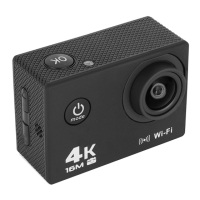
The itek 4K Action Sports Camera is a versatile device designed for capturing high-quality video and photographs in various environments, including sports and outdoor activities. It supports 4K video recording and high-resolution still images. Key functionalities include:
- Video Recording: Capture videos in multiple resolutions including 4K 30fps, 2.7K 30fps, 1080p 60fps, and 720p 120fps. It also features loop recording and sound recording options.
- Photography: Take still photographs with resolutions up to 16M. Features include self-timer, auto-shot, and drama shot modes.
- Slow-Motion and Time-Lapse: Specialized modes for capturing slow-motion video and time-lapse photography.
- Wi-Fi Connectivity: Connects to smart devices via Wi-Fi using the dedicated Sports XVD app (available on Google Play and Apple Store) for remote control, live preview, media management (viewing, downloading, deleting), and sharing.
- Media Playback: View captured photos and videos directly on the camera's built-in screen or on a compatible computer/smart device using a Micro SD/TF card.
- Settings Customization: Adjust various camera parameters such as video resolution, photo resolution, exposure, white balance, image rotation, driving mode, Wi-Fi, light source frequency, LED indicator, auto screensaver, auto shutdown, time watermark, language, date/time, format, and factory reset.
The camera is designed to be used with a waterproof case, making it suitable for water-based activities. A range of accessories is included for mounting the camera in different scenarios, such as on bicycles or helmets.
Important Technical Specifications
- Description: 4K Action Sports Camera
- Model: I67003
- Power: 3.7V
- Output: 5V/0.5A
- Battery: Rechargeable 900mAh
- Video Resolutions: 4K 30fps, 2.7K 30fps, 1080p 60fps, 720p 120fps
- Photo Resolutions: 2M, 5M, 8M, 12M, 16M
- Storage: Micro SD/TF card (no internal storage)
- Connectivity: Wi-Fi, Micro USB, HD Out port
- Wi-Fi Network ID: 'i67003'
- Wi-Fi Security Password: '0123456789'
- Display: Built-in screen
- Controls: OK button, Up key, Power ON/OFF button, Down key
- Audio: Speaker, Microphone
- Dimensions: Not specified, but implied to be compact for action sports.
Usage Features
- User-Friendly Interface: The camera features a simple control panel with dedicated buttons for navigation and mode selection.
- Multi-Mode Operation: Easily switch between Video, Photography, Slow-Motion/Time-Lapse, View/Gallery, and Settings modes using the Power ON/OFF/Mode Selection button.
- Zoom Functionality: Zoom in and out of images using the 'Up' and 'Down' buttons.
- Remote Control via Wi-Fi: Control the camera, preview footage, manage files, and share content wirelessly through the Sports XVD app on a smartphone or tablet.
- Battery Management: The rechargeable battery is removable, allowing for easy replacement. The unit can also be used while charging.
- Accessory Compatibility: Comes with a variety of mounts and supports (waterproof case, bicycle bracket, helmet mount, back clip, switch support, commutator, pedestal, bandage, straps) for diverse applications and secure attachment.
- Media Deletion: Files can be deleted directly from the camera's menu without needing to transfer them to another device.
- Language Support: Multiple language options available in settings, including English, Traditional Chinese, Simplified Chinese, Japanese, Korean, Russian, German, French, Italian, Spanish, Polish, Dutch, Portuguese, and Thai.
- Date/Time Stamp: Option to enable a time watermark on photos and videos.
- Auto Screensaver and Shutdown: Configurable settings to conserve battery life.
Maintenance Features
- Cleaning: The camera requires minimal maintenance. The casing can be cleaned with a damp soft cloth. For stubborn stains, a small amount of detergent can be used. A commercial lens cleaner is recommended for the lens surface to prevent damage.
- Storage: Store the unit in a cool, dry environment away from bright light and dust. It is recommended to remove all media and uninstall the battery if storing the camera for an extended period.
- Battery Replacement: The rechargeable battery is designed to be easily accessed and replaced when needed. Ensure the replacement battery is of the correct type and voltage.
- Troubleshooting Guide: The manual includes a troubleshooting section to address common issues such as the unit not turning on, SD/TF card errors, no sound in videos, low resolution, and Wi-Fi connectivity problems, providing clear solutions for each.
- Warranty: The product comes with a 12-month guarantee from the date of original purchase, covering defects in materials or workmanship. An extended warranty is available upon online registration within 28 days of purchase.
- Customer Support: A dedicated customer support team is available for assistance with appliance problems or spare parts.
- Disposal Information: Adheres to WEEE directive guidelines for the separate disposal of old electrical and electronic appliances, encouraging recycling rather than landfill.


 To Next Page
 General