Playing the CD
Once the CD is loaded press the Play/Pause Button (16)
The LED display will display the track number that is currently playing.
The CD that is playing can be stop at any time by pressing the Stop button then the CD can be
opened.
To Pause the CD whilst playing press the Play/Pause button (16) and the disc will stop
spinning and the LED will ash showing the current position
To restart the CD press the Play/Pause (16)
Skip the CD forward or Backwards
The skip/search function
The skip/search function can be used at anytime when playing a CD
To select the next track press the Next button (15) to forward however if it is the last track
then this function will place this to the beinging of the CD track.
To go back to a previous track press the Back button (13) twice
To go back to the beginning of the CD press the Back button (13) once
If you want to play a particular track press the Next Button (15) untill the track number is
shown in the LED display and then press the Play/Pause button
.
To program track selection
To select this function you must rstly ensure that there is no CD in the tray
Press the program button (12) once .The LED will display “0” and the program LED will ash
Press Next Button or the Back button to display the track number you want to play then
press the Back button (12) once to select the next track the rst track is now saved.
the above steps can be repeated up to a maximum of 20 tracks
When you have made your selection press the Play/Pause Button (16). The program LED will
light up at this point your rst selection will start to play.
Once the selection has played your selection it will stop automatically
To cancel this press the Stop button (17) and open the CD door (18)
To repeat the track selection press the Play/Pause button to play your 1st track press then
press the Repeat button (14) once for a particular track or twice to repeat the whole
selection.
To Repeat a Single Track
Start the CD to play using Play/Pause button press the Repeat button (14) once and the led
will ash and show Repeat one/All now the track playing will repeat untill you decide to stop it
To repeat the whole disc
Start the CD to play using Play/Pause button press the Repeat button (14) twice and the
led will ash and show Repeat one/All now the track playing will repeat untill you decide to
stop it
Please ensure that you do not have direct exposure to the laser beam as this may harmful
Using the Cassette Player
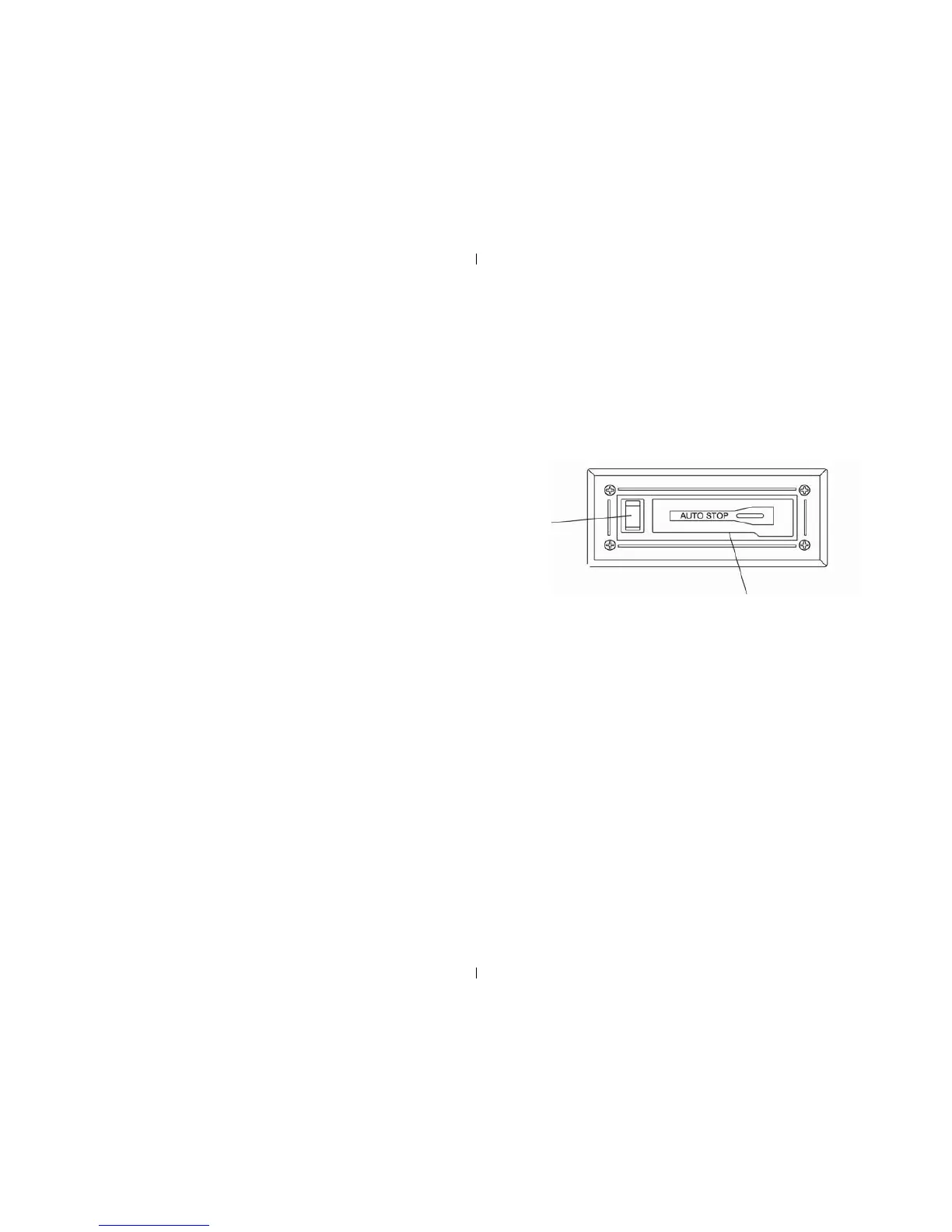
Turn the function knob to the cassette function.
Put the cassette tape into the slot (22) and it will start to play.
To fast forward the tape press the Fast Forward /Eject button (21) gently till
it reaches the rst position.
To eject the tape press the Fast Forward /Eject (21) button in fully.
When the tape has reached the end the player will automatically stop.
Fast Forward /
Eject (21)
Cassette Slot
(22)
Cleaning and & Maintenance
Cleaning CDS
Use a soft cloth to wipe off any ngerprints and dust from the disc surface.
Wipe in a straight line from the centre to the outside of the disc. Small dust particles and light
stains will not affect reproduction quality.
Never use chemicals such as record sprays, anti-static sprays, benzene or thinners to clean your
CDs.
To reduce the risk of scratches, please put the CD back into the bag after using.
Do not expose CDs to direct sunlight, high humidity or high temperatures for long periods.
Do not stick paper or write anything on either side of the CD.
Only discs displaying this symbol can be played on this unit.
Cleaning the Lens
A dirty lens will cause sound skipping and, if the lens is very dirty, the CD may not work
Please use a CD cleaning disc.


 To Next Page
 Loading...