17
17
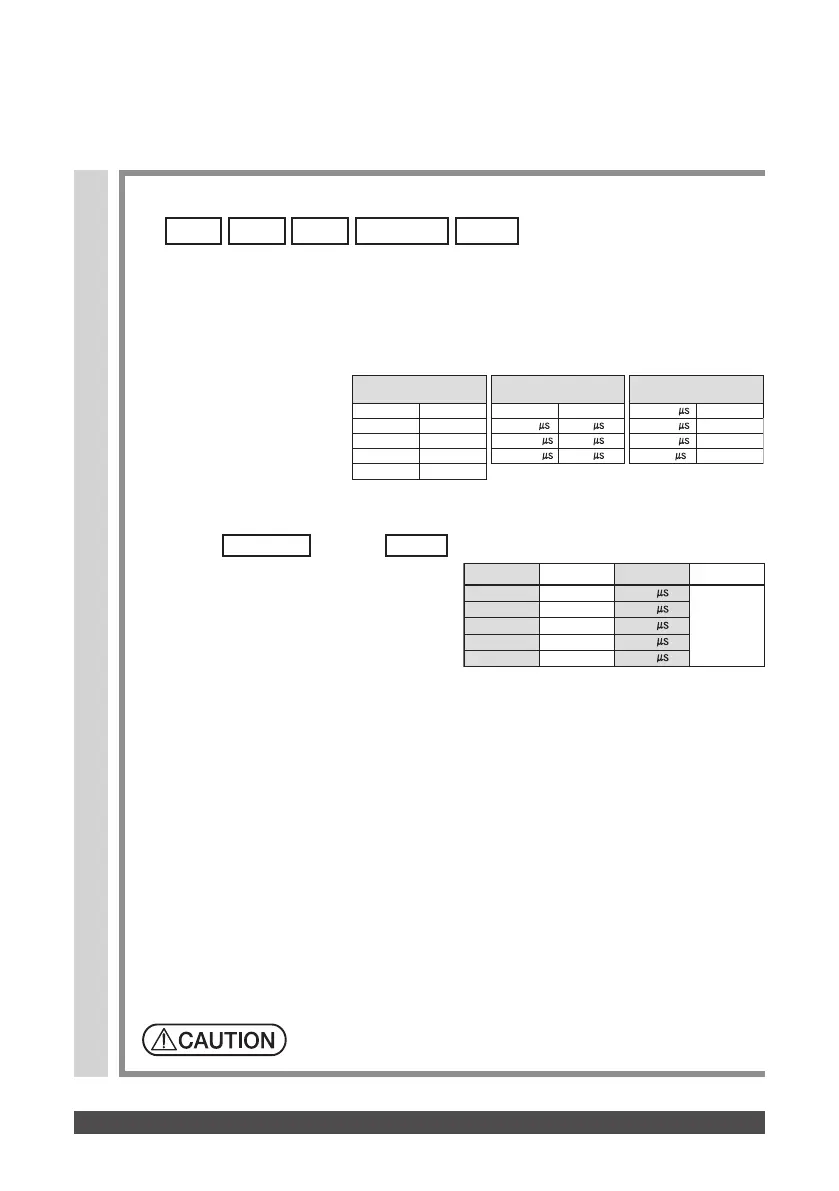
① When the unit is turned on for the first time, the initial settings of the unit are
as specified below. To change a parameter values, use the Frequency key,
Phase duration key, or Timer key, as appropriate.
② As the unit stores the latest data used in each mode for the immediately
previous treatment, it is automatically set to that data in subsequent
treatment sessions.
※ The stored data consists of the output mode used in the previous treatment and the relevant
parameter values.
③ Upon completion of setting the parameter values, operate the Output
intensity knob to increase the output intensity. The treatment will begin.
Increase output intensity gradually to avoid shock to the patient.
Precautions on changing parameter values:
Initial setting
While the mode or
mode is activated, the unit displays the
Fast frequency. When the Fast frequency
is set to the desired value, the Slow
frequency is automatically set to one-
third of the set Fast frequency.
Fast+Slow
Sweep
■When a free programmable mode such as
, or the like is selected
Fast+Slow SweepSurgeBurstConst
MODE FREQUENCY
PHASE DURATION
TIMER
Constant 3 Hz
Burst 2 Hz
Surge 10 Hz
15 min
Fast+Slow 3 Hz/10 Hz
Sweep 3 Hz/10 Hz
300
250
250
150
150
Note:
During the treatment, the display alternates the Fast frequency and Slow frequency.
Phase duration settings
Range
50−100
Unit
10
100−200 25
200−400 50
Phase durations for
the frequency ranges
50−400
50−200
0.5−90 Hz
100−200 Hz
50−100 225−350 Hz
50−80 400−500 Hz
Frequency settings
Range
1−10 Hz
Unit
1 Hz
10−100 Hz 10 Hz
100−250 Hz 25 Hz
250−500 Hz 50 Hz
Phase duration
50−400
50−200
0.5−90 Hz
100−200 Hz
50−100 225−350 Hz
50−80 400−500 Hz
Phase duration settings
Range
50−100
Step
10
100−200 25
200−400 50
Frequency settings
Range
1−10 Hz
Step
1 Hz
10−100 Hz 10 Hz
100−250 Hz 25 Hz
250−5000 Hz 50 Hz
Setting units and setting ranges for the parameters
The unit will emit the sound for 10 seconds to indicate the end of treatment,
automatically turning off in 5 minutes if no action is taken.
The table right lists setting
units for frequency and phase
duration, and available phase
duration for frequency range.


 To Next Page