18
18
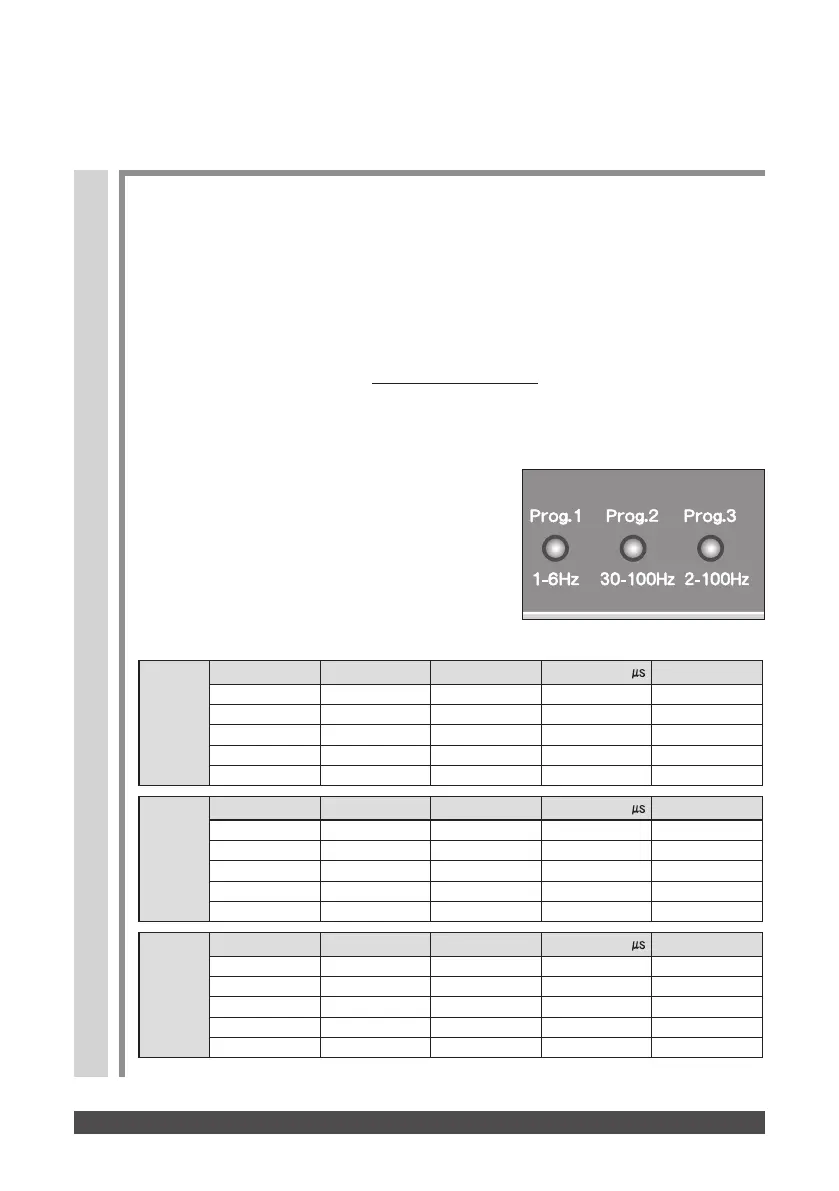
■ When a preset program mode such as Random program
1, 2, 3, etc., is selected
Prog3
2−100 Hz
1 Constant 20 2
2 Fast+Slow 2/6 4
3 Surge 100 3
4 Sweep 3−10 3
5 Constant 70 3
150
100
300
100
400
Prog2
30−100 Hz
1 Constant 80 2
2 Surge 100 3
3 Fast+Slow 30/90 4
4 Sweep 33−100 3
5 Constant 70 3
150
150
150
150
150
Prog1
1−6 Hz
STEP MODE
FREQUENCY(Hz)
TIMER(min)
1 Constant
2 Fast+Slow 2/6 4
3 Burst
4 Sweep 1−5 3
5 Constant
PHASE DURATION
( )
PHASE DURATION
( )
PHASE DURATION
( )
STEP MODE
FREQUENCY(Hz)
TIMER(min)
STEP MODE
FREQUENCY(Hz)
TIMER(min)
300
150
150
50
300
To prevent habituation to stimulation, the unit comes equipped with three preset
programs: the Slow-frequency, Fast-frequency and Slow+Fast-frequency
programs. These programs have their respective parameters preset as shown
below. To change the preset data, use the Frequency key, Phase duration key,
or Timer key, as appropriate during the treatment.
Note:
The parameters changed will be canceled when the treatment is terminated except the timer set.
Preset Parameters in Random Programs


 To Next Page