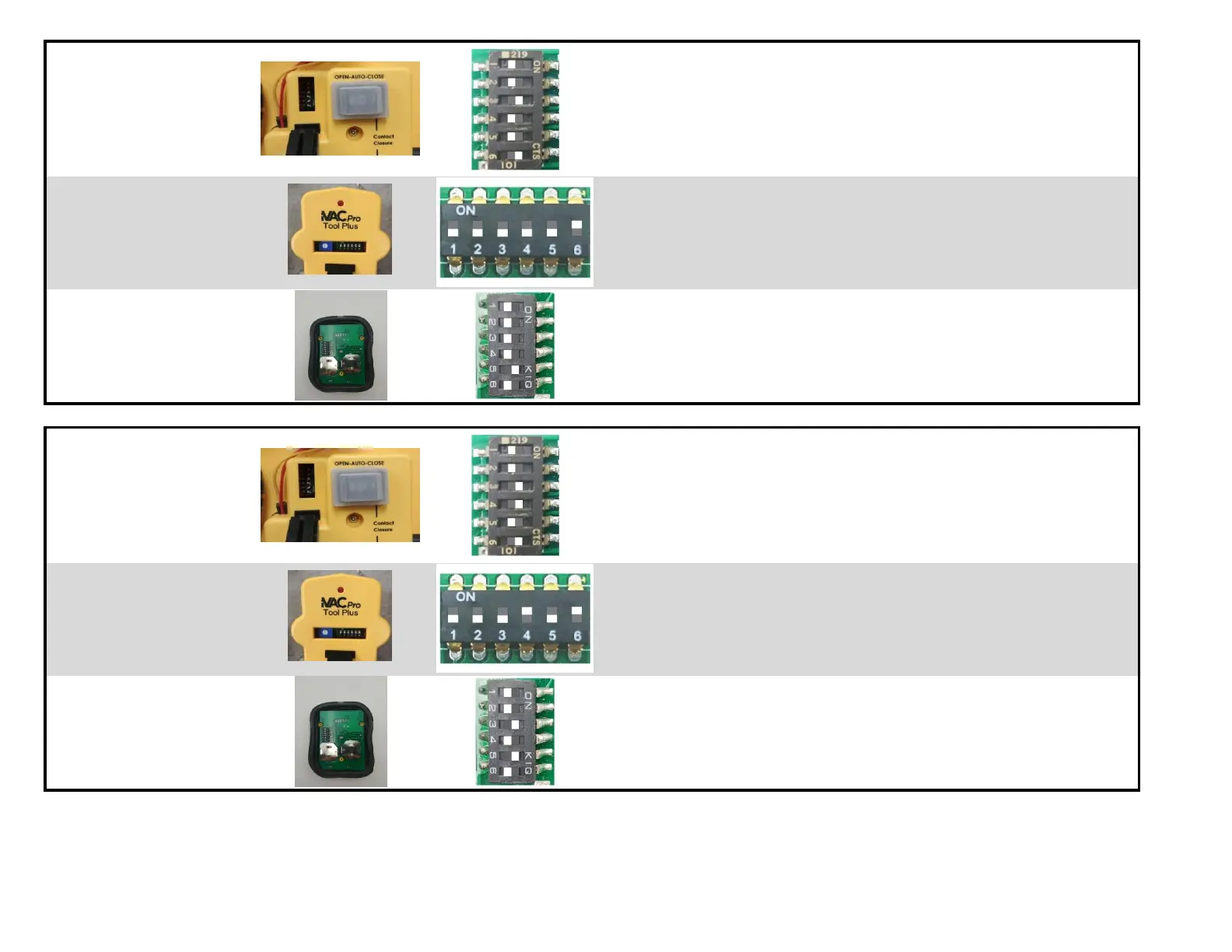
Set to System Address A (S1 = OFF, S2 = OFF)
Set to Tool Address A4 (S4 = OFF, S5 = OFF, S6 = ON)
Set Delay Time to 5sec (S3 = ON)
Test it manually - Open / Close Gate A4
Set Delay Time to your preference
Set Mode to Auto - Ready to work with other iVAC modules
Set to System Address A (S1 = OFF, S2 = OFF)
Set to Tool Address A4 (S4 = OFF, S5 = OFF, S6 = ON)
Test it manually - ON / OFF to control Gate A4 and Switch A
Test Auto Mode with tool A4 to control Gate A4 and Switch A
Set to System Address A (S1 = OFF, S2 = OFF)
Set to Tool Address A4 (S3 = OFF, S4 = OFF, S5 = ON)
Test it manually - ON / OFF to control Gate A4 and Switch A
Set to System Address A (S1 = OFF, S2 = OFF)
Set to Tool Address A5 (S4 = ON, S5 = OFF, S6 = ON)
Set Delay Time to 5sec (S3 = ON)
Test it manually - Open / Close Gate A5
Set Delay Time to your preference
Set Mode to Auto - Ready to work with other iVAC modules
Set to System Address A (S1 = OFF, S2 = OFF)
Set to Tool Address A5 (S4 = ON, S5 = OFF, S6 = ON)
Test it manually - ON / OFF to control Gate A5 and Switch A
Test Auto Mode with tool A5 to control Gate A5 and Switch A
Set to System Address A (S1 = OFF, S2 = OFF)
Set to Tool Address A5 (S3 = ON, S4 = OFF, S5 = ON)
Test it manually - ON / OFF to control Gate A5 and Switch A


 To Next Page