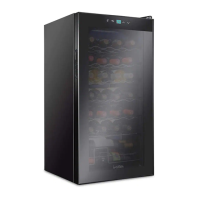
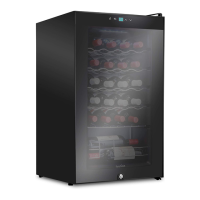
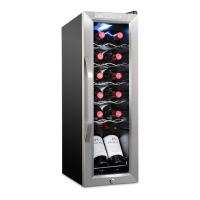
This document serves as a User Guide for Ivation® Freestanding Compressor Wine Coolers, providing essential guidelines for safe operation and maintenance. The product is designed for household use, not commercial, and is covered by a limited one-year warranty.
Function Description
The Ivation Freestanding Compressor Wine Cooler is an appliance designed to store and preserve wine at optimal temperatures. It utilizes an advanced compressor cooling system to create the ideal environment for both red and white wines, helping to maintain their unique flavor and delicacy over time. The cooler protects your favorite bottles from external factors that could compromise their quality.
Usage Features
The wine cooler offers a range of features to enhance its usability and the preservation of your wine collection:
- Temperature Control: The cooler is capable of maintaining red and/or white wines at their proper serving or storage temperatures.
- User Interface: It features one-touch controls and an LCD display for easy operation.
- Interior Lighting: Independent on/off control for interior lighting allows you to illuminate your wine collection as needed. The light automatically turns off after 10 minutes to conserve energy and prevent unnecessary heat generation.
- Temperature Units: Temperatures can be displayed and adjusted in either Celsius or Fahrenheit, with one-degree increments for precise control.
- Shelving: Chrome shelves are designed for easy pull-out, making it convenient to access and organize your bottles.
- Security Features:
- An automatic panel lock helps prevent accidental changes to settings.
- A lockable door provides added security for your wine collection and peace of mind.
- Door Design: The door is made of tempered smoked glass, which protects wines from harmful UV rays.
- Exterior: The cooler features a black metal exterior, offering a sleek and modern aesthetic.
- Insulation: CFC-free solid polyurethane foam insulation ensures efficient temperature retention and environmental responsibility.
- Control Panel Operation (Single Zone Models):
- To unlock the control panel, press the designated button for 2 seconds. A beep will confirm the unlock.
- Adjust the temperature in 1-degree increments using the up and down arrow buttons until the desired temperature is reached.
- To switch between Fahrenheit and Celsius, press the temperature unit button for 2 seconds.
- The interior light can be turned on or off by pressing the light button.
- Control Panel Operation (Dual Zone Models):
- For dual zone models, after unlocking the panel (press button for 2 seconds), press the button once more to select either the upper or lower zone before adjusting the temperature.
- Temperature adjustment, unit switching, and light control follow the same procedure as single zone models.
- Placement: For optimal performance, place the wine cooler on a level surface that can support its full weight when loaded. Ensure the unit is level by checking if a small ball placed on top does not roll. Position the unit in a dry, well-ventilated space with ambient temperatures between 41°F – 90°F (5°C – 32°C). Allow at least 6 inches of space at the back and 10 inches on both sides for proper ventilation. Do not place any objects on top of the unit. The unit requires 2 inches of ground clearance and should not be used without its feet.
- Initial Setup: Before plugging in the wine cooler, allow it to stand upright for 3 hours.
- Normal Operation Sound: It is normal for the wine cooler to produce a whirring sound. This sound will cycle up when the compressor is working harder to chill the wine and cycle down as the temperature stabilizes.
Maintenance Features
Proper maintenance ensures the longevity and efficient operation of your wine cooler:
- De-icing: The unit is equipped with an Auto Defrost feature to prevent ice accumulation. If ice does accumulate, unplug the cooler, allow all ice to melt, remove any water from the unit, and then plug it back in to restart.
- Exterior Cleaning:
- Always unplug the unit before cleaning.
- Do not use abrasive cleaning products.
- Wash the cabinet exterior with mild soap and water, then rinse thoroughly.
- Clean the glass door with glass cleaner or mild soap and water and a soft cloth.
- Wipe the control panel with a damp cloth and dry thoroughly. Avoid cleaning sprays or over-saturation to prevent damage to the panel.
- Interior Cleaning:
- Unplug the unit before cleaning.
- Do not use abrasive cleaning products.
- Clean the door gasket using mild soap or a baking soda solution, rinse well, and apply a thin layer of petroleum jelly to the gasket at the hinge side to prevent sticking.
- Clean the interior of the unit with a warm water and baking soda solution (approximately one tablespoon of baking soda to one quart of water) to clean and neutralize odors.
- Disposal of Old Units: If discarding an old unit, remove its door and leave shelves in place to prevent an entrapment hazard.
Troubleshooting Guidance
The user guide also provides basic troubleshooting steps for common issues:
- Unit Not Working: Check for correct power supply voltage and ensure no circuit breaker has tripped or fuse blown.
- Unit Not Cold Enough: Verify temperature settings are correct. Consider if the room temperature is too high. Check if the door has been opened too frequently or is not fully closed, and inspect the door seal for integrity. Ensure sufficient clearance around the unit.
- Vibration or Excessive Noise: Confirm the unit is on a level, stable surface and that the fan is functioning properly.
- LED Display Not Working or Showing Error: Check if the unit is properly plugged in. If so, professional servicing may be required for a main circuit board issue.
- Buttons Not Working: The control panel may be damaged.

 Need help?
 General

 To Next Page