TROUBLE SHOOTING
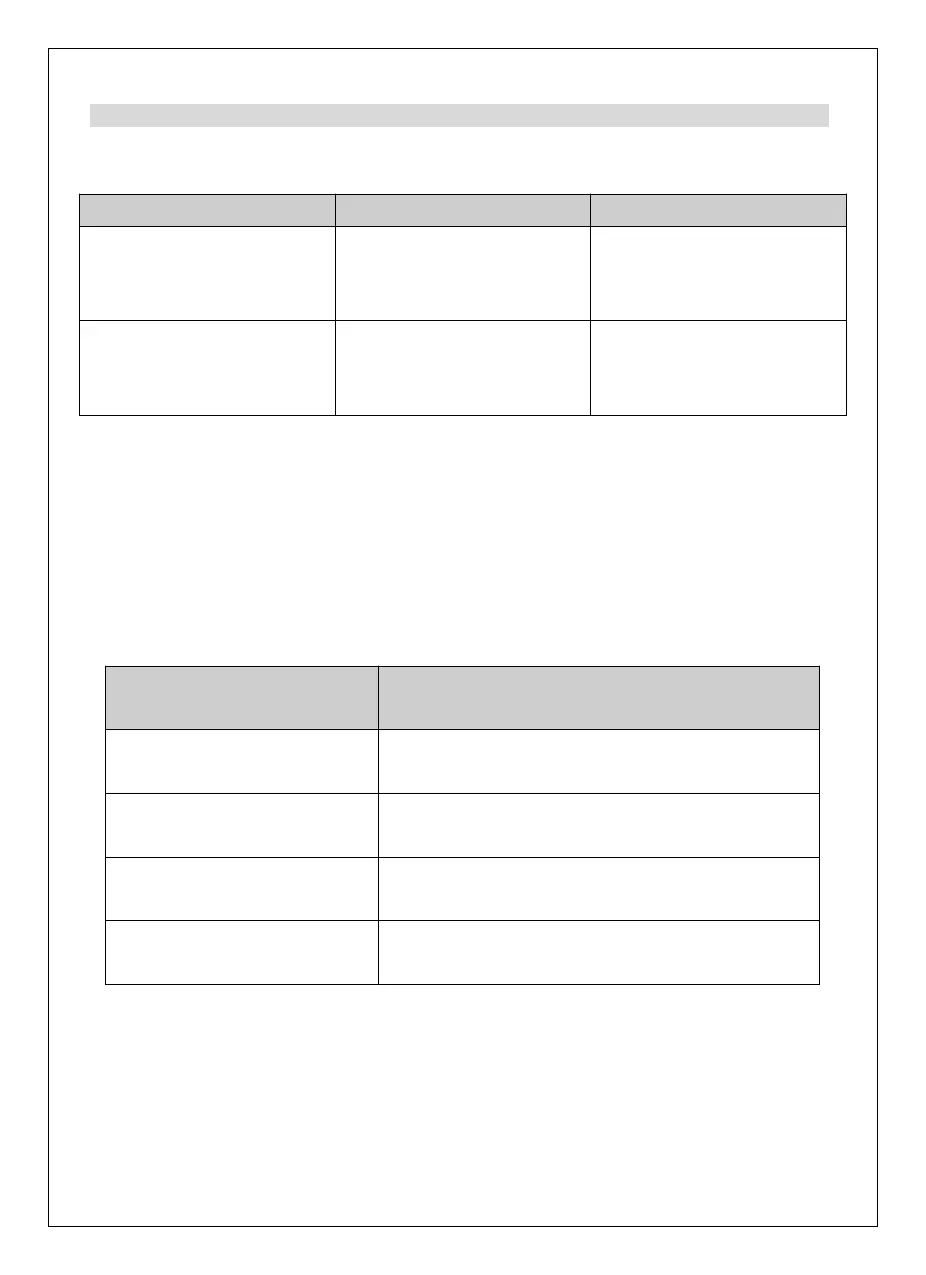
In the unlikely event of difficulties with your appliance please follow the trouble
shooting guide below.
The mains plug is not
plugged in, or the switch is
off.
Insert the mains plug.
Turn the switch on.
Pouch is not exiting the
machine at the other side.
If jammed, can’t reverse
automatically.
Unplug the laminator and
clear the jammed pouch
as per instructions.
Problem Possible cause Solution
NOTE:
The pouch may be jammed inside the unit if the size of the document is too small. It
is highly recommended to follow the below suggestion to add the document into the
pouch for laminating.
Minimum required size of documents in the pouch
A3 303 x 426mm
(80 /100/125 micron)
A4 303 x 216mm
(80 /100/125 micron)
A5 216 x 154mm
(80 /100/125 micron)
card size 65 x 95mm
(80 /100/125 micron)
in



 To Next Page