Need help?
Do you have a question about the Jabra Link 380c MS and is the answer not in the manual?
Explains direct pairing of Jabra devices with computers/softphones and potential functionality loss.
Lists required Bluetooth profiles (HFP/HSP, A2DP) for direct device connection to computers.
Provides steps to resolve issues when pairing Jabra devices directly with computers or softphones.
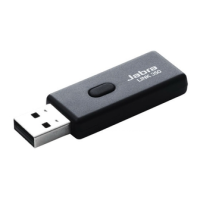
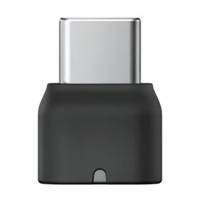
The Jabra Link 380c MS is a USB-C Bluetooth adapter designed to facilitate the connection of Jabra Enterprise Bluetooth devices to computers and softphones. Its primary function is to ensure full functionality and optimal performance of your Jabra headset when used with a computer-based communication system, such as Microsoft Teams or other softphone clients. While it is sometimes possible to pair a Jabra Enterprise Bluetooth device directly with a computer without the adapter, the Jabra Link 380c MS is engineered to provide a more robust and feature-rich experience, ensuring that all call controls and audio functionalities work as intended.
The core function of the Jabra Link 380c MS is to act as a dedicated Bluetooth interface between your Jabra Enterprise Bluetooth headset and your computer. It creates a reliable and optimized Bluetooth connection that supports the necessary profiles for both audio transmission and call control. This adapter is particularly crucial for maintaining the full range of features offered by your Jabra headset, which might otherwise be limited when pairing directly with a computer's built-in Bluetooth. For instance, while direct pairing might allow for basic audio send and receive, critical call control buttons on your headset (like answer/end call, mute, volume adjustments) may not function correctly with softphone clients without the adapter. The Jabra Link 380c MS ensures that these controls are fully integrated and responsive, providing a seamless user experience for professional communication. It supports essential Bluetooth profiles, including the Hands-Free Profile (HFP) or Headset Profile (HSP) for voice communication, and the Advanced Audio Distribution Profile (A2DP) for high-quality audio streaming. These profiles are fundamental for both clear voice calls and enjoying multimedia content through your headset.
Using the Jabra Link 380c MS is designed to be straightforward, enhancing the usability of your Jabra Enterprise Bluetooth device with a computer. The adapter plugs into a USB-C port on your computer, establishing a dedicated Bluetooth connection for your headset. This dedicated connection is optimized for Jabra devices, ensuring better stability and performance compared to generic computer Bluetooth. When the adapter is in use, your Jabra headset will typically be recognized as the primary audio device by your computer and softphone client, simplifying audio routing.
For optimal performance, it is recommended to always use the Jabra Link 380c MS with your Jabra Enterprise Bluetooth device when connecting to a computer. This ensures that all features, including call controls, are fully operational. If you choose to pair directly with a computer without the adapter, it's important to verify that your computer supports the necessary Bluetooth profiles (HFP/HSP and A2DP) to ensure at least basic audio functionality. However, even with profile support, the full range of call controls may still be unavailable.
When pairing your Jabra Enterprise Bluetooth device with the adapter, the process is similar to pairing with a mobile device. You would typically put your headset into pairing mode, and the adapter, once plugged into your computer, will facilitate the connection. This ensures a consistent and familiar pairing experience across different devices. The adapter is particularly beneficial in professional environments where reliable communication and efficient call management are paramount. It minimizes compatibility issues and ensures that your Jabra headset performs as intended with your chosen softphone client.
Maintaining the optimal performance of your Jabra Link 380c MS and the associated Jabra Enterprise Bluetooth device primarily involves ensuring that all components are up to date and correctly configured. This includes keeping the firmware of your Jabra Enterprise Bluetooth device current, as well as ensuring that the Jabra Link 380c MS itself has the latest software updates. Regular updates often include performance enhancements, bug fixes, and improved compatibility with new softphone versions or operating system updates.
For troubleshooting connection issues when using the adapter or when attempting direct pairing, several steps can be taken. First, always verify that the Bluetooth connection is active on your computer. If you encounter persistent issues, removing any previous pairings (both from the computer's Bluetooth settings and from the headset's memory) and then re-pairing the devices can often resolve connectivity problems. Resetting your Jabra device to its factory settings can also be an effective troubleshooting step, as it clears any potentially corrupted settings.
Furthermore, it is crucial to ensure that you have the latest version of your softphone client installed. Outdated softphone software can sometimes lead to compatibility issues with Bluetooth devices, even with the adapter. Finally, always confirm that your Jabra device (whether connected via the adapter or directly) is selected as the primary audio input and output device within both your computer's sound settings and your softphone client's audio settings. This ensures that audio is routed correctly and that your headset is recognized for calls and other audio functions. By following these maintenance and troubleshooting steps, you can ensure a consistent and high-quality experience with your Jabra Link 380c MS and your Jabra Enterprise Bluetooth device.
 General
| Type | USB adapter |
|---|---|
| Product Type | Bluetooth Adapter |
| Connectivity Technology | Bluetooth |
| Bluetooth Version | Bluetooth 5.0 |
| Optimized for | Microsoft Teams |
| Supported operating systems | Windows, Mac OS |
| Wireless Range | 30 meters |
| Connection Type | USB |
| Audio Codec | SBC |

 To Next Page