Need help?
Do you have a question about the Jabra Speak 510+ MS and is the answer not in the manual?
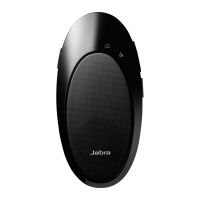
Press and hold the Bluetooth button on the Jabra Speak 510 for 2 seconds to activate pairing mode.
Insert the Link 360; its Bluetooth light flashes blue. Pairing with the Speak 510 may take up to one minute.
Press and hold the Bluetooth button for 2 seconds to initiate pairing mode on the Jabra Speak 510.
Enable Bluetooth on your mobile phone, select 'Jabra Speak 510', and enter '0000' if prompted for a PIN.
Press and hold the Bluetooth button for 8 seconds until it flashes green to enter pairing mode.
Set your Bluetooth headset to pairing mode, then proceed to pair the Jabra Speak 510 with the headset.
 General
| Bluetooth Version | 4.0 |
|---|---|
| Battery Life | Up to 15 hours |
| Microphone Type | Omnidirectional |
| Weight | 195 g |
| Talk Time | Up to 15 hours |
| Speakerphone | Yes |
| Digital Signal Processing (DSP) | Yes |
| Connectivity | USB, Bluetooth |
| Wireless Range | Up to 30 meters |
| Charging Time | Approximately 2 hours |
| Optimized for | Microsoft Teams |
| Speaker Output | 10 Watts |
| Speaker Frequency Range | 250Hz - 14kHz |
| Dimensions | 120 mm x 120 mm x 33 mm |

 To Next Page