Need help?
Do you have a question about the Jabra Talk 25 and is the answer not in the manual?
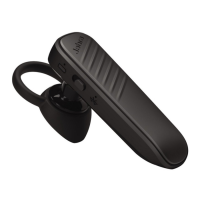
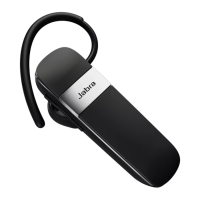
Select from two ergo-designed eargels for optimal fit and comfort.
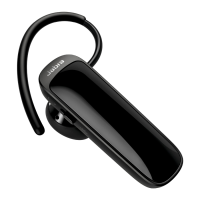
Attach the earhook for a secure fit, with or without an eargel.
The headset can accept and handle multiple calls simultaneously.
Always store the headset safely, avoid extreme temperatures, and do not expose to liquids.
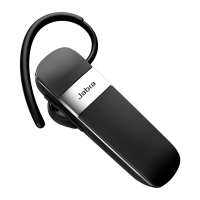
The Jabra Talk 25 is a wireless headset designed for clear communication and media streaming. It offers a blend of functionality, comfort, and durability, making it suitable for everyday use. The headset's primary function is to facilitate hands-free calls, leveraging an omni-directional microphone and a dynamic speaker to deliver clear HD audio, which is dependent on the connected phone's capabilities. Beyond calls, the Jabra Talk 25 allows users to stream various forms of audio from their phone, including music, podcasts, and GPS directions, enhancing its utility for both communication and entertainment on the go.
One of the key usage features of the Jabra Talk 25 is its long-lasting battery life. It is designed to support up to 8 hours of talk time, ensuring that users can engage in extended conversations without frequent recharging. Additionally, the headset boasts an impressive standby time of up to 10 days, which means it can remain ready for use for a considerable period without needing to be powered off or recharged. This extended battery performance makes it a reliable companion for users who are frequently on the move or have limited access to charging facilities.
The headset's design emphasizes user comfort and adaptability. It can be worn on either the left or the right ear, providing flexibility based on individual preference. To further enhance comfort and fit, the Jabra Talk 25 comes with two ergo-designed eargels, allowing users to choose the one that provides the optimal fit for their ear. This customization ensures that the headset remains comfortable even during prolonged use. For a more secure fit, especially during active periods, an earhook can be attached to the headset. This earhook can be used with or without the eargel, offering another layer of personalization for a stable and comfortable wearing experience.
Connecting the Jabra Talk 25 to a Bluetooth device is a straightforward process. Users simply need to turn on the headset using the On/Off switch. Then, by pressing and holding the Answer/End button for three seconds, the headset enters pairing mode, indicated by a flashing blue Bluetooth indicator. Voice-guided instructions are provided to assist users through the pairing process, making it intuitive even for those less familiar with Bluetooth technology. This ease of connection ensures that users can quickly set up their headset and start using it with their smartphone or other compatible devices.
The Jabra Talk 25 features a user-friendly interface with clearly labeled buttons for various functions. The Micro-USB port is used for charging the device. An Answer/End button allows users to manage calls, while On/Off and Volume Up/Down buttons provide control over the headset's power and audio levels. A battery indicator keeps users informed about the remaining power, and a Bluetooth indicator confirms the connection status. These controls are strategically placed for easy access and intuitive operation, contributing to a seamless user experience.
Call management is a core strength of the Jabra Talk 25. Users can answer and end calls with a simple tap of the Answer/End button. For situations where voice dialing is preferred, pressing and holding the Answer/End button for two seconds when not on a call activates the voice dialing feature, provided the phone supports it. Incoming calls can be rejected by double-tapping the Answer/End button. The headset also supports redialing the last number by double-tapping the Answer/End button when not on a call, offering quick access to recent contacts.
Beyond basic call functions, the Jabra Talk 25 is equipped to handle multiple calls simultaneously, a valuable feature for busy professionals or individuals who frequently receive calls. Users can end a current call and answer an incoming one by tapping the Answer/End button. To switch between a held call and an active call, or to put a current call on hold and answer an incoming one, a press and hold (2 seconds) of the Answer/End button is required. Incoming calls can be rejected by double-tapping the Answer/End button, providing comprehensive control over call flow.
Audio control is also intuitive. The Volume Up and Volume Down buttons allow users to adjust the speaker volume to their preferred level. For privacy or to manage background noise, the microphone can be muted or unmuted by tapping both the Volume Up and Volume Down buttons simultaneously. This feature is particularly useful in noisy environments or during conference calls where temporary muting is necessary.
For enhanced functionality and support, Jabra offers the Jabra Assist app. This application provides several useful features, including "Find my headset," which helps users locate a misplaced device. The app also offers a "Message readout" feature, allowing users to have their messages read aloud, which is convenient when hands are occupied. Additionally, the Jabra Assist app provides access to manuals for all supported Jabra devices, offering comprehensive help at users' fingertips. This app integration adds significant value by extending the headset's capabilities and providing convenient support resources.
Maintenance of the Jabra Talk 25 is straightforward, focusing on ensuring its longevity and optimal performance. Users are advised to always store the headset with the power off and in a safely protected manner to prevent damage. It is crucial to avoid storing the headset at extreme temperatures, specifically above 35°C (95°F) or below -20°C (-4°F). Exposure to such temperatures can significantly shorten the battery life and potentially affect the overall operation of the headset. Furthermore, to protect the internal components and ensure continued functionality, the headset should not be exposed to rain or other liquids. Adhering to these simple care instructions will help maintain the Jabra Talk 25 in good condition and extend its operational lifespan.
 General
| Driver unit | 11 mm |
|---|---|
| Ear coupling | Intraaural |
| Headphone frequency | 300 - 7000 Hz |
| Microphone mute | Yes |
| Microphone type | Boom |
| Microphone frequency | 100 - 800 Hz |
| Microphone direction type | Omnidirectional |
| Cables included | USB |
| Eartips material | Silicone |
| Accessories included in set | 3 sizes silicone eartips |
| Battery type | Built-in battery |
| Standby time | 240 h |
| Battery recharge time | 2 h |
| Headset type | Monaural |
| Product type | Headset |
| Product color | Black |
| Wearing style | Ear-hook, In-ear |
| LED indicators | Bluetooth, Power |
| Operating keys | Volume +, Volume - |
| Volume control | Button |
| Recommended usage | Calls/Music |
| Number of simultaneously connected devices (max) | 2 |
| Operating temperature (T-T) | 0 - 45 °C |
| USB connector | Micro-USB |
| Wireless range | 30 m |
| 3.5 mm connector | No |
| Bluetooth version | 4.0 |
| Bluetooth profiles | A2DP |
| Connectivity technology | Wireless |
| Voice guidance languages | English |
 Weight and Dimensions
| Depth | 16.6 mm |
|---|---|
| Width | 1.66 mm |
| Height | 47.1 mm |
| Weight | 8.2 g |

 To Next Page