Need help?
Do you have a question about the Jabra Talk 15 and is the answer not in the manual?
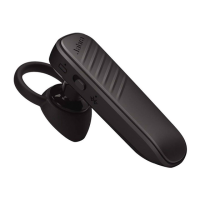
Details the physical parts of the Jabra Talk 15 headset, including buttons and ear gels.
Lists technical specifications like talk time, standby time, Bluetooth version, weight, and operating range.
Instructions on how to charge the headset using a USB cable and understanding the indicator lights.
Steps to manually set the headset to pairing mode for connecting with a new phone.
Explains automatic connection after initial pairing and how to reconnect if devices are not immediately linked.
Instructions on answering and ending incoming or active calls using the headset button.
How to reject calls, handle call waiting, and place active calls on hold.
Guidance on initiating calls, voice dialing, and redialing the last number.
How to adjust the headset's volume and mute/unmute the microphone during calls.
Explains the meaning of lights for Bluetooth connection status and battery level.
Explains the voice prompts for connection status, low battery, and redialing.
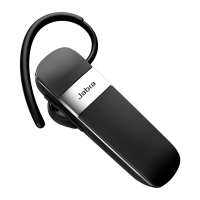
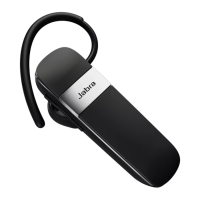
The Jabra Talk 15 is a Bluetooth® wireless technology headset designed for hands-free communication and audio playback. This user manual provides comprehensive instructions for setting up, using, and maintaining the headset, ensuring users can maximize its features for a seamless audio experience.
The Jabra Talk 15 serves as a versatile communication device, enabling users to manage calls and listen to audio wirelessly. Its primary functions include answering, ending, and rejecting calls, as well as facilitating voice dialing and last number redialing. The headset supports call waiting, allowing users to handle multiple calls simultaneously. A key feature is Multiuse™, which permits connection to two Bluetooth® devices at the same time, offering flexibility for users with multiple mobile phones or other Bluetooth-enabled devices. The headset also boasts HD call quality and the ability to stream music, enhancing both communication clarity and entertainment.
Getting started with the Jabra Talk 15 involves a few simple steps: charging the headset, activating Bluetooth® on your mobile phone, and pairing the headset with your phone. The headset is designed for ease of operation, with an answer/end button that performs various functions based on the duration of the press. A brief tap answers a call, a double tap initiates last number redialing, a 1-second press performs a standard action, and a 5-second press is typically used for specific settings or pairing.
Charging the headset is straightforward using the supplied USB cable. A solid red light on the battery indicator signifies charging, while a solid green light for five minutes indicates a full charge before turning off. It is recommended to fully charge the headset for two hours before initial use.
Turning the headset on and off is controlled by a simple slide switch. Sliding the on/off button towards the “I” symbol turns the headset ON, causing both indicators to flash on the Jabra StatusDisplay™. Sliding it towards the “O” symbol turns the headset OFF.
Pairing the headset with a phone is a crucial step for wireless functionality. When turned on for the first time, the Jabra Talk 15 automatically enters pairing mode, making it discoverable to your phone. The Bluetooth® status indication on the StatusDisplay™ will flash during this mode. Users need to set their Bluetooth® phone to 'discover' new devices, typically found in the phone's 'setup,' 'connect,' or 'Bluetooth' menu. Once discovered, the headset will appear as "Jabra Talk 15." To complete pairing, accept the connection on the phone, and if prompted, enter the passkey or PIN "0000." A successful pairing is confirmed by the Bluetooth® status indication shifting from flashing to a steady light, and the headset's voice guidance announcing "connected."
For manual pairing, if the process is interrupted or if you wish to connect to a different phone, ensure the headset is on, then press and hold the answer/end button for approximately 5 seconds until the Bluetooth® icon changes from a steady light to a flashing light. Then, repeat the discovery and pairing steps. Once paired, the headset and phone will automatically connect when both devices have Bluetooth® activated and the headset is on. If they don't connect immediately, a tap on the answer/end button will establish the connection, confirmed by the Bluetooth® connection icon being constant for 3 seconds and the voice guidance saying "connected."
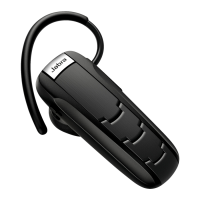
The Jabra Talk 15 offers flexible wearing styles, usable with or without the ear hook. The ear hook is removable, allowing the headset to be worn with just the eargels. The eargels come in two styles and can be twisted slightly for optimal fit and comfort, accommodating both left and right ear wearing. For best performance, it is advised to wear the headset and mobile phone on the same side of the body or within the line of sight, minimizing obstructions for a stronger connection.
Call management features include answering calls with a tap of the answer/end button, ending active calls with another tap, and rejecting incoming calls by pressing the answer/end button when the phone rings. Depending on phone settings, rejected calls may be forwarded to voicemail or result in a busy signal. When making a call from the mobile phone, the audio typically transfers automatically to the headset; if not, a tap on the answer/end button will transfer the call. Voice dialing can be activated by pressing the answer/end button, leveraging the mobile phone's voice-dialing function. Last number redialing is performed by double-tapping the answer/end button when the headset is on and not in use.
Volume adjustment is done by tapping the volume up or down buttons. The headset also supports mute/un-mute functionality: pressing both volume buttons simultaneously mutes the call, indicated by a low beep alert, and tapping either volume button un-mutes it. Call waiting and placing calls on hold are also supported, allowing users to manage multiple conversations.
The Jabra StatusDisplay™ provides visual cues for the headset's status. The Bluetooth® indicator shows a solid light when connected to a phone and a flashing light when in pairing mode. The battery indicator displays a green light for more than 30 minutes of talk time remaining and a red light for less than 30 minutes. To conserve battery, the StatusDisplay™ turns off after 3 seconds but can be reactivated with a tap on any button when not on a call.
Voice guidance offers audible feedback for key events. It announces "connected" when a connection is established, "low battery" when less than 30 minutes of talk time remain, and "redialing" when the MFB button is double-tapped for redial.
The Jabra Talk 15 supports connection to two mobile phones simultaneously (Multiuse™). To use this feature, the headset must be paired with both phones. Once paired, ensure the headset is on and Bluetooth® is enabled on both phones, and the headset will automatically connect to both. It's important to note that Last Number Redial will dial the number from the last outgoing call regardless of which phone it originated from, and the Voice Dialing function will only work with the last paired mobile phone.
Proper care of the Jabra Talk 15 ensures its longevity and optimal performance. Always store the headset with the power off and in a safely protected manner. Avoid exposing the headset to extreme temperatures, both high (above 45°C/113°F, including direct sunlight) and low (below -10°C/14°F), as this can shorten battery life and degrade overall operation. Additionally, the headset should not be exposed to rain or other liquids. To maintain battery health, it is recommended to recharge the device at least once a month, as leaving it uncharged for extended periods can significantly reduce its battery lifetime.
 General
| Driver unit | 11 mm |
|---|---|
| Ear coupling | Intraaural |
| Headphone frequency | 300 - 7000 Hz |
| Microphone mute | Yes |
| Microphone type | Boom |
| Microphone frequency | 100 - 800 Hz |
| Microphone direction type | Omnidirectional |
| Cables included | USB |
| Eartips material | Silicone |
| Accessories included in set | 3 sizes silicone eartips |
| Battery type | Built-in battery |
| Standby time | 336 h |
| Battery recharge time | 2 h |
| Headset type | Monaural |
| Product type | Headset |
| Product color | Black, Silver |
| Wearing style | Ear-hook, In-ear |
| Volume control | Digital |
| Recommended usage | Calls/Music |
| Number of simultaneously connected devices (max) | 2 |
| Operating temperature (T-T) | 0 - 45 °C |
| USB connector | Micro-USB |
| Wireless range | 10 m |
| 3.5 mm connector | No |
| Bluetooth version | 3.0 |
| Bluetooth profiles | A2DP |
| Connectivity technology | Wireless |
| Voice guidance languages | English |
 Weight and Dimensions
| Depth | 16.6 mm |
|---|---|
| Width | 2.42 mm |
| Height | 53.5 mm |
| Weight | 8.9 g |


 To Next Page