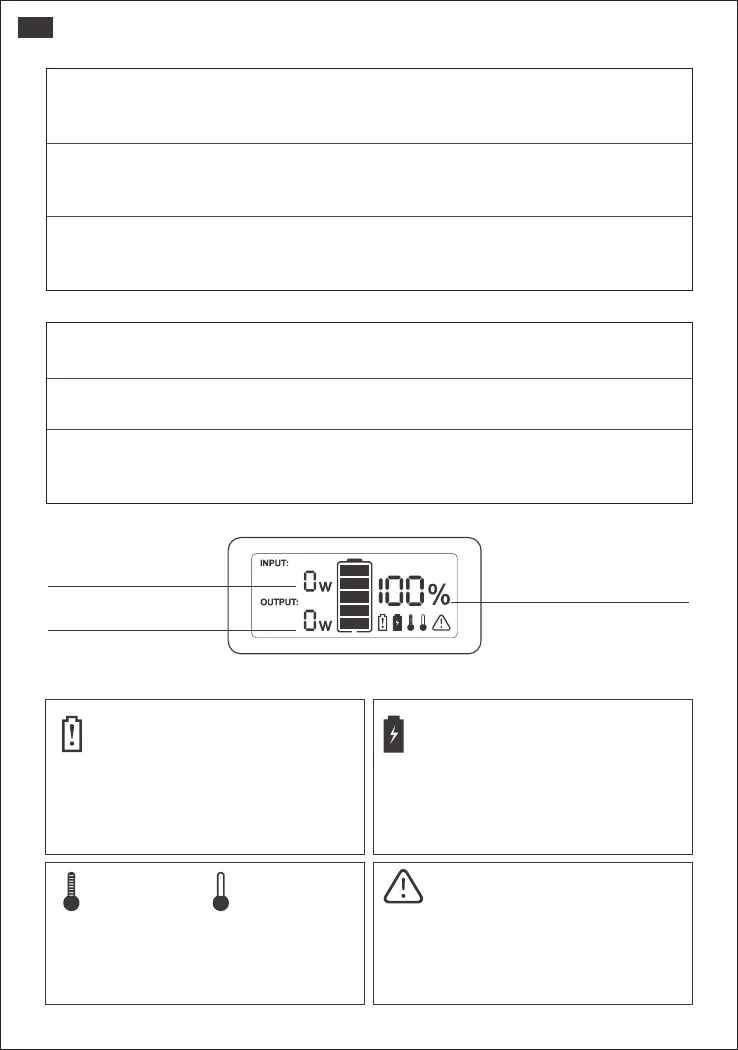
If you operate the power station in improper way, there will be appearing symbols
on LCD screen.
•Attention
Input Power
Output Power
Power Display
High
Temperature
Low
Temperature
Over-loaded
Battery was overcharged
Battery has been drain out
It shows that the battery has been drain
out. Please kindly charge it to 100% and
then use it. A warming tip: It's suggested to
recharge the battery before the power
drops below 15%. Please don't drain out
the battery.
It shows that the battery was
overcharged.
Please try to hold the display power
button for 8s to reset the battery and try
to charge to see.
It shows that the battery is used in a high
or low temperature. Please charge, use
and store the E300 within a ambient
temperature 0℃-40℃ (32°F-104°F).
It shows that the power station is
over-loaded, please kindly check the
power of your device and hold the
display power button for 8s to reset the
battery and try to charge to see.
•Other
How to reset the Explorer 300
Please try to hold the display power button for 8s to reset the battery.
When should we need to reset the power station?
When the power station can't work properly, you can choose to reset the battery to trouble shoot.
Fan Operating Principle
E300 uses intelligent temperature control. When the AC is turned on, the fan does
not turn on.Only when the temperature rises to a certain degree then the fan
starts to turn on.
•LCD Screen
Power Level Percentage
Check the battery level by pressing the display button before use. If battery is at a low level,
charge first.LCD screen flickers around 10 times when the battery capacity falls to 20% to 10%.
Power of Input Output (W)
Please ensure that power consumption is less than 300W, then press the power
button. If the Jackery Explorer's total output exceeds 300W, it will shut off.
Low & High Temperature Alarm
The E300 can power your devices at temperatures ranging from -10°C~40°C.
If your working temperature is outside this range, the unit may stop working.
04
US







 To Next Page