07
US
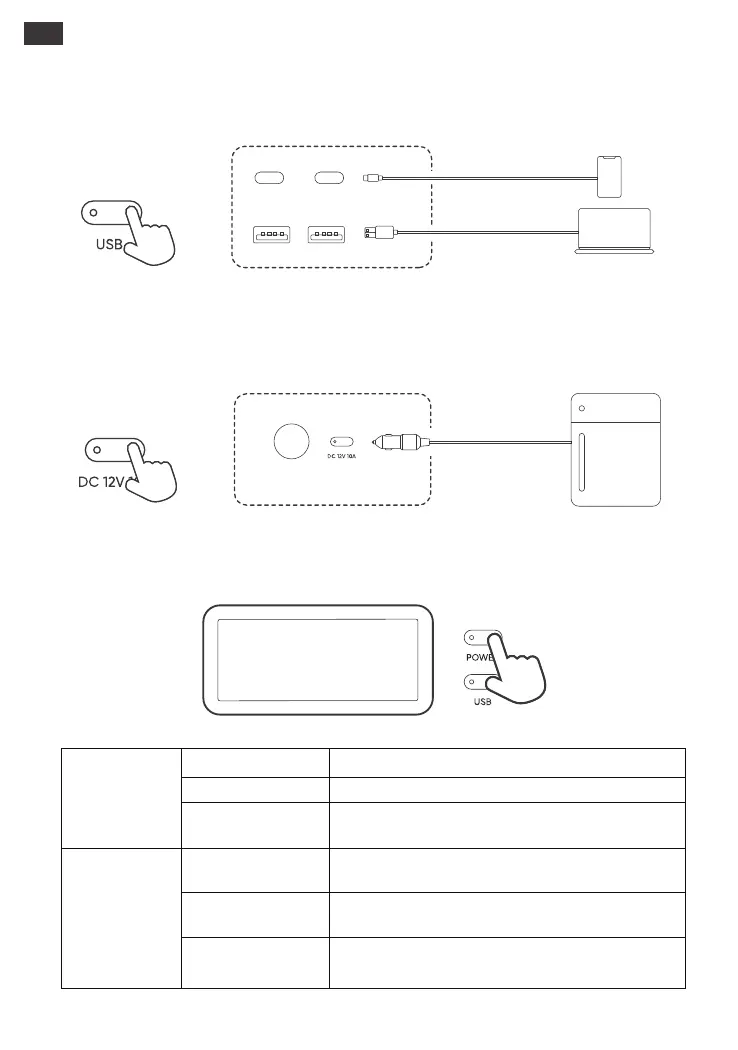
Ensure the main power button is on. Press the DC button to turn on the cigarette lighter port output
and power your device. Press it again to turn off the
cigarette lighter port output.
Ensure the main power button is on. Press the USB button to turn on the USB outputs
and power your appliances. Press it again to turn off the USB output.
USB Output On/O
DC Output On/O
Step 1
Step 2
Step 1
Step 2
LCD Screen
LCD Screen
Press the Main Power Button or when there's a charging input.
Press the Main Power Button.
If there is no operation in 2 minutes, the product will enter a
sleep state.
After the display screen lights up, double-click the Main
Power Button.
When the Always-on Display Mode is on, press the Main
Power Button.
During Always-On Display mode, the screen automatically
turns o after 2 hours without charging or discharging.
Turn on
Turn o
Always-on Display
Mode
(under charging or
discharging state)
Always-on Display Mode
is o automatically
Turn o
Turn on
LCD is o automatically







 To Next Page