17
US
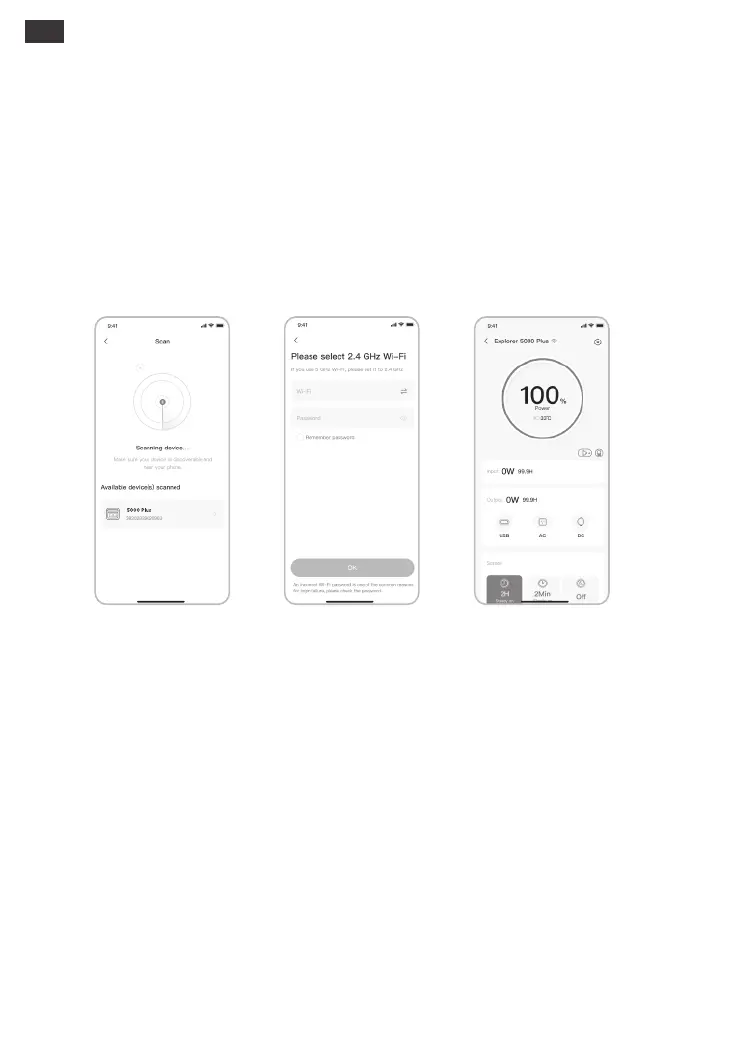
2.3 After clicking the searched device icon, the App automatically connects the device via
Bluetooth.
Remarks: If “the device has been bound” is prompted during the binding process, the following two ways can be used
for connection:
• The device owner will share this device with other users through the App.
• Wi-Fi & Bluetooth are automatically turned on after the device is on, and the Wi-Fi & Bluetooth
icons on the screen light up;
• Press the USB button and the AC button at the same time until the Wi-Fi & Bluetooth icons on
the screen light up;
3. To unbind the device
Click the Settings button in the upper right corner of the main interface of the device to enter the
settings page, and click the Unbind button at the bottom of the page to unbind the device.
4. Notes
4.1 To turn on Wi-Fi & Bluetooth:
• Press the USB button and AC button at the same time until the Wi-Fi & Bluetooth icons on the
screen are o;
4.2 To turn o Wi-Fi & Bluetooth:
• Wi-Fi & Bluetooth will be automatically turned o if no device is connected within 2 hours;
• Press the POWER button and USB button at the same time for 3 seconds to reset Wi-Fi &
Bluetooth to factory settings and reboot the system. The connected App account will be
unbound.
4.3 To reset Wi-Fi & Bluetooth:
2.4 After the device is successfully connected, it is necessary to enter your Wi-Fi password and tap
the OK button;
2.5 After the device is successfully added on the home page of the device, the Wi-Fi icon on the
device will be always on;
Remarks: Please select a Wi-Fi network in 2.4GHz band. The device does not support a Wi-Fi network in 5GHz
band.
• Press and hold the “POWER Button” and “USB Button” for 3 seconds to reset the device, and then
re-bind the device.
The above screenshots are for reference only.
2.52.3 2.4







 To Next Page