9
See FAQ at support.jadens.com
:
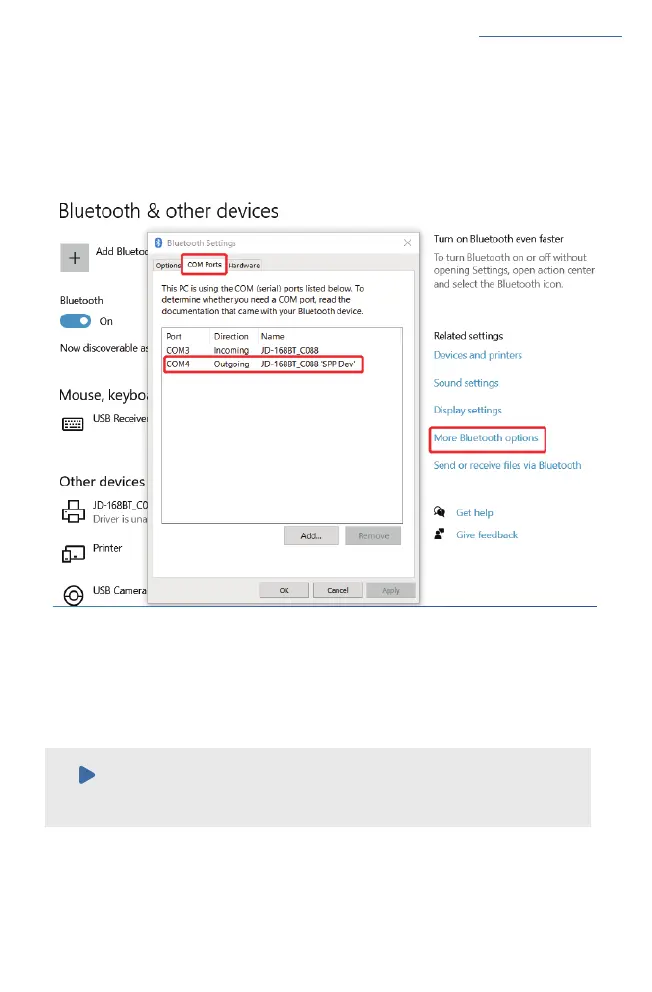
a.Click ' Bluetooth & other device' > ' More Bluetooth options' > 'COM Ports' > Check
OUTGOING port of the Bluetooth ' JD-168BT_ XXXX'' (XXXX are suffixes, which will vary depending
on the different printer) and mark down the COM number (For example, here is COM4).
Click'Printer & Scanners'> Find'Label Printer(4inch)'>'Manage'>'Printer properties'>'Ports'
> Check in the Ports match to your Bluetooth Port(For example, here is COM4)>Click'OK'.
b.Change printer's port to the COM that matches to the Bluetooth.
Note:
Please ignore the message 'Driver is unavailable' shown in picture below, for it is
normal and won't affect the printing.


 To Next Page