10
See FAQ at support.jadens.com
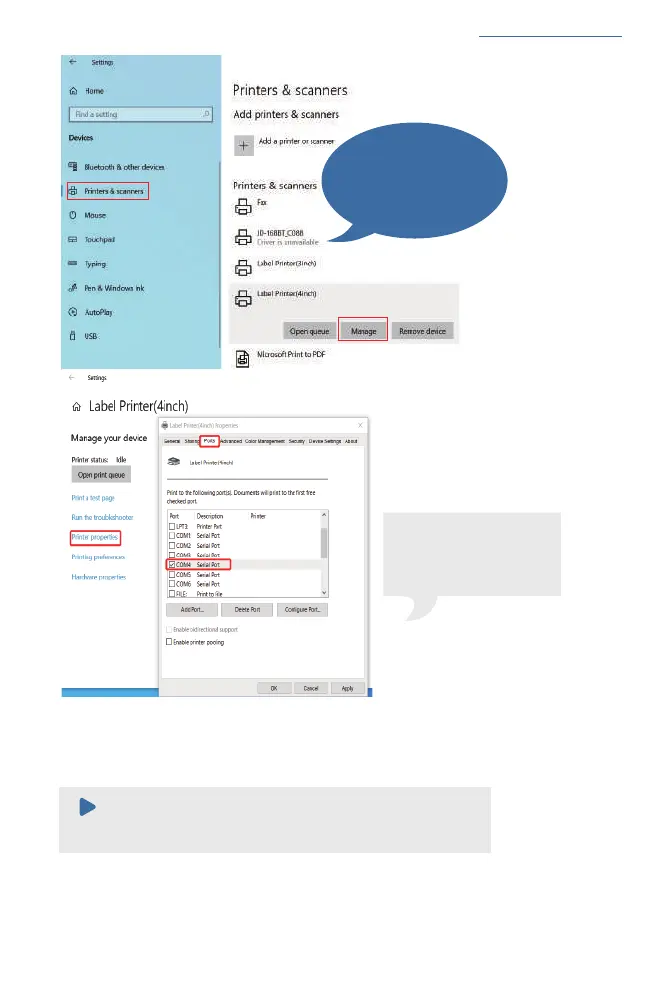
If you can't find which COM
port match with Bluetooth
port, please restart your
computer and printer, then
try again.
Note:
If you can't print seccessfully, please restart your computer and
printer, install again.
c.Now you can unplug the USB cable from computer, and then Open PDF file (recommend to use
Adobe)>Choose printer named 'Label Printer(4inch)'>You may set up printer preference like
darkness, speed, size, then click 'Print' (via Bluetooth).
Note:
Please ignore the message
'Driver is unavailable' , as
it is normal and won't affect
the printing.


 To Next Page