26
BRIZA JDPC.BRC4 Dynamic Product Controller with control panel, heating.
With room-temperature sensor and water-temperature sensor
Basic settings JDPC.001: MODE C
0
F
E
D
C
B
A
9
8
7
6
5
4
3
2
1
0
F
E
D
C
B
A
9
8
7
6
5
4
3
2
1
0
F
E
D
C
B
A
9
8
7
6
5
4
3
2
1
0
F
E
D
C
B
A
9
8
7
6
5
4
3
2
1
0
F
E
D
C
B
A
9
8
7
6
5
4
3
2
1
0
F
E
D
C
B
A
9
8
7
6
5
4
3
2
1
0
F
E
D
C
B
A
9
8
7
6
5
4
3
2
1
0
F
E
D
C
B
A
9
8
7
6
5
4
3
2
1
0
F
E
D
C
B
A
9
8
7
6
5
4
3
2
1
0
F
E
D
C
B
A
9
8
7
6
5
4
3
2
1
0
F
E
D
C
B
A
9
8
7
6
5
4
3
2
1
0
F
E
D
C
B
A
9
8
7
6
5
4
3
2
1
0
F
E
D
C
B
A
6
5
3
2
1
0
F
E
D
C
B
A
9
8
7
6
5
4
3
2
1
0
F
E
D
C
B
A
9
8
7
6
5
4
3
2
1
0
F
E
D
C
B
A
9
8
7
6
5
4
3
2
1
Configuration code: see the product label on the device
Setup and operation
The module is factory assembled and tested according to the product configuration.
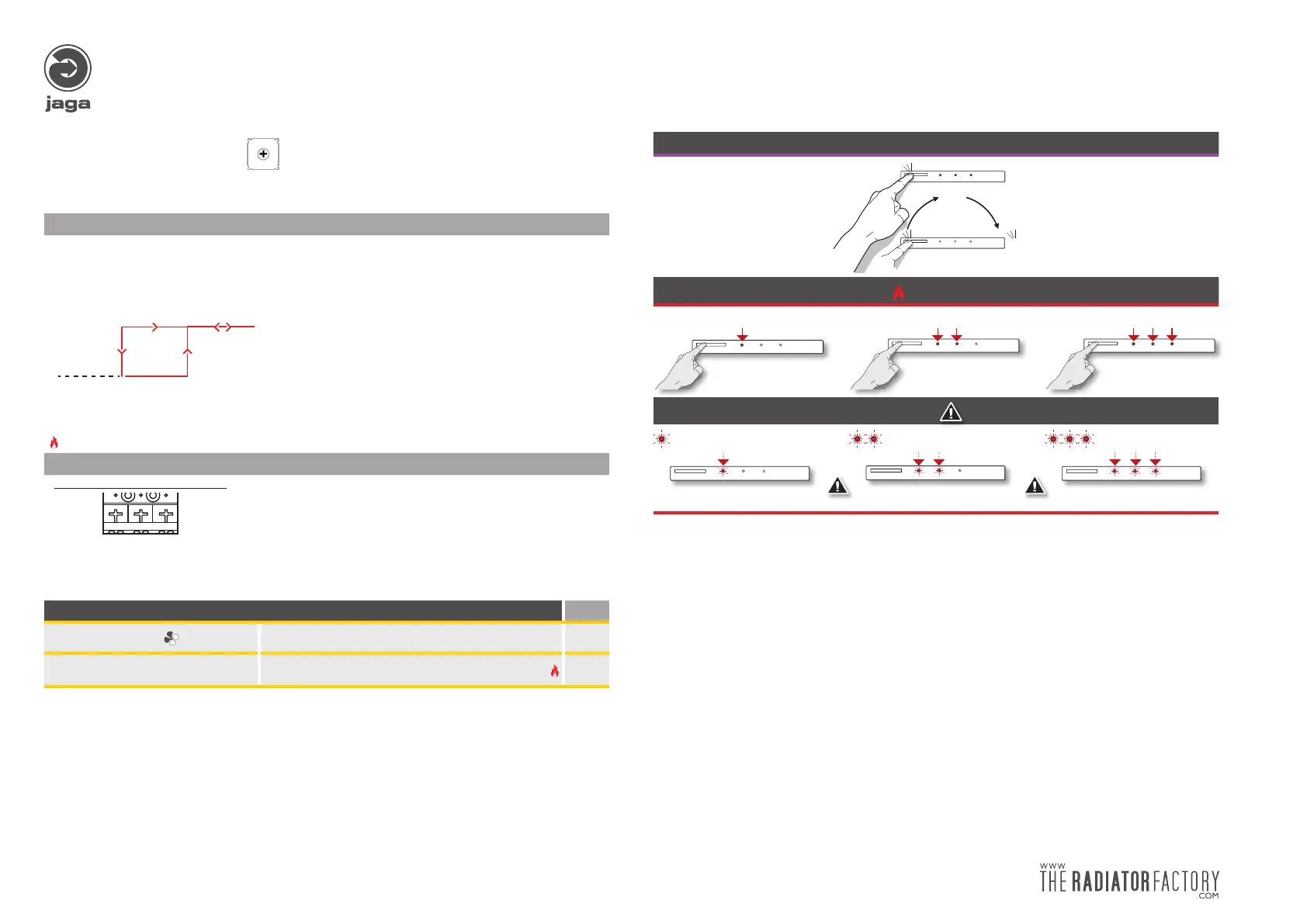
Basic settings water temperature set point:
Operation:
Mode koelen
WT°<RT°-4° WT°<RT°+2°WT°>RT°-2° WT°>RT°+4°
Auto mode
Standby
Mode verwarmen
WT°<RT°+2°
WT° = Watertemperatuur
RT° = Ruimtetemperatuur
WT° = Watertemperatuur
RT° = Ruimtetemperatuur
WT°>RT°+4°
Auto mode
Standby
Mode verwarmen
Fan start when supply water T° >32°C
Connecting
Ι
BLUE -24V
Ι
RED +24V
Ι
Not connected
Manually adjusting settings: Page
Adjusting fan speed
Table 1B: fan speed 6
Adjusting water temperature set
point
Table 2: adjusting min. water temperature heating
7
WT° = water temperature
RT° = roomtemperature
Heating mode
Put the controller in the desired mode with the control panel
Press button until the desi-
red mode is reached
(± 3 sec.)
verwarmen
chauffer
Heizung
heating
1 2
MODE
3
1 2
MODE
3
3
uit
éteinte
Aus
off
3
3
sec
How to use
• Speed 1 • • Speed 2 • • • Speed 3
1 2
MODE
3
1 2
MODE
3
1 2
MODE
3
1 2
MODE
3
1 2
MODE
3
1 2
MODE
3
Water temperature < 32°:
Leds flashing every 3”
or or
2
MODE
3
1
2
MODE
3
1
2
1
MODE
3


 To Next Page