2
/
6
Back
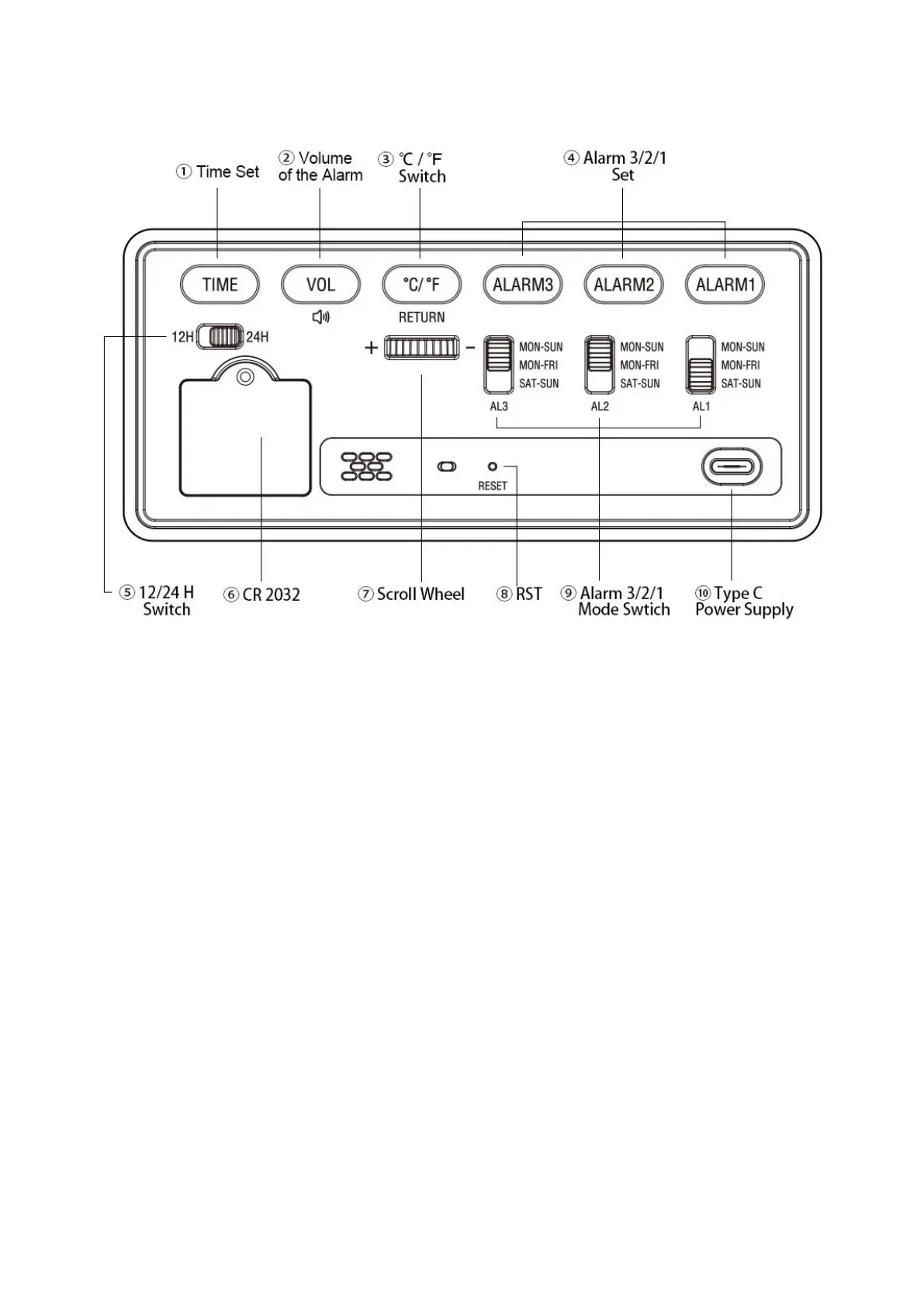
① Time Set – Press and hold the “TIME” button, then use the scroll wheel to set “Year”, “Date”, “Time”.
② Volume – Press the "Vol" button once to adjust the volume of the alarm. There are 5 levels to choose from: V1-V5.
③°C / °F Switch – Press the "°C / °F" button once to switch between Celsius and Fahrenheit on the display.
④ Alarm 3/2/1 Set – Pressing the "Alarm" button once will turn the alarm ON or OFF. Press and hold the "Alarm" button to
enter the alarm setting mode. The alarm will be turned ON by default after setting the alarm.
⑤ 12/24 H Switch – A convenient switch to toggle between 12-hour and 24-hour display modes.
⑥ CR 2032 – The CR2032 battery is used to retain your alarm settings, allowing the clock to restore the current time without
re-setting after power is restored. It CANNOT work as power source.
Note: If the alarm fails to restore its settings after a power outage, it is possible that the CR2032 battery is drained and needs
to be replaced.
⑦ Scroll Wheel–Turn it to adjust brightness in normal status, or select value in setting menu.
⑧ Reset – If you find the clock works abnormally, you can use a small stick to push “RESET” button to initialize.
⑨ Alarm 3/2/1 Mode Switch – “MON-SUN” = Every day; "MON-FRI" = Weekday mode, only activates the alarm on Monday
through Friday. "SAT-SUN" = Weekend mode, only activates the alarm on Saturday and Sunday.
⑩ Power Supply– Please use the original power cord and adapter. If missing, please contact us.
Note: Using a non-original power cord and adapter may cause malfunction of the alarm clock. An excessive current may
damage the circuit board.( If your adapter is 5V 1A or 5V 2A, it can be used as a replacement)


 To Next Page