20
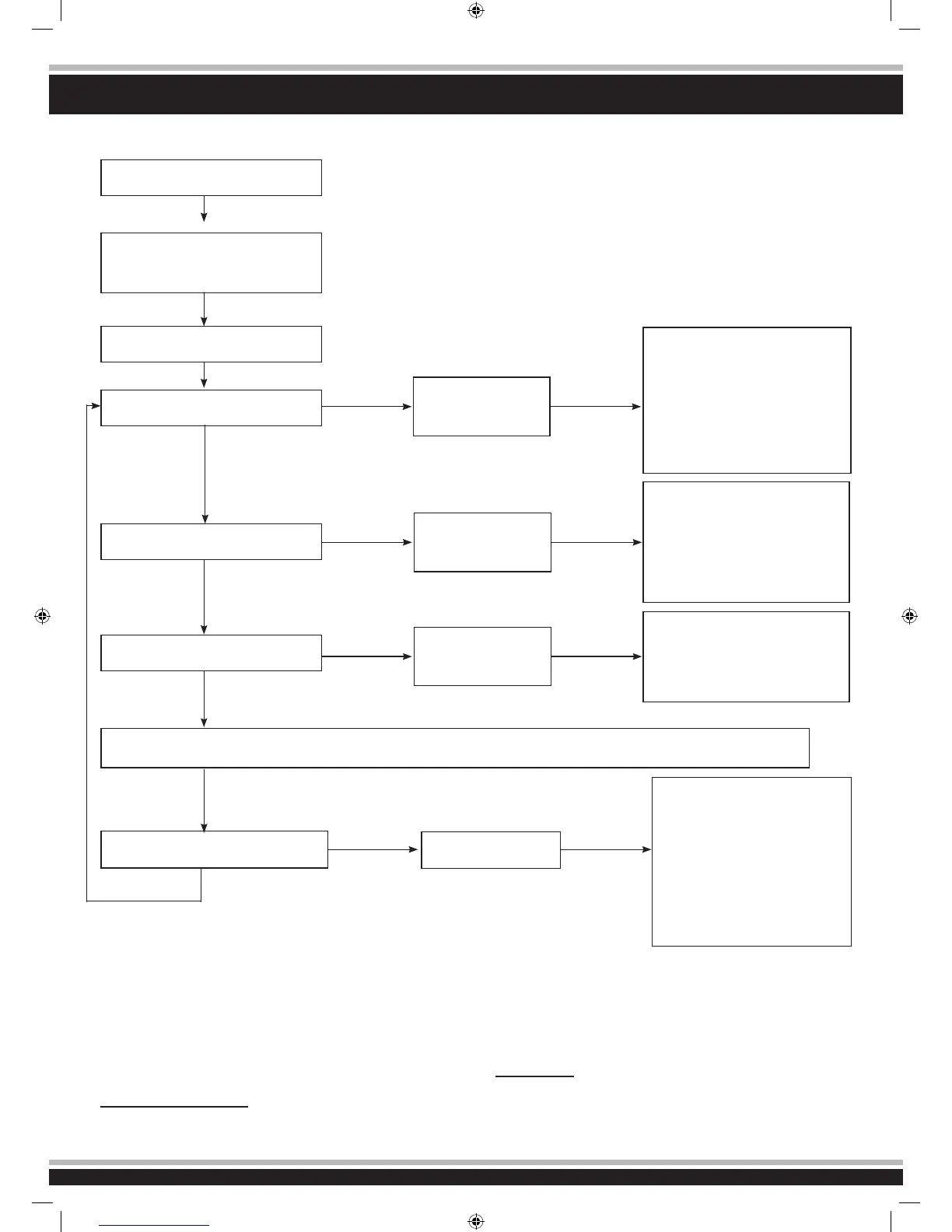
6. Menüstruktur des Reglers
Menu structure
Wichtiger Hinweis:
ZusätzlichzudenBlinksignalenderrotenLEDwerdenauchent-
sprechendeakustischeSignalevomMotorerzeugt.Nachjeder
Programmierung muss der Regler zuerst ausgeschaltet werden.
Beim Wiedereinschalten wird die neue Konguration wirksam.
Beachten Sie, dass ab dem 5. Programmierschritt die Darstel-
lung etwas anders erfolgt. Dabei symbolisiert ein langes Blinks-
ignal den Schritt 5, gefolgt von weiteren kurzen Signalen für die
weiteren Schritte.
Beispielsweise wie folgt:
langes Blinksignal + einmal kurz = Programmierschritt 6
langes Blinksignal + zweimal kurz = Programmierschritt 7
langes Blinksignal + dreimal kurz = Programmierschritt 8, usw.
Important note:
In addition to the red LED blinking, the motor will omit an acoustic
signal. After every change to the values the ESC must be swit-
ched off to store the values. The new settings will not be effec-
tive until the ESC is re-started. Please note that program option
5andabove(Professionalsettings)areslightlydifferentinthat
theywillbeindicatedbyalongblinkrstfollowedbyshortblinks.
For example:
Long blink + one short = Program option 6
Long blink + two short = Program option 7
Long blink + three short = Program option 8, etc.
Sender einschalten
SwitchtransmitterON
Regler einschalten, und dabei
’SET’-Taste drücken
Press and hold the ‘SET‘ button down and
switch the receiver on
die rote | red LED blinkt | blinks
The red LED blinks
die grüne LED blinkt einmal
The green LED blinks once
die grüne LED blinkt 2 x
The green LED blinks twice
die grüne LED blinkt 3 x
The green LED blinks 3 times
Taste lösen
Release button
Taste lösen
Release button
Taste lösen
Release button
Taste lösen
Release button
Taste 3 Sek. halten
Press the button
for 3 seconds
Taste 3 Sek. halten
Press the button
for 3 seconds
Taste 3 Sek. halten
Press the button
for 3 seconds
Programmierphase 1,
Fahrmodus
Program option 1,
Drive mode
Programmierphase 2,
Bremsmodus
Program option 2,
Brake mode
Programmierphase 3,
Unterspannung
Program option 3,
Low voltage cut-off
Taste drücken
Press button
Taste drücken
Press button
Taste drücken
Press button
Taste drücken
Press button
roteLEDblinkteinmal,d.h.Vor-
wärtsfahrt mit Bremse
Red LED blinks once indicating
forwards and brake.
rote LED blinkt zweimal, d.h.
Vorwärts-undRückwärtsfahrtmit
Bremse
The red LED blinks twice indicating
forwards, reverse and brake.
rote | red LED blinkt | blinks 1 x, ð 0 %
rote | red LED blinkt | blinks 2 x, ð 5 %
rote | red LED blinkt | blinks 3 x, ð 10 %
rote | red LED blinkt | blinks 4 x, ð 15 %
rote | red LED blinkt | blinks 5 x, ð 20 %
rote | red LED blinkt | blinks 6 x, ð 25 %
rote | red LED blinkt | blinks 7 x, ð 30 %
rote | red LED blinkt | blinks 8 x, ð 40 %
rote | red LED blinkt | blinks 1 x, ð aus
rote|redLEDblinkt|blinks2x,ð2,6V
rote|redLEDblinkt|blinks3x,ð2,8V
rote|redLEDblinkt|blinks4x,ð3V
rote|redLEDblinkt|blinks5x,ð3,2V
rote|redLEDblinkt|blinks6x,ð3,4V
alle weiteren Programmierschritte laufen nach dem gleichen verfahren ab
All of the other menu options are accessed in the same manner.
The green LED blinks X times
Programmierphase X
ProgramOptionX
DrückenSiebittejeweilsdie’SET’-
Tastezur Veränderung desjeweili-
genWertes,dieroteLED zeigt je-
weils die Werte an, einmal blinken
heißt Wert 1, zweimal blinken heißt
2, usw.
Press the ‘SET‘ button to select the
desired value. The red LED will in-
dicate which value is selected. 1 X
blink indicates value 1, 2 x blinks
indicate value 2 etc.
053265_Akron 2,4 GHz_D_GB.indd 20 24.07.2012 10:28:10












 To Next Page