Need help?
Do you have a question about the Jandy Aqualink RS OneTouch and is the answer not in the manual?
Details on reducing injury risks, including water temperature limits and consulting physicians.
Instructions for safe electrical installation and precautions regarding electric shock.
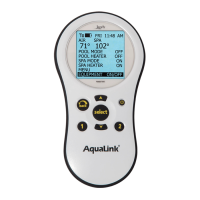
Explains the three ways the AquaLink® RS OneTouch panel operates pool/spa equipment.
Details on the function and use of the controller's buttons for navigation.
Information on how the coin cell battery backs up date and time settings.
Describes the system's default behavior during a power interruption.
Instructions for manually turning pool/spa equipment on or off via the menu.
Details on operating the main filtration pump for pool circulation.
Guides on switching water circulation to spa mode and activating related functions.
Instructions for enabling and controlling the pool heater operation.
Details on enabling and controlling the spa heater operation.
Instructions for controlling the solar heating system.
Information on controlling auxiliary devices via AUX modes.
Guidance on operating heat pumps, including configuration options.
Instructions for controlling the chilling operation of heat pumps.
Details on setting the pulse rate for laminar jets.
Instructions for setting the color and assigning color lights to auxiliaries.
Information on operating the sprinkler system via the OneTouch™.
Enabling, disabling, or canceling sprinkler programs and setting delays.
Procedure to disable sprinklers for a 24-hour period.
Steps to manually start sprinkler programs.
Enabling the sprinkler control system for automatic program execution.
Disabling the sprinkler control system and canceling all running programs.
Information on using a single controller for multiple power centers.
Details on adjusting variable speed pump settings and presets.
Setting the priority temperature (TEMP1) for pool or spa.
Operating the filter pump for dual equipment systems.
Operating the spa function for dual equipment systems.
Manual operation and programming of two-speed pumps.
Configuring OneTouch mood/scene settings for controlling multiple devices.
Identifies the buttons on the control panel for navigation.
Provides access to local service company information.
Displays system model, firmware, and checks sensor connections.
Allows programming on/off times for equipment for specific days or all days.
Guides on programming variable speed pump speeds and filtration cycles.
Allows preset pool and spa thermostat temperatures and maintain feature hours.
Enables setting the correct time and date for proper programming.
Configuration for AquaPure® Chlorine Generator output and boost settings.
Controls for the display light: on, off, or with a timeout.
Prevents changes to specific operations like system setup or device control.
Restricts access to system settings, programs, and devices.
Steps to enable password protection for specific devices.
Explains user interaction when system or device passwords are active.
Allows switching between program groups for different settings (e.g., summer/winter).
Enables custom naming for program groups.
Automates switching between program groups based on date.
Provides access to system configuration settings.
Activates AquaPure® Chlorine Generator at 100% output for 24 hours.
Customizes OneTouch buttons with names and specific device assignments.
Allows custom naming of auxiliary equipment for display.
Adjusts hours or mode for the Boost Pool feature.
Assigns freeze protection to equipment and sets activation temperature.
Assigns equipment to freeze protection and sets activation temperature.
Turns the display of air temperature on or off.
Changes the temperature display between Fahrenheit and Celsius.
Enables automatic adjustment for Daylight Savings Time.
Allows adjustment of displayed temperature by +/- 4 degrees.
Enables or disables the automatic in-floor cleaning feature.
Sets priority for solar heat or heat pump usage.
Enables or disables pump operation during valve switching.
Assigns Jandy Valve Actuators (JVAs) to auxiliary buttons.
Assigns auxiliary buttons to control dimmable lights.
Defines equipment controlled by Spa Side Switch buttons.
Defines equipment controlled by SpaLink® buttons.
Sets devices to automatically turn on at sunset.
Allows programming sprinkler start times, run days, and durations.
Steps to program individual sprinkler programs.
Setting the start time for sprinkler programs.
Selecting the days for sprinkler watering.
Setting the duration for each sprinkler valve.
Reviewing sprinkler program summaries and editing settings.
Sets a specific time to turn off all equipment.
Entering custom product name and service company information.
Clears all stored values and resets settings to defaults.
Selects color light type and assigns lights to auxiliary relays.
Assigns a runtime duration for devices or auxiliaries.
Setup menu for heat pump heat or chill mode and priority settings.
Sets heat/chill mode and checks heat pump setup.
Sets low temperature threshold for heat pump priority via RS485.
Assigns a Laminar Light to an auxiliary relay.
Specifies how often water temperature is sampled when Maintain Temp is active.
Adjusts cycles based on seasons for filtration, chlorine, water level, sprinklers.
Shows how seasonal adjust feature operates for filtration timing.
Enables and custom labels the RS InterLink feature.
Selects pump type and configures variable speed pump settings.
Guides on selecting the type of variable speed pump.
Configures how variable speed pumps are used (pool, spa, filtration).
Sets minimum and maximum speed/flow for pumps.
Details on setting default speed presets for variable speed pumps.
Shows default preset labels when pump is configured for filtration.
Allows changing default labels for speed presets.
Default preset labels for dual equipment configurations.
Assigns pump speeds to auxiliaries, allowing speed changes.
Adjusts the priming speed for the variable speed pump.
Sets the duration for the pump's priming mode.
Defines safety delays like filter pump delay and heater cool down delay.
Explains special auxiliary labels and their functions.
Defines common controller messages and error indicators.
 General
| Brand | Jandy |
|---|---|
| Model | Aqualink RS OneTouch |
| Category | Control Systems |
| Language | English |

 To Next Page