24
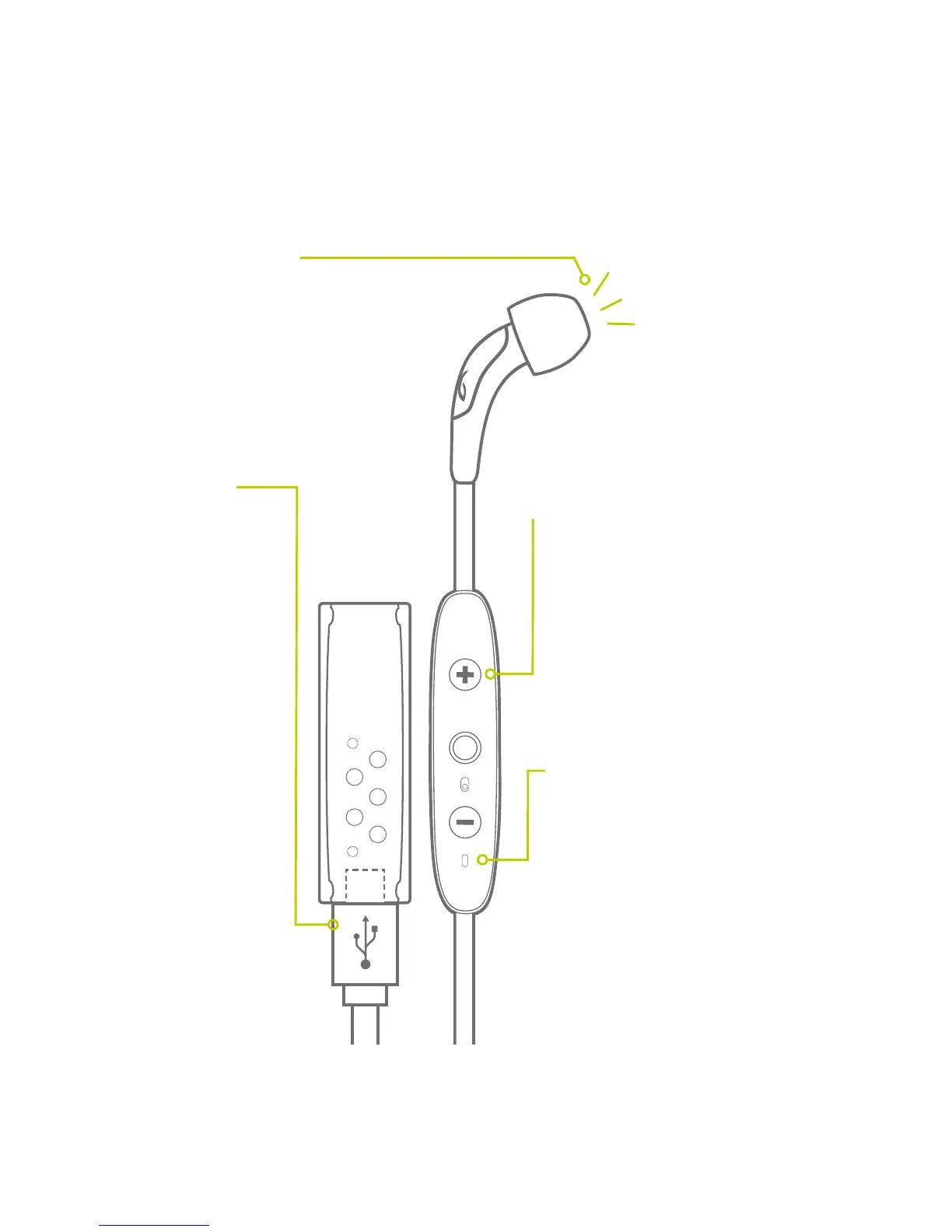
VOICE PROMPT
LED STATUS
MICRO USB
CHARGING
ARE THE BUDS ON?
IS THE BATTERY LOW?
When not playing music,
pressing ‘Volume + or
Volume –’ will announce
battery status.
Red: Charging
Green: Charged
(while charger clip is attached)
Red+Green Alternating: Pair Mode
No Light: Standby / Play Mode /
Phone Call / Powered Off
The charging clip
that came with your
buds also acts as a
charging dock. 2.5
hrs for full charge
gives 4 + 4 hours of
playtime. 20 mins
charging gives 1 hour
of play time. The clip
can also be charged
separately and used
at a later time.
In Standby* mode, push +, watch LED:
Single Green Flash =
10% or more battery remaining
Single Red Flash =
Below 10% battery remaining
No Light = Powered off
* Standby Mode: Powered and not connected to a
device but not playing music or on a phone call.



 To Next Page