15
TROUBLESHOOTING
Soft reset: If your earbuds are not responding, place your Vista in the charging case, close the lid for at least 5 seconds and plug the
case into charge. This will turn your earbuds o and perform a soft reset.
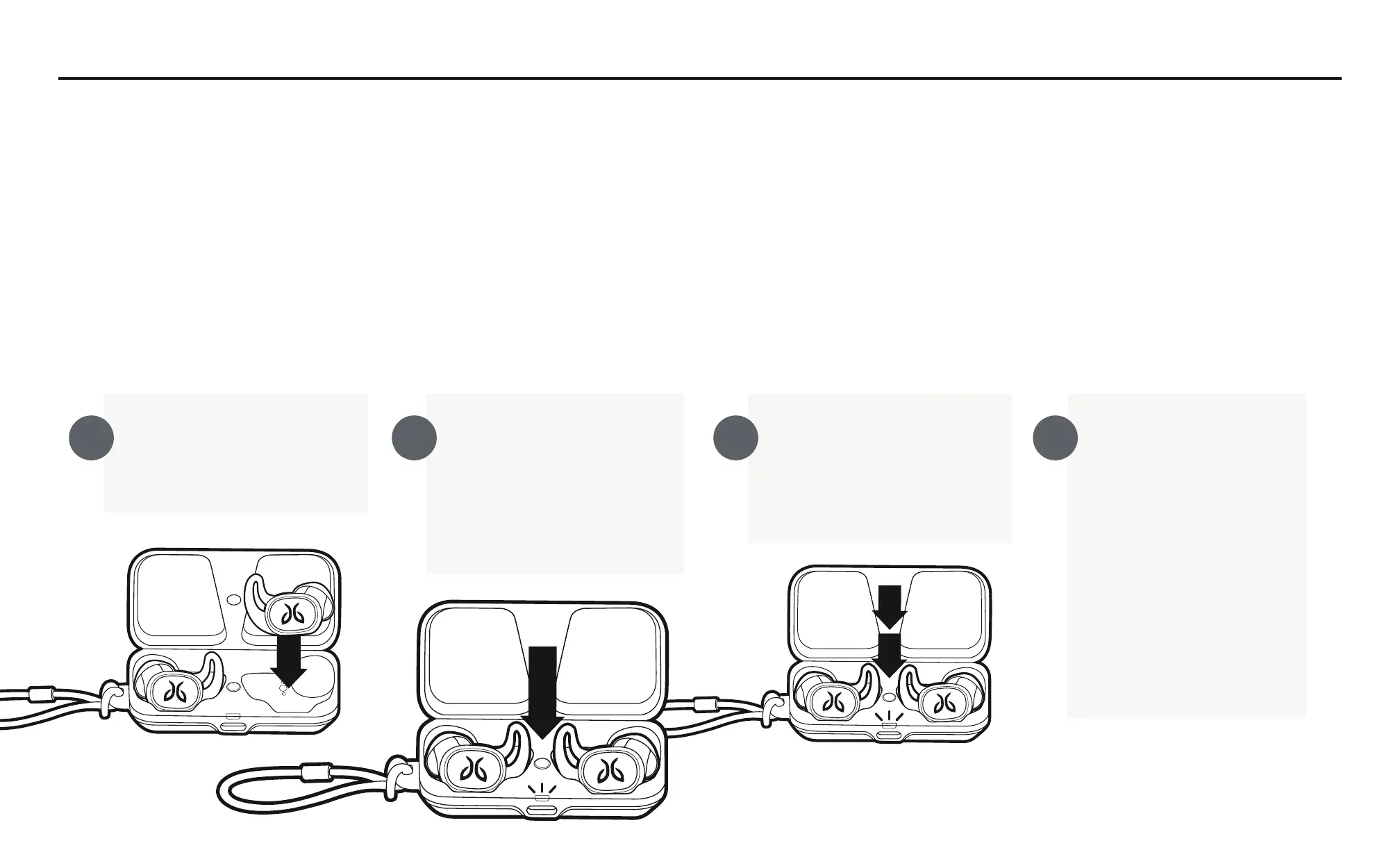
Factory reset: If that does not resolve your problem we recommend resetting your earbuds to their original factory settings. Before starting
this process please FORGET or REMOVE your Vista device from the Bluetooth menu on all your connected audio devices.
Hard reset: If the battery has enough charge but the device does not turn on and you don’t hear any tones, press and hold the earbud
button for 20 seconds and then release. Put the earbud back in the case, wait for 5 seconds, then take the earbud out of the case.
Place both earbuds into
the charging case and
close the lid.
Open the charging
case and press & hold
the case button until
the case LED starts
blinking white.
While the charging case
LED is blinking white,
press the button on
the case twice.
The LED will blink
pink. Once it stops
close the case.
Your earbuds are
reset and ready to
pair. Go to your audio
device Bluetooth
menu and select
“Jaybird Vista” to
pair again.
A B C D


 To Next Page