91
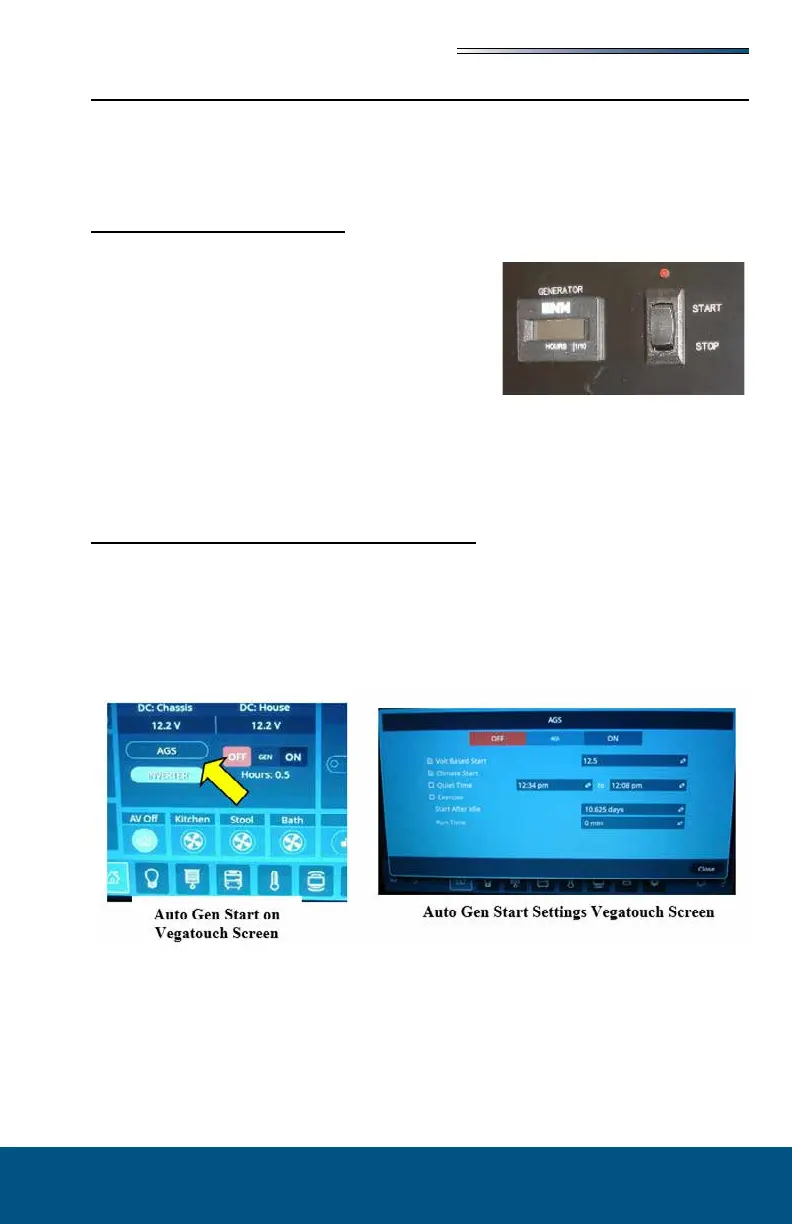
Starting the Generator
Your motorhome, depending on the model, will have a touchscreen to control the generator
or manual switches located at the Command Center panel. There may also be secondary
switches located on the dash or on the generator itself. A digital hour meter that keeps track
of generator hours used is located either on the touchscreen or on a separate hour meter on
the Command center panel.
1. At either “START/STOP” switch, press and hold
the upper portion of the switch to start the genera-
tor. Depending on the outside temperature the start
process can take up to 15 seconds. Once the gen-
erator starts running, release the “START/STOP”
switch.
2. An LED above the start switch will light when the
generator is running.
3. For better performance and engine life, especially in colder weather, let the generator
engine warm up for two minutes before turning “ON” 120-volt appliances.
For more information on generator operation and maintenance, refer to the manufacturer’s
owner’s manual.
Certain models of motorhomes may be equipped with an Automatic Generator Start system
(AGS). The controls are built into the Vegatouch touchscreen system. When enabled, the
Automatic Generator Start system will automatically start and stop the generator according
to operator or factory pre-selected parameters.
The Magnum AGS Start section or the Vegatouch User Guide (in your warranty packet) will
give detailed instructions about Automatic Generator Start depending on your model.







 To Next Page