Need help?
Do you have a question about the Jaytech 1200 V1 and is the answer not in the manual?
Controls open, stop, and close with auto light and force adjustment.
Ensures smooth operation and longevity with low noise and soft start/stop.
Provides visual feedback on the operator's working status.
Utilizes rolling code for secure radio transmission.
Enables manual operation of the door during power outages.
Features like photo beam, battery backup, wall button, and flash light.
Lists essential tools required for installation, including drill, ratchet, and screwdriver.
Details the process for mounting the operator unit and its rail system.
Initial steps and checks before programming the garage door opener.
Procedure to define the fully open and closed limits for the door.
Instructions for clearing existing codes and adding new transmitters.
How to adjust the motor's force for opening and closing the door.
Details on setting up and configuring the safety photo beam sensors.
Enabling or disabling the automatic door closing function and setting the delay.
Activating the lock function to prevent unauthorized door operation.
Important safety precautions and best practices for using the garage door opener.
Troubleshooting common problems and their solutions for the opener.
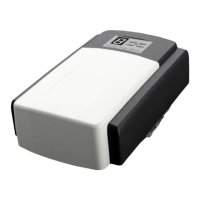
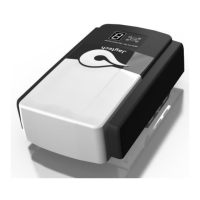
The Jaytech 1200 V1-V3 Garage Door Opener is a professional-grade device designed for automated garage door operation, emphasizing safety, convenience, and durability.
The opener features a micro-intellectual control system that allows for one-button operation to open, stop, and close the garage door. A courtesy light illuminates during door operation and turns off automatically after three minutes. During setup, the opener intelligently senses and adjusts operating force requirements, creating a digital map of the door's travel cycle for optimized performance.
The device is equipped with a DC motor that ensures low noise operation, soft start, and soft stop, contributing to smooth movement and extended longevity. An LED display provides real-time information on the working situation of the opener. For security, it utilizes rolling code secure radio transmission. In the event of a power cut, a manual disengagement feature allows the door to be opened and closed by hand.
Optional functions include a photo beam for enhanced safety, a battery backup system for continued operation during power outages, a wall button for fixed control, and a flash light.
The control panel features SET, UP, DOWN, and CODE buttons, along with an LED screen, for easy programming and operation. The remote transmitter includes four buttons for versatile control.
Installation: Installation involves mounting the operator and rail. Recommended tools include a drill, step ladder, ratchet, tape measure, carpenter's level, screwdriver, tongs, neon-electroscope/multimeter, adjustable wrench, and hammer. To tighten the belt, the adjusting nut-M8 should be turned in the direction shown in picture C of the manual. It's crucial to ensure the shuttle is locked and connected to the chain. Upon powering on, the LED display counts down from 99 to 11, then shows "--" to indicate standby mode.
Setting Open and Close Positions:
SET until "P1" is displayed, then press SET again to show "OP".UP to move the door to the desired open position, then press SET.DOWN to move the door to the desired closed position, then press SET.Self Learning Transmitter:
The opener can store up to 20 codes. If "Fu" flashes, it indicates 20 codes are stored or to prevent coding mistakes, requiring cancellation of all stored codes. To cancel, press and hold CODE for more than 8 seconds until "dL" flashes.
To add or change transmitters:
CODE to display "Su".Force Adjustments:
SET until "P1" is displayed.UP once to display "P2".SET again to show the current force setting (default "F5").UP to increase the force (up to "F9") or DOWN to decrease (down to "F1").SET to confirm.Photo Beam:
SET until "P1" is displayed.UP twice to display "P3".SET to show the current status.UP once to display "H1" to enable the photo beam.DOWN once to display "H0" to disable the photo beam.SET to confirm and exit. It is crucial to ensure "H0" is displayed if a photo beam device is not used.Auto-Close ON/OFF:
SET until "P1" is displayed.UP three times to display "P4".SET to show the current auto-close setting (default "b0" for off).UP to increase the auto-close time by one minute (up to "b9") or DOWN to decrease (down to "b0").SET to confirm.Lock Door: This function prevents the door from opening until an "unlock" button is pressed, recommended when using uncovered transmitters.
SET until "P1" is displayed.UP four times to display "P5".SET to show the current status.UP to display "Lc" to enable the lock door function.DOWN to display "uL" to disable the lock door function.SET to confirm.Owner's Guide:
Examination Guide (Troubleshooting):
Product Warranty: The Jaytech 1200 Garage Door Opener comes with a 5-year warranty from the date of installation, covering repair or replacement for defects in material or workmanship. Replacement parts for defective components are furnished free of charge, including professional installation costs.
Warranty Restrictions: The warranty does not cover light bulbs, fuses, or repair parts due to operator abuse, negligence, or failure to follow manual instructions. It also excludes problems caused by interference, impact damage, or remote controls. The warranty is void if the door has not been serviced at least every 2 years by a professional garage door company, with proof of service required. Damage or premature wear to the opener caused by a broken, unbalanced, worn, or damaged garage door also voids the warranty. An original purchase receipt/invoice is required for warranty claims. If a technician visit is requested and the issue is not a product fault, a call-out fee and parts may be charged.
Liability (Australia only): The seller is not liable for consequential, incidental, or special damages. Liability for damages or injury from breach of law or contract will not exceed the cost of repairing, replacing, or refunding the unit. The warranty acknowledges consumer rights under the Australian Consumer Law, including replacement or refund for major failures and compensation for foreseeable loss, and repair or replacement for goods not of acceptable quality.
 General
| Brand | Jaytech |
|---|---|
| Model | 1200 V1 |
| Category | Garage Door Opener |
| Language | English |

 To Next Page