5
JB INDUSTRIES • SH-35N Quick Start Guide • 630.851.9444 • sales@jbind.com
APP SETTINGS
Setting Atmospheric Pressure
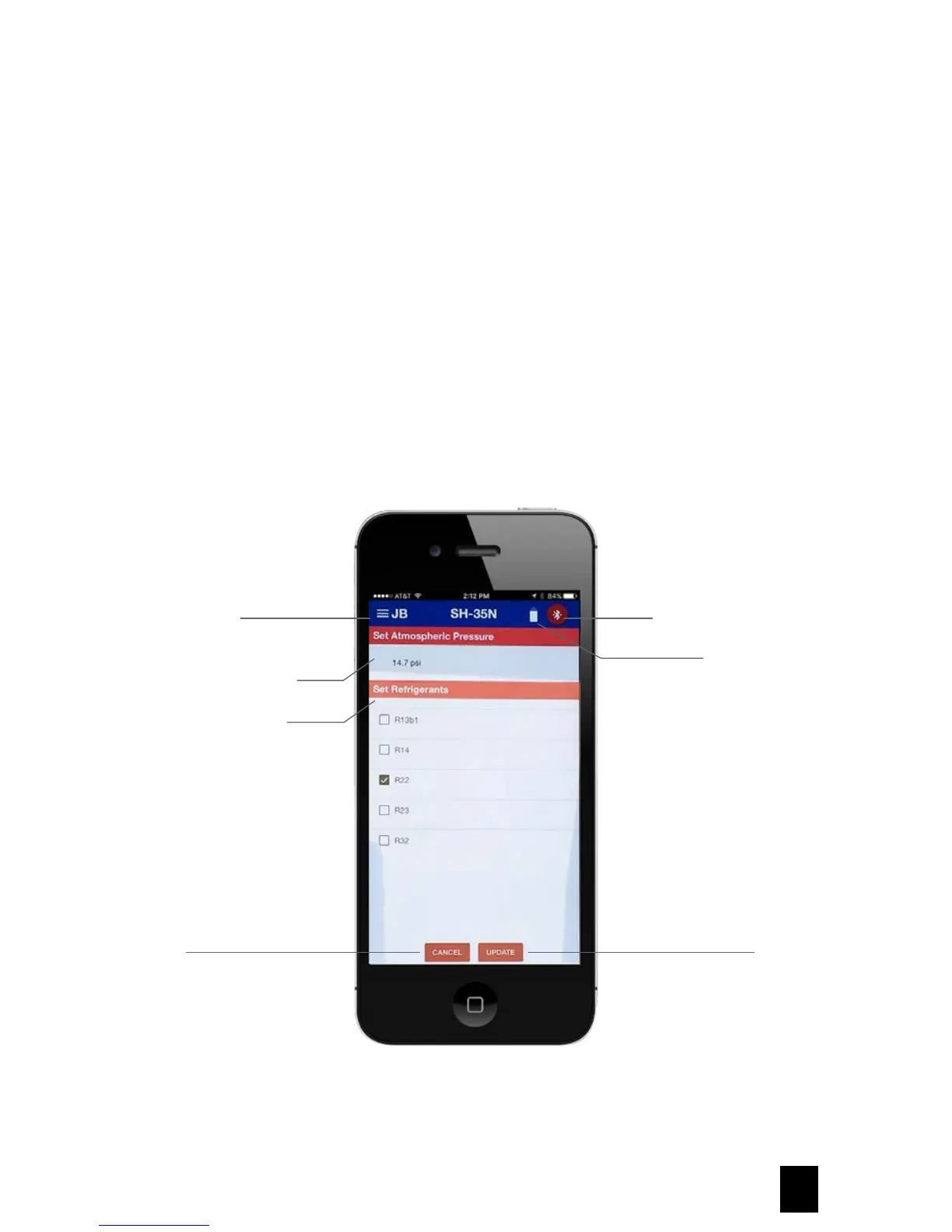
1. Select the JB icon at upper left to expand menu and select Device Settings.
2. Set Atmospheric Pressure will be displayed and can be manually updated based on location.
Selecting Refrigerant Menu Options
1. Select the JB icon at upper left to expand menu and select Device Settings.
2. Go to Set Refrigerants and select up to five refrigerants for storage in the SH-35N unit memory. Only five
refrigerants may be selected at one time or an error message to deselect a refrigerant will display.
3. Once refrigerants are selected, press update to save or cancel to clear and exit.
JB Main Menu
Atmospheric Pressure
Refrigerant Selection
Cancel
Bluetooth Connection
Battery Status
Update



 To Next Page