Need help?
Do you have a question about the JBL Horizon 2 and is the answer not in the manual?
Pull the plastic tab on the bottom to engage the lithium ion battery for backup power.
Plug the power supply into the Horizon unit and a power outlet.
Choose the display language and set the room number using the Snooze Bar.
Configure the maximum volume level for the room, defaulting to Level 8.
Select between 24-Hour or 12-Hour mode and set the current time, year, month, and date.
Set a single day alarm by selecting time, volume, and light options.
Initiate pairing mode via the Bluetooth icon to connect audio devices.
Utilize the side USB slots for charging phones and tablets.
Rotate for volume/time/alarm settings; Press for snooze, light control, or confirmation.
Manual and automatic radio tuning, FM radio access, and preset management.
Control Bluetooth connectivity and activate alarms 1 or 2.
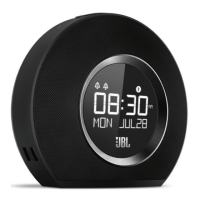
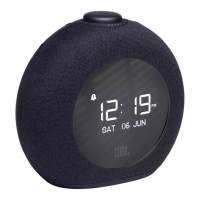
The JBL Horizon 2 for Hotels is a versatile bedside device designed to enhance the guest experience with its combination of an alarm clock, speaker, and charging capabilities. This quick start guide provides a comprehensive overview of its features and setup process, ensuring hotels can easily deploy and guests can intuitively use the device.
The JBL Horizon 2 serves multiple functions, making it a central hub for a guest's bedside needs. At its core, it is an alarm clock, offering a single-day alarm feature, which is ideal for hotel environments where guests have varying wake-up times each day. This prevents previous guests' alarms from disturbing new occupants. Beyond its alarm capabilities, the device functions as a Bluetooth speaker, allowing guests to wirelessly stream their favorite music, podcasts, or audiobooks from their personal devices. It also includes an FM radio with three preset slots, providing access to local broadcasts for news, music, or talk shows.
A significant feature for modern travelers is its dual USB charging ports. These ports enable guests to conveniently charge their smartphones, tablets, or other USB-powered devices directly from the Horizon 2, eliminating the need for multiple wall adapters and freeing up electrical outlets. This is particularly useful in hotel rooms where outlets can be limited.
The device also incorporates a backlight/nightlight/sunrise function. This feature can serve as a gentle nightlight, providing subtle illumination in a dark room, or simulate a sunrise to offer a more natural and pleasant wake-up experience in conjunction with the alarm. The sleek design of the JBL Horizon 2, coupled with its "great JB sound," ensures it not only looks good but also delivers a quality audio experience.
Setting up and using the JBL Horizon 2 is designed to be straightforward for both hotel staff and guests.
The top of the JBL Horizon 2 features an intuitive layout of buttons and controls:
While the guide does not explicitly detail maintenance features, the design implies ease of use and durability suitable for a hotel environment. The "single day alarm" feature is a key maintenance aspect for hotels, as it reduces the need for staff to reset alarms between guests. The inclusion of a security lanyard suggests a focus on preventing theft, which is a common concern for hotel assets. The robust construction and user-friendly interface are designed to minimize guest confusion and potential misuse, thereby reducing maintenance calls. The lithium-ion battery for backup power ensures that the device maintains its time settings even if unplugged or during a power outage, reducing the need for staff to constantly reset the clock.
In summary, the JBL Horizon 2 for Hotels is a thoughtfully designed device that combines essential bedside functionalities with hotel-specific considerations, offering convenience for guests and ease of management for hotel operators.
 General
| Radio type | Clock |
|---|---|
| Tuner type | - |
| FM band range | 87.5 - 108 MHz |
| DAB band range | 174.928 - 239.200 MHz |
| Supported radio bands | DAB, DAB+, FM |
| Radio Data System (RDS) | Yes |
| Preset stations quantity | 3 |
| Driver unit | 38 mm |
| Number of built-in speakers | 2 |
| Frequency range | 75 - 20000 Hz |
| RMS rated power | 4 W |
| Signal-to-Noise Ratio (SNR) | 80 dB |
| Display type | LCD |
| Bluetooth version | 4.2 |
| Battery type | CR2032 |
| Battery voltage | 13 V |
| Product color | Black |
| Volume control | Rotary |
| Audible alarm type | Radio/Sound/Buzzer |
| Pallet net weight | 307248 g |
| USB charging voltage | 5 V |
| Pallet GTIN (EAN/UPC) | 6925281971846 |
| Master (outer) case volume | 0.032 cm³ |
| Package depth | 207 mm |
| Package width | 155 mm |
| Package height | 188 mm |
| Package weight | 1390 g |
| Pallet length | 1200 mm |
| Quantity per pallet | 192 pc(s) |
| Master (outer) case width | 327 mm |
| Quantity per pallet layer | 24 pc(s) |
| Master (outer) case height | 223 mm |
| Master (outer) case length | 435 mm |
| Master (outer) case weight | 6401 g |
| Number of layers per pallet | 8 pc(s) |
| Number of cartons per pallet | 48 pc(s) |
| Export Control Classification Number (ECCN) | China |
 Weight and Dimensions
| Depth | 75.7 mm |
|---|---|
| Width | 178 mm |
| Height | 162 mm |
| Weight | 810 g |

 To Next Page