EasyManua.ls Logo

JBL JBL-R3500 - Select Knob Menu Navigation

JBL JBL-R3500
25 pages
Print Icon
To Next Page IconTo Next Page
To Previous Page IconTo Previous Page
Loading...
General Operation I Funcionamiento general
7
s
EL
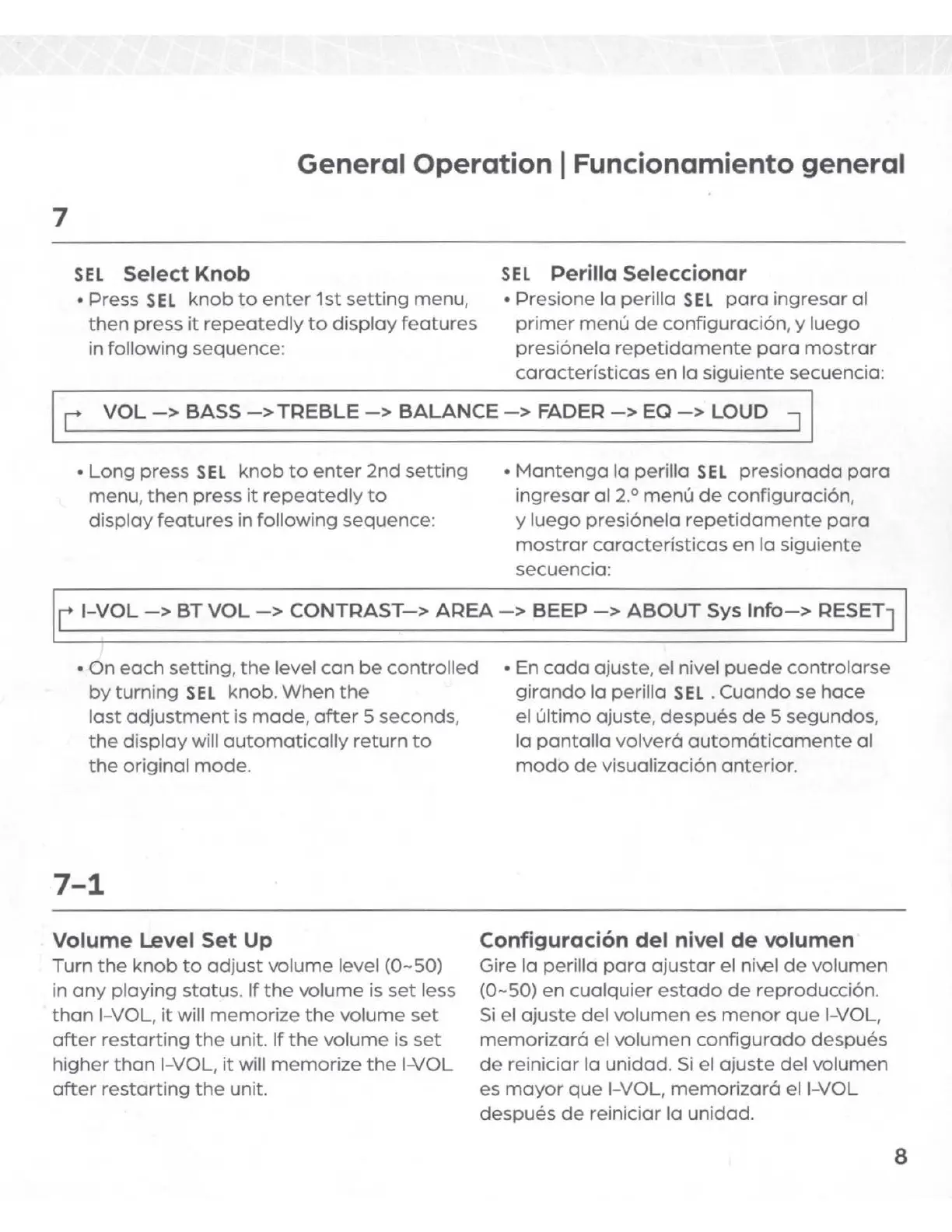
Select Knob
Press S
EL
knob
to
enter
1st
setting
menu,
then
press
it
repeatedly
to
display
features
in following sequence:
SEL
Perilla Seleccionar
Presione la perilla
SE
L
para
ingresar
al
primer
menu
de
configuraci6n
, y
luego
presi6nela
repetidamente
para
mostrar
caracterfsticas
en
la siguiente secuencia:
L
VOL
->
BASS
->
TREBLE
->
BALANCE
->
FADER
->
EQ
->
LOUD J
Long
press S
EL
knob
to
enter
2nd
setting
menu,
then
press
it
repeatedly
to
display
features
in following sequence:
Mantenga
la
perilla
SEL
presionada
para
ingresar
al
2.
0
menu
de
configuraci6n,
y
luego
presi6nela
repetidamente
para
mostrar
caracterf
sticas
en
la siguiente
secuencia:
r
I-VOL
->
BT
VOL
->
CONTRAST->
AREA->
BEEP
->
ABOUT
Sys
Info->
RESET]
On
each
setting
,
the
level
can
be
controlled
by
turning
SEL
knob.
When
the
last
adjustment
is
made
,
after
5
seconds
,
the
display
will
automatically
return
to
the
original
mode
.
7-1
Volume Level Set Up
Turn
the
knob
to
adjust
volume
level (0~50)
in
any
playing
status
.
If
the
volume
is
set
less
than
I-
VOL
,
it
will
memorize
the
volume
set
after
restarting
the
unit.
If
the
volume
is
set
higher
than
I-VOL
,
it
will
memorize
the
I-VOL
after
restarting
the
unit.
En
coda
ajuste
, el nivel
puede
controlarse
girando
la
perilla
SE
L .
Cuando
se
hace
el
ultimo
ajuste
,
despues
de
5 segundos,
la
pantalla
volvera
automaticamente
al
modo
de
visualizaci6n anterior.
Configuraci6n del nivel
de
volumen
Gire la perilla
para
ajustar
el ni\€I
de
volumen
(0~50)
en
cualquier
estado
de
reproducci6n.
Si
el
ajuste
del
volumen
es
menor
que
I-VOL,
memorizara
el volumen
configurado
despues
de
reiniciar la unidad.
Si
el
ajuste
del
volumen
es
mayor
que
I-VOL,
memorizara
el I-VOL
despues
de
reiniciar la unidad.
8

Related product manuals